Introduction
Cyber insurance quotes are carrier-issued pricing proposals summarizing what coverage a carrier will offer and at what price: aggregate limits per coverage category, per-incident retentions, sublimits for specific risk types, total premium, and commission. Brokers and MGAs receive competing quotes from multiple carriers for every submission, and the comparison work (matching limits, retentions, and sublimits across different carrier formats) is a manual bottleneck at volume.
The extraction challenge compounds in two ways:
- Carrier format variability. Beazley structures its cyber quote differently from Coalition, Chubb, or AXA XL, and a config built for one carrier's label conventions breaks on another.
- Document density. Cyber quote PDFs are often multi-page documents where the actual quote data sits in the first few pages, followed by carrier services guides and endorsement documentation. Extracting only the relevant fields requires anchoring precisely to the right sections.
Sensible handles this through carrier-specific layout configs. Cyber quotes are well suited to this approach: the structured Coverage Schedule tables and endorsement grids provide reliable anchor points that deterministic methods extract precisely, with no LLM calls and no prompt maintenance overhead on high-volume carriers. Each carrier gets its own config anchored to its label text and document structure, returning a normalized output schema across all carriers. For carriers without a layout config yet, a generalized LLM config handles extraction on day one without per-carrier configuration, covering the long tail of carriers that appear at low volume or in one-off submissions.
This post walks through a Beazley cyber quote using a deterministic layout config. The same approach applies to cyber quotes from any carrier, and to other commercial lines quote types: GL, E&O, D&O, property, and umbrella.
Cyber insurance quotes are multi-page carrier proposals summarizing aggregate limits, per-incident retentions, coverage sublimits, and premium for each coverage option presented. At volume, manual extraction across competing carrier formats is the primary bottleneck in submission comparison workflows. Sensible's carrier-specific layout config extracts the fields that matter for comparison deterministically, returning a consistent schema regardless of which carrier issued the quote.
What we'll cover:
- How to extract named insured using the Row method
- How to extract aggregate limits for two coverage options using tiebreakers
- How to extract premium with a case-sensitive anchor
- How to extract sublimits by coverage using the Row and Zip methods
Prerequisites
To extract from this document, take the following steps:
- Sign up for a Sensible account
- After completing onboarding, click the Document types tab and click Create new document type. In the dialog, upload the example document below. Leave all defaults as-is except ensure "Auto-generate configuration" is disabled, then click Create.
Download Beazley cyber quote sample - Name the document type
cyber_insurance_quote
Write document extraction queries with SenseML
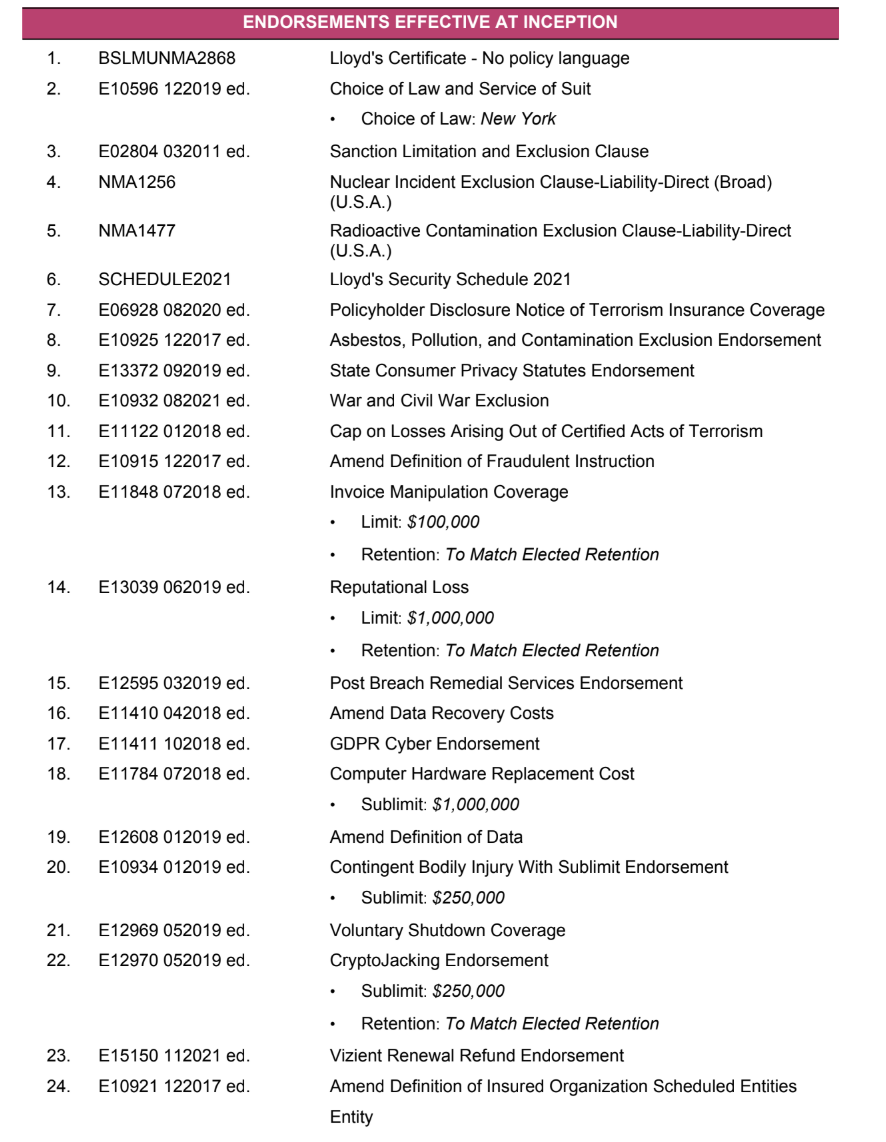
In this Beazley example, quote data appears in two main sections: a Coverage Schedule listing limits, retentions, and premium in a two-option grid, and an Endorsements section listing sublimits and retentions per endorsement. The configs below anchor to Beazley's specific label text in each section and extract values deterministically. No LLM calls are required for any of the fields shown.
Extract named insured
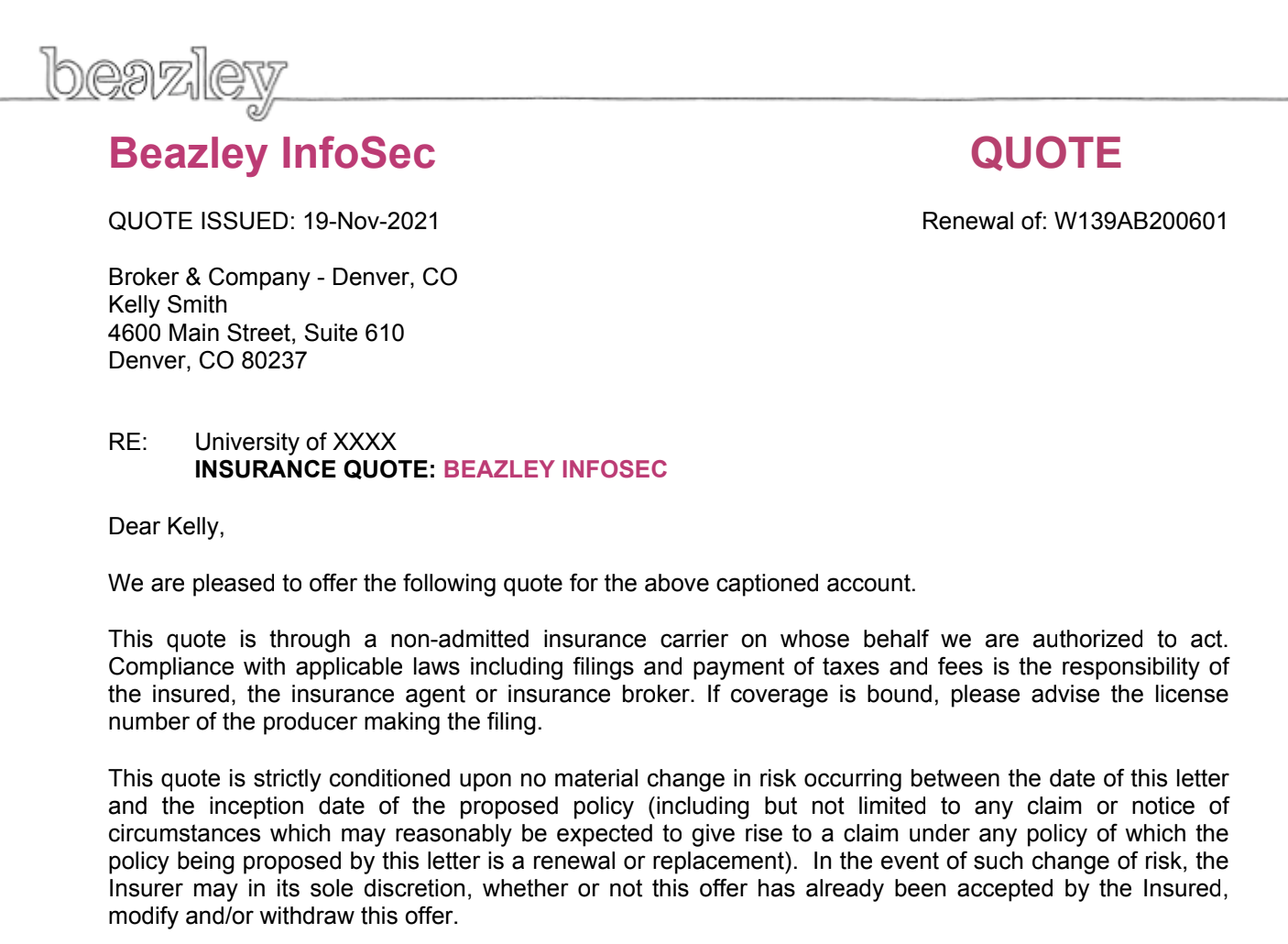
Here are the queries we'll use:
Extracted value:
Named insured is anonymized in the sample output.
The Row method scans horizontally from the anchor text and returns values on the same line. The anchor "INSURED:" appears at the top of the Beazley header, and the insured entity name sits immediately to its right. The tiebreaker: "first" parameter extracts the first populated cell in the row.
Extract aggregate limit
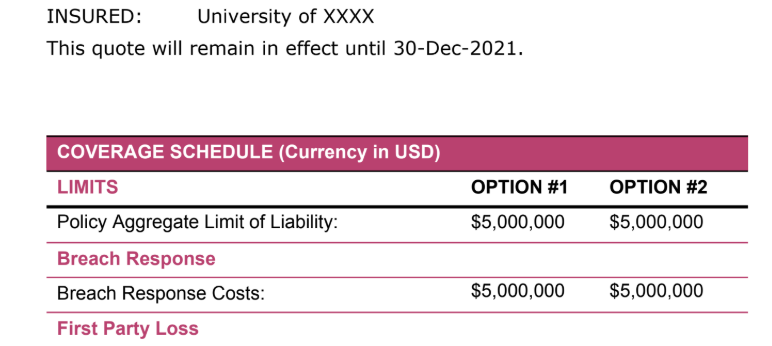
Here are the queries we'll use:
Extracted value:
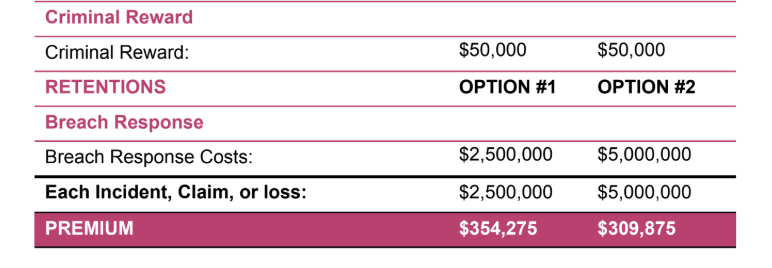
Beazley's Coverage Schedule presents two side-by-side options with limits listed by coverage type in rows. The tiebreaker parameter extracts each option from the same anchor independently: "first" returns the Option 1 value, "second" returns Option 2. In this quote, both options carry the same aggregate limit. The same tiebreaker pattern extracts any field in the coverage grid where values differ by option: retentions, sublimits, and per-coverage amounts all follow the same two-column structure.
Extract premium
Here are the queries we'll use:
Extracted value:
The total premium sits at the bottom of the Coverage Schedule under the all-caps label "PREMIUM." The anchor uses isCaseSensitive: true because "premium" appears in lowercase elsewhere in the document: in endorsement descriptions and the Optional Extension Premium line. Case-sensitive matching locks the anchor to the Coverage Schedule row.
To extract the Option 2 premium ($309,875), add a second field with tiebreaker: "second". The pattern is identical to the aggregate limit fields above.
isCaseSensitive is available on any match object in SenseML. In documents where text appears at different casing in different contexts, it prevents the anchor from matching the wrong occurrence without requiring a more complex anchor array.
Extract sublimits by coverage
Here are the queries we'll use:
Extracted value:
sublimit_coverage and sublimit_amount each return an array of sublimit values, one per sublimit line in the endorsements section. The Zip method pairs those two parallel arrays, producing an array of row objects with consistent keys: comparison-ready for downstream systems, rather than two separate arrays that need to be joined in application code.
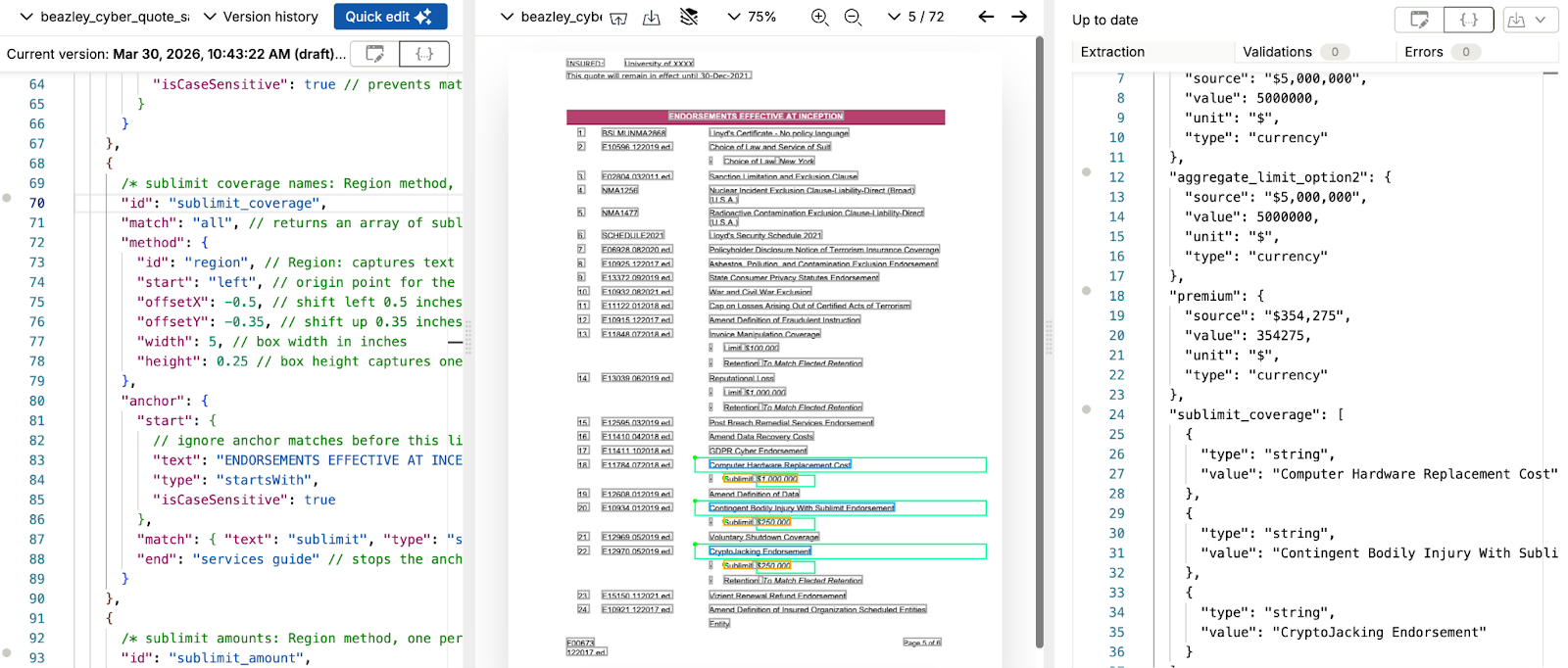
The Region method captures text within a box defined in inch coordinates relative to the anchor. Both sublimit_coverage and sublimit_amount use Region, with different coordinate offsets for each. For sublimit_coverage, the coordinate box shifts 0.35 inches up from the anchor (offsetY: -0.35) and captures 0.25 inches of height, exactly where Beazley places the coverage name on the line above each sublimit entry. For sublimit_amount, the box shifts 0.56 inches to the right (offsetX: 0.56), landing on the dollar amount that Beazley places to the right of the "Sublimit:" label. If a carrier places either value at a different distance, adjust the corresponding offset to match that carrier's layout.
The end: "services guide" parameter on both fields bounds the anchor search to the endorsements section, stopping before the carrier services guide that follows in the document. Without this bound, the anchor continues matching through the remainder of the document.
Each entry in sublimits_by_coverage is a self-contained row object. The array grows automatically if Beazley adds endorsements to the quote, with no config changes required for new coverage lines.
Putting it all together
Here is the complete config for all fields shown in this post:
Combined extraction output:
Named insured is anonymized in the sample output.
The sublimit_coverage and sublimit_amount fields are intermediate arrays that feed the Zip method. They do not appear as separate top-level keys in the final output. The sublimits_by_coverage array is the field to pass downstream; it contains each sublimit as a row object, comparison-ready across carriers.
When to use a layout-specific config vs. a generalized config
A layout-specific config is the right choice when a carrier appears regularly in your submission pipeline and the quote format is consistent across submissions. The Beazley config above anchors to Beazley's specific label text: "ENDORSEMENTS EFFECTIVE AT INCEPTION", all-caps "PREMIUM", "INSURED:". No LLM calls, no prompt maintenance, consistent output on every Beazley document that enters the pipeline.
For carriers that appear less frequently or whose format you haven't templated yet, a generalized LLM config handles extraction on day one. A platform processing cyber quotes from 15 different carriers can run a generalized LLM config on 12 of them while running layout-specific configs on the 3 that appear at high volume. Both run through the same API endpoint, and Sensible's fingerprint method routes each document to the right config automatically, based on carrier-identifying text in the document.
The Beazley config in this post covers named insured, aggregate limits by option, premium, and sublimits with no LLM calls. For a team processing hundreds of Beazley submissions per month, that trades a one-time build against ongoing variability on every document.
Extract more data
Sensible can extract any field present on a cyber insurance quote. The examples above cover named insured, aggregate limits by option, premium, and sublimits by coverage. A complete config can also pull quote effective date, policy period start and end dates, per-option retentions from the Coverage Schedule, per-endorsement retentions, individual coverage sublimits (Breach Response, Business Interruption, Cyber Extortion, eCrime), commission rate, policy form number, carrier name, waiting period, and other data.
There is no prebuilt cyber insurance quote config in Sensible's open-source configuration library yet. The Beazley config shown in this post is a working starting point to build from directly, or to adapt for other carriers by updating anchor text to match that carrier's label conventions. To build a custom config from scratch, the SenseML reference covers every available extraction method. To have Sensible's team handle configuration, testing, and ongoing maintenance, managed services gets you fully set up.
Connect Sensible to your workflow
Once your SenseML config is set up, there are several ways to integrate cyber insurance quote extraction into your application or process.
Python SDK
The Sensible Python SDK wraps the extraction API for Python applications. Install with pip and pass a file path or URL to get back a parsed_document object:
Save the script as extract_cyber_quote.py. Run it from the command line:
After running the script, you should see the following output.
Sample API response for the Beazley cyber quote:
Named insured is anonymized in the sample output.
For async processing at volume, configure a webhook instead of polling with wait_for. See the Python SDK docs for the full reference.
MCP server
Sensible's MCP server connects document extraction directly to AI coding tools like Claude, letting you query and extract cyber insurance quote data through natural language without writing API calls. See the MCP server docs for setup instructions.
API (synchronous and asynchronous)
Call the Sensible REST API directly for language-agnostic integration. The synchronous endpoint returns extracted data inline; the asynchronous endpoint accepts a webhook URL and posts results when extraction completes, recommended for high-volume or large-document workflows. See the API reference for endpoint details.
Zapier
For no-code integration, Sensible's Zapier connector routes extracted cyber insurance quote data into existing workflows without writing code, connecting to Google Sheets, Airtable, Slack, or any of Zapier's connected apps. See the Zapier integration docs to get started.
FAQ
What fields can be extracted from a cyber insurance quote?
Sensible can extract any field present on a cyber insurance quote. Core fields include named insured, aggregate limit per coverage option, per-incident retention, sublimits by coverage type, total premium, and commission rate. A complete config also pulls individual sublimits (Breach Response, Cyber Extortion, Business Interruption, eCrime), policy period dates, and carrier name.
How does Sensible handle cyber quotes from multiple carriers?
Each carrier gets a layout-specific config anchored to its label text, returning the same output field IDs regardless of which carrier issued the quote. For carriers without a layout config, a generalized LLM config extracts fields without per-carrier configuration. Sensible's fingerprint method routes each incoming document to the correct config automatically.
How accurate is automated cyber insurance quote extraction?
For carrier-specific layout configs, each field anchors to a fixed label position within the carrier's known format and output is fully traceable back to source coordinates. The end parameter bounds extraction to the relevant document section, preventing false matches from the carrier services guide or endorsement prose that follows the quote data.
Can Sensible handle 70-page cyber quotes efficiently?
Layout-based extraction completes in seconds regardless of document length. The config anchors to specific labels and sections rather than reading the full document, so a 70-page quote returns at the same speed as a 10-page one.
Can Sensible extract from cyber quotes bundled with other insurance documents?
The portfolio method segments multi-document PDFs before extraction runs. Each document type (quote, binder, endorsement schedule, loss run, dec page) is identified and extracted by its own config without interfering with the others.
How long does it take to set up cyber insurance quote extraction?
There is no prebuilt cyber quote config in Sensible's library yet, but the Beazley config in this post is a working starting point. Layout-specific configs for individual carriers take under an hour to configure depending on field count and document structure.
Start extracting
The Beazley config shown in this post extracts named insured, aggregate limits by option, premium, and per-coverage sublimits from a multi-page carrier quote. The same pattern extends to any carrier: update the anchor text to match that carrier's label conventions and keep the Row and Zip methods.
Cyber quotes are one document type in a broader commercial lines intake workflow. Sensible also handles loss runs and insurance dec pages from the same carriers.
Sign up for a free 2-week trial to run the config against your own cyber quote samples.
Talk to our team if you're building a multi-carrier comparison workflow and want help designing configs across your full carrier set.
.png)
.png)