How to extract data from delivery orders with Sensible
Learn how to extract vessel details, port routing, and cargo data from delivery orders using Sensible's SenseML. Handles carrier format variability with a generalized LLM config and OOCL-specific deterministic layout template through a single API.
A delivery order (DO) authorizes the release of cargo from a carrier, terminal, or warehouse to the consignee. It references the underlying bill of lading and is a required step in most international freight workflows. Without a processed DO, cargo doesn't move.
Teams that need to extract data from delivery orders at scale face a structural problem: there is no universal format standard. Every carrier, port authority, and freight forwarder issues them differently. Consignee details, release authorization references, container numbers, and pickup windows appear under different label conventions and in different positions depending on the issuer. Processing this variability manually introduces delays and keying errors at a critical point in the supply chain.
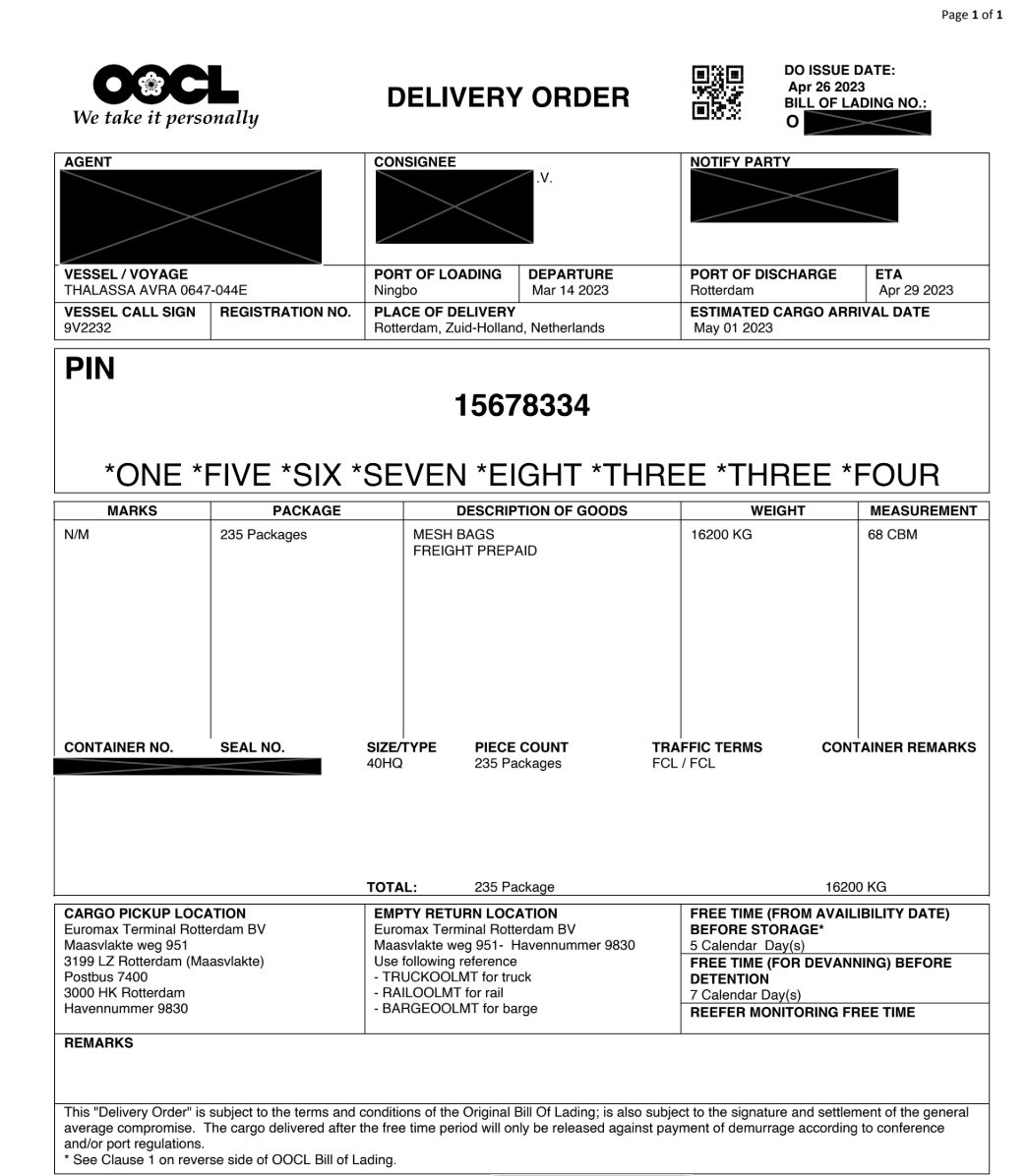
Sensible handles the long tail of carrier formats with a generalized LLM template that requires no per-carrier configuration and is ready to extract on day one. For carriers representing significant volume, Sensible can build layout-specific deterministic templates in under an hour and apply them reliably across that carrier's full document set. This post demonstrates the deterministic approach applied to OOCL delivery orders: a high-volume carrier format where a dedicated template delivers speed and precision. OOCL delivery orders are well suited to this approach: column headers are fixed across all OOCL documents and values appear directly below them, giving consistent anchor points that deterministic methods extract without LLM inference.
Delivery orders are carrier-issued cargo release authorizations that reference the underlying bill of lading and unlock cargo at the terminal or warehouse. At volume, manual extraction across inconsistent carrier formats introduces delays and keying errors at a critical point in the supply chain. Sensible's generalized LLM config extracts document data from the full carrier mix on day one; a carrier-specific layout template handles high-volume carriers deterministically through the same API.
What we'll cover:
Using fingerprinting to automatically classify incoming delivery orders and route each document to the right config
Extracting vessel, voyage, and port routing with the Label method
After completing onboarding, click the Document types tab and click Create new document type. In the dialog, upload the example document below. Leave all defaults as-is except ensure "Auto-generate configuration" is disabled, then click Create. Download OOCL delivery order sample
Name the document type delivery_orders
Write document extraction queries with SenseML
SenseML is Sensible's declarative configuration language for document extraction. You define fields by their location and type, using anchors, position rules, and type declarations; Sensible resolves each field against the document. A complete config has the top-level shape { "fingerprint": { ... }, "fields": [ ... ] }. The fingerprint runs first to classify the document; the fields extract data only if the fingerprint passes.
Identify and classify incoming delivery orders
Four text conditions uniquely identify the OOCL delivery order format; all must pass before field extraction runs.
Here are the queries we'll use:
/* Sensible uses JSON5 to support in-line comments */
{
  "fingerprint": { /* runs before any field extraction; all tests must pass to activate this config */
    "tests": [ /* array of text conditions that identify this document format */
      {
        "type": "startsWith", /* matched line must start with the text */
        "text": "delivery order" /* OOCL DOs open with a "DELIVERY ORDER" title */
      },
      {
        "type": "equals", /* full string match; the label appears exactly as written */
        "text": "CONSIGNEE", /* required header on OOCL delivery orders */
        "isCaseSensitive": true /* exact case required; rules out "Consignee" in narrative prose */
      },
      {
        "type": "endsWith", /* matched line must end with this text */
        "text": "VOYAGE", /* OOCL DOs list VOYAGE in the column footer */
        "isCaseSensitive": true
      },
      {
        "type": "includes", /* line must include the text */
        "text": "PIECE COUNT", /* PIECE COUNT column confirms the OOCL cargo table format */
        "isCaseSensitive": true
      }
    ]
  }
}
All four tests must pass for the OOCL config to activate. Documents that don't match fall through based on how fingerprint mode is configured: with strict fingerprinting, non-matching documents are rejected; with standard fingerprinting, they fall to the next config in the document type, which could be a generalized LLM template set up as a fallback for all other carrier formats.
Extract vessel, voyage, and port routing
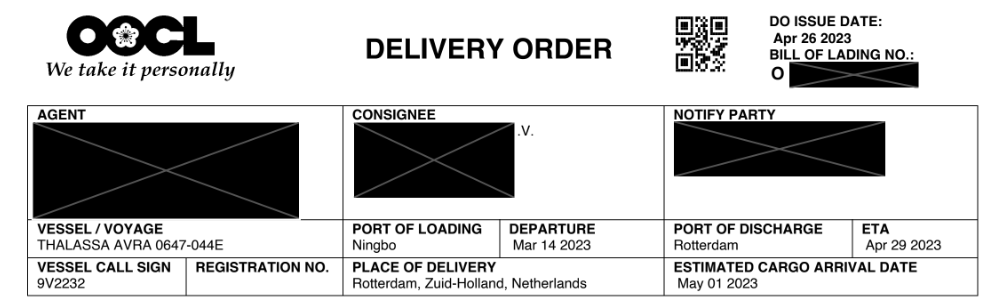
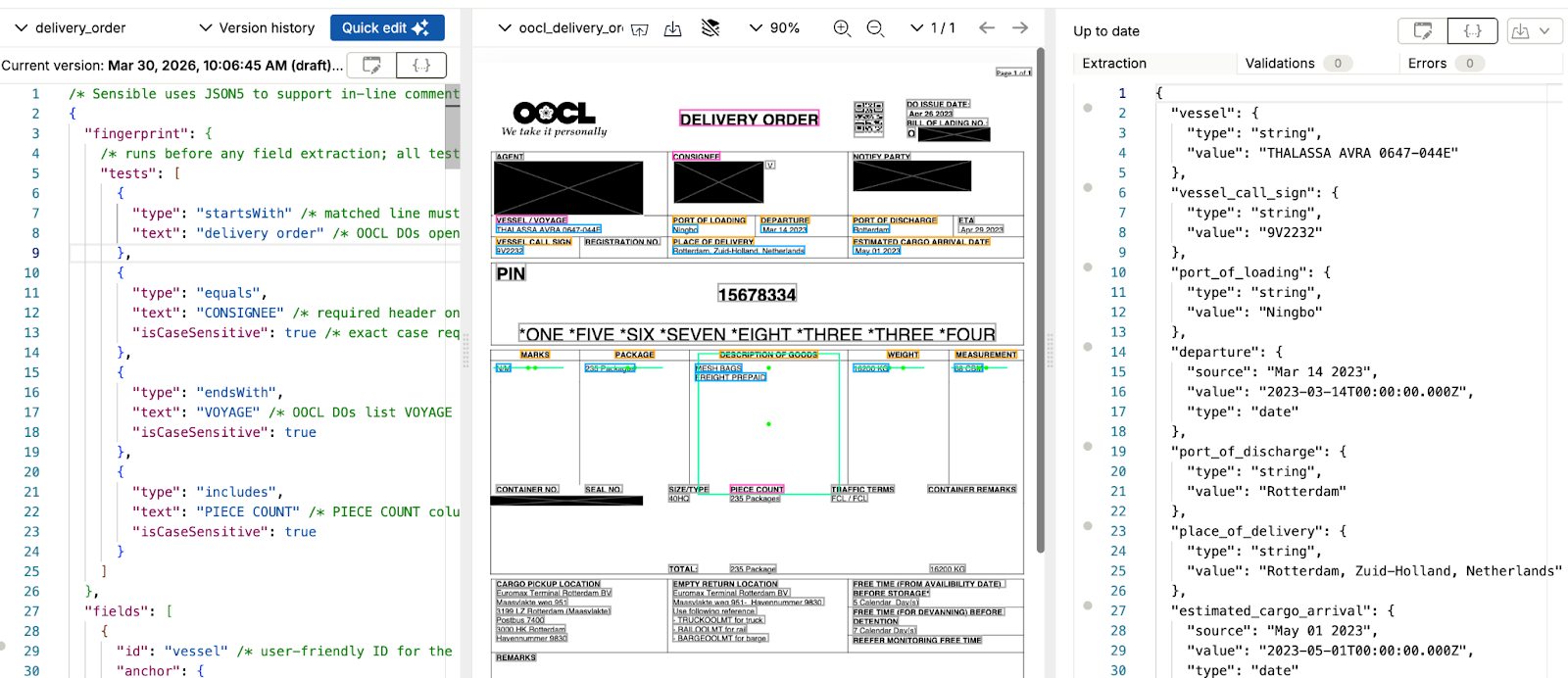
Vessel name, voyage number, call sign, and port routing fields each appear directly below a fixed column header on OOCL delivery orders.
Here are the queries we'll use:
{
  "id": "vessel",               /* user-friendly ID for the extracted data */
  "anchor": {
    "match": {
      "type": "equals",
      "text": "vessel / voyage" /* search for this exact column header in the document */
    }
  },
  "method": {
    "id": "label",              // Label: reads the value immediately adjacent to the anchor text
    "position": "below"         /* value appears directly below the anchor, not to the right */
  }
},
{
  "id": "vessel_call_sign",     /* user-friendly ID for the extracted data */
  "anchor": {
    "match": {
      "type": "equals",
      "text": "vessel call sign" /* search for this exact column header in the document */
    }
  },
  "method": {
    "id": "label",              // same pattern: reads value directly below the column header
    "position": "below"
  }
},
{
  "id": "port_of_loading",      /* user-friendly ID for the extracted data */
  "anchor": {
    "match": {
      "type": "equals",
      "text": "port of loading" /* search for this exact column header in the document */
    }
  },
  "method": {
    "id": "label",
    "position": "below"
  }
},
{
  "id": "departure",            /* user-friendly ID for the extracted data */
  "type": "date",               /* returns a typed object { source, value, type }; normalizes date format */
  "anchor": {
    "match": {
      "type": "equals",
      "text": "departure"       /* search for this exact column header in the document */
    }
  },
  "method": {
    "id": "label",
    "position": "below"
  }
},
{
  "id": "port_of_discharge",    /* user-friendly ID for the extracted data */
  "anchor": {
    "match": {
      "type": "equals",
      "text": "port of discharge" /* search for this exact column header in the document */
    }
  },
  "method": {
    "id": "label",
    "position": "below"
  }
},
{
  "id": "place_of_delivery",    /* user-friendly ID for the extracted data */
  "anchor": {
    "match": {
      "type": "equals",
      "text": "place of delivery" /* search for this exact column header in the document */
    }
  },
  "method": {
    "id": "label",
    "position": "below"
  }
},
{
  "id": "estimated_cargo_arrival", /* user-friendly ID for the extracted data */
  "type": "date",               /* returns a typed object { source, value, type }; normalizes date format */
  "anchor": {
    "match": {
      "type": "equals",
      "text": "estimated cargo arrival date" /* search for this exact column header in the document */
    }
  },
  "method": {
    "id": "label",
    "position": "below"
  }
}
The Label method anchors to each column header text and reads the value directly below, with no LLM inference and no prompt to maintain. Adding type: "date" to the departure and estimated arrival fields normalizes output to ISO 8601 regardless of how the source document formats the date. "Mar 14 2023," "14/03/2023," and "March 14, 2023" all produce the same value. A validation rule could flag any DO where the estimated arrival date has already passed at processing time.
Extract cargo line items
The goods table has a variable number of cargo rows; the Sections method extracts each as a structured object, with Intersection resolving each column value within the row.
The Sections method defines repeating ranges, one per cargo row, and returns an array of objects regardless of shipment size. The externalRange parameter enables anchoring on text that is external to each section's boundaries: the column headers (MARKS, PACKAGE, DESCRIPTION OF GOODS, and others) sit above the row sections and are not available as anchors without it. Within each section, the Intersection method locates each value at the coordinate where a column header anchor and the row position overlap. The weight field returns a typed numeric value separate from the source string; CBM measurements return as a string.
A Custom Computation field could parse that string and calculate its equivalent in other units of measurement if needed.
Putting it all together
The full OOCL delivery order config combines the fingerprint with all extracted fields in a single SenseML document.
/* Sensible uses JSON5 to support in-line comments */
{
"fingerprint": { /* runs before any field extraction; all tests must pass to activate this config */
"tests": [
{
"type": "startsWith", /* matched line must start with the text */
"text": "delivery order" /* OOCL DOs open with a "DELIVERY ORDER" title */
},
{
"type": "equals",
"text": "CONSIGNEE", /* required header on OOCL delivery orders */
"isCaseSensitive": true /* exact case required; rules out "Consignee" in narrative prose */
},
{
"type": "endsWith",
"text": "VOYAGE", /* OOCL DOs list VOYAGE in the column footer */
"isCaseSensitive": true
},
{
"type": "includes",
"text": "PIECE COUNT", /* PIECE COUNT column confirms the OOCL cargo table format */
"isCaseSensitive": true
}
]
},
"fields": [
{
"id": "vessel", /* user-friendly ID for the extracted data */
"anchor": {
"match": { "type": "equals", "text": "vessel / voyage" } /* search for this exact column header */
},
"method": {
"id": "label", // Label: reads the value immediately adjacent to the anchor text
"position": "below" /* value appears directly below the anchor, not to the right */
}
},
{
"id": "vessel_call_sign", /* user-friendly ID for the extracted data */
"anchor": {
"match": { "type": "equals", "text": "vessel call sign" }
},
"method": { "id": "label", "position": "below" }
},
{
"id": "port_of_loading", /* user-friendly ID for the extracted data */
"anchor": {
"match": { "type": "equals", "text": "port of loading" }
},
"method": { "id": "label", "position": "below" }
},
{
"id": "departure",
"type": "date", /* returns a typed object { source, value, type }; normalizes date format */
"anchor": {
"match": { "type": "equals", "text": "departure" }
},
"method": { "id": "label", "position": "below" }
},
{
"id": "port_of_discharge", /* user-friendly ID for the extracted data */
"anchor": {
"match": { "type": "equals", "text": "port of discharge" }
},
"method": { "id": "label", "position": "below" }
},
{
"id": "place_of_delivery", /* user-friendly ID for the extracted data */
"anchor": {
"match": { "type": "equals", "text": "place of delivery" }
},
"method": { "id": "label", "position": "below" }
},
{
"id": "estimated_cargo_arrival", /* user-friendly ID for the extracted data */
"type": "date", /* returns a typed object { source, value, type }; normalizes date format */
"anchor": {
"match": { "type": "equals", "text": "estimated cargo arrival date" }
},
"method": { "id": "label", "position": "below" }
},
{
  "id": "goods",
  "type": "sections",
  "range": {
    // externalRange: enables anchoring on text outside each section's boundaries — column headers above the table rows are external to the row sections, making them available as Intersection anchors within each section
    "externalRange": {
      "anchor": {
        "type": "equals",
        "text": "description of goods"
      },
      "stop": {
        "type": "equals",
        "text": "description of goods"
      },
      "offsetY": -0.05,
      "stopOffsetY": 0.05,
      "anchorIsAbsolute": true
    },
    // anchor: matches each cargo row; has a KG weight value but is not the total row
    "anchor": {
      "match": {
        "type": "all",
        "matches": [
          {
            "type": "not",
            "match": {
              "type": "equals",
              "text": "total:"
            }
          },
          {
            "type": "regex",
            "pattern": "\\\\d+\\\\s?(kg|g)",
            "flags": "ig"
          }
        ]
      },
      "end": {
        "type": "equals",
        "text": "piece count"
      }
    },
    "stop": {
      "type": "equals",
      "text": "piece count"
    },
    "stopOffsetY": -0.1
  },
  "fields": [
    {
      "id": "marks",
      "anchor": { "match": { "type": "equals", "text": "marks" } },
      "method": {
        "id": "intersection",
        "horizontalAnchor": {
          "match": { "type": "regex", "pattern": "\\\\d+\\\\s?(kg|g)" }
        },
        "width": 1,
        "offsetX": -0.1
      }
    },
    {
      "id": "package",
      "anchor": { "match": { "type": "equals", "text": "package" } },
      "method": {
        "id": "intersection",
        "horizontalAnchor": {
          "match": { "type": "regex", "pattern": "\\\\d+\\\\s?(kg|g)" }
        },
        "width": 1,
        "offsetX": -0.1,
        "percentOverlapX": 0.5
      }
    },
    {
      "id": "description_of_goods",
      "anchor": { "match": { "type": "equals", "text": "description of goods" } },
      "method": {
        "id": "intersection",
        "horizontalAnchor": {
          "match": { "type": "regex", "pattern": "\\\\d+\\\\s?(kg|g)" }
        },
        "width": 2,
        "height": 2,
        "offsetY": 0.8,
        "wordFilters": ["description of goods"]
      }
    },
    {
      "id": "weight",
      "type": "weight",   /* returns a typed object { source, value, unit, type } */
      "anchor": { "match": { "type": "equals", "text": "weight" } },
      "method": {
        "id": "intersection",
        "horizontalAnchor": {
          "match": { "type": "regex", "pattern": "\\\\d+\\\\s?(kg|g)" }
        },
        "width": 1,
        "offsetX": -0.2,
        "percentOverlapX": 0.5
      }
    },
    {
      "id": "measurement",
      "anchor": { "match": { "type": "equals", "text": "measurement" } },
      "method": {
        "id": "intersection",
        "horizontalAnchor": {
          "match": { "type": "regex", "pattern": "\\\\d+\\\\s?(kg|g)" }
        },
        "width": 0.8,
        "offsetX": -0.1
      }
    }
  ]
}
]
}
Combined parsed_document output with all extracted fields:
Sensible can extract any field present on a delivery order. The examples above cover vessel routing, port data, and cargo line items. A complete OOCL config can also pull container numbers (ISO 6346 format), seal numbers, traffic terms (FCL/LCL), free time windows, and cargo pickup location details. Container number extraction is a strong deterministic candidate: the ISO 6346 format is fixed, and identifiers appear in consistent positions on carrier-specific templates.
There is no prebuilt delivery orders config in Sensible's open-source configuration library yet. The OOCL template shown in this post is a starting point you can build from directly. To build a custom config from scratch, the SenseML reference covers every available extraction method. To have Sensible's team handle configuration, testing, and ongoing maintenance, managed services gets you fully set up.
Connect Sensible to your workflow
Once your SenseML config is set up, there are several ways to integrate delivery order extraction into your application or process.
Python SDK
The Sensible Python SDK wraps the extraction API for Python applications. Install with pip and pass a file path or URL to get back a parsed_document object:
pip install sensibleapi
import json
from sensibleapi import SensibleSDK

sensible = SensibleSDK("YOUR_API_KEY")  # if you paste in your key, like SensibleSDK("1ac34b14"), then secure it in production

request = sensible.extract(
    path="./delivery_order.pdf",  # replace with path to your document
    document_type="delivery_orders",
    environment="production"
)

results = sensible.wait_for(request)

try:
    print(json.dumps(results, indent=2))
except Exception:
    print(results)
Save the script as extract_delivery_order.py. Run it from the command line:
python extract_delivery_order.py
After running the script, you should see the following output.
For async processing at volume, configure a webhook instead of polling with wait_for. See the Python SDK docs for the full reference.
MCP server
Sensible's MCP server connects document extraction directly to AI coding tools like Claude, letting you query and extract delivery order data through natural language without writing API calls. See the MCP server docs for setup instructions.
API (synchronous and asynchronous)
Call the Sensible REST API directly for language-agnostic integration. The synchronous endpoint returns extracted data inline; the asynchronous endpoint accepts a webhook URL and posts results when extraction completes, recommended for high-volume or large-document workflows. See the API reference for endpoint details.
Zapier
For no-code integration, Sensible's Zapier connector routes extracted delivery order data into existing workflows without writing code, connecting to Google Sheets, Airtable, Slack, or any of Zapier's connected apps. See the Zapier integration docs to get started.
Frequently asked questions
What fields can be extracted from a delivery order?
Core fields include consignee name and address, release authorization reference, container numbers, vessel name and voyage identifier, port of loading, departure date, port of discharge, place of delivery, estimated cargo arrival date, and cargo line items (description, package count, weight, measurement). A complete config also pulls seal numbers, traffic terms, and free time windows.
How accurate is automated delivery order extraction?
Deterministic extraction on a carrier-specific template like OOCL is highly accurate: each field anchors to a fixed label position, and output is fully traceable back to source coordinates in the document. For formats handled by a generalized LLM template, Sensible's schema enforcement guarantees consistent field shapes regardless of carrier-specific label variation or positional differences.
Can Sensible handle delivery orders from multiple carriers?
The generalized LLM template covers the carrier long tail without per-carrier configuration, using LLM methods to handle label variation and positional inconsistency across formats. For high-volume carriers, a carrier-specific deterministic template takes under an hour to configure. Both run through the same API; fingerprinting routes each document to the right config automatically.
How does Sensible handle poor scan quality on delivery orders?
Sensible's OCR pipeline pre-processes scanned delivery orders before extraction runs. For low-resolution scans or documents with handwritten annotations, confidence signals flag uncertain extractions for human review rather than returning incorrect values silently.
Can Sensible extract from delivery orders bundled with other logistics documents?
The portfolio method segments multi-document PDFs before extraction runs. Bills of lading, packing lists, or other logistics documents in the same file are identified and extracted by their own configs without interfering with delivery order extraction.
Start extracting
The OOCL config shown above can be extended to additional carriers in the same document type. Each new carrier template takes under an hour to configure and runs through the same API endpoint as the generalized LLM fallback. The fingerprint handles routing automatically: no changes to your integration code when you add a new carrier template.
Delivery orders are one step in the logistics document chain. Sensible also handles bills of lading, rate confirmations, and packing lists from the same carrier set, through the same API.


.png)
.png)