How to extract data from insurance declaration pages with Sensible
Learn how to extract named insured, coverage details, liability limits, and vehicle data from insurance declaration pages using Sensible's SenseML. Handles carrier format variability with a generalized LLM config and carrier-specific layout templates through a single API.
Insurance declaration pages summarize what a policy actually covers: named insured, covered vehicles or properties, coverage types, limits, deductibles, and premium. Underwriters, claims teams, and insurance platforms pull this data continuously for renewals, coverage verification, intake workflows, and loss analysis.
Dec pages exist for every line of insurance: auto, homeowners, renters, commercial property, umbrella, and more. This post focuses on auto dec pages, but the same two-config approach applies to any line of insurance.
The extraction challenge is carrier variability. GEICO formats its auto dec page differently from USAA, which formats it differently from Progressive, which formats it differently from Travelers. A templated approach that works for one carrier breaks the moment a new carrier enters the pipeline.
Sensible handles this through two complementary configs. Dec pages are well suited to this hybrid approach: carrier variability across the long tail requires LLM reasoning to handle without per-carrier configuration, while high-volume carriers like GEICO have fixed, predictable field positions that deterministic methods extract precisely. A generalized LLM config uses the Query Group and List methods to extract key fields from any carrier's dec page without prior templates, covering your full carrier mix on day one. A carrier-specific layout config uses deterministic methods (Region and Row) for carriers appearing at high volume, reducing per-document LLM cost and eliminating prompt latency on fields with fixed positions. Both route through the same API endpoint, and Sensible validates each extracted field against its declared type before returning output.
This post walks through both approaches using USAA (generalized) and GEICO (layout-specific) as examples.
Insurance declaration pages are carrier-issued policy summaries listing named insured, coverage limits, deductibles, vehicles, and premium amounts. At scale, manual extraction across a multi-carrier pipeline breaks on format variability. Sensible's hybrid config approach handles the full carrier mix through a single API: a generalized LLM template on day one, carrier-specific layout templates for high-volume formats.
What we'll cover:
How Sensible identifies the carrier and routes to the right config using the Fingerprint method
How to extract named insured and address with Query Group (generalized) and Region (GEICO layout)
How to extract the policy period using Region with coordinate offsets
How to extract coverage details and liability limits using the List and Row methods
How to extract vehicle information
When to build a carrier-specific layout template vs. relying on the generalized config
Prerequisites
To extract from this document, take the following steps:
Add prebuilt extraction support for insurance declaration pages to your account. Follow the steps in Out-of-the-box extractions and select insurance declaration pages.
Write document extraction queries with SenseML
Insurance dec pages suit Sensible's hybrid extraction model directly. The generalized config uses LLM methods to locate fields regardless of carrier layout. The carrier-specific config uses deterministic methods for fields whose positions are consistent within a given carrier's template. The examples below illustrate both, using USAA dec pages for the generalized config and GEICO for the layout-specific config.
Identify the carrier (Fingerprint method)
GEICO config's fingerprint routes any document containing "geico" to the carrier-specific layout config before field extraction runs.
/* Sensible uses JSON5 to support in-line comments */
{
  "fingerprint": { /* runs before any field extraction; all tests must pass to activate this config */
    "tests": [
      {
        "page": "any", /* check against any page in the document, not just the first */
        "match": [
          {
            "text": "geico", /* search for this carrier name in the document */
            "type": "includes" /* partial match; catches "GEICO" and "Geico" case-insensitively */
          }
        ]
      }
    ]
  },
  "fields": [
    // ... field extraction config below
  ]
}
Any document containing "geico" on any page routes to this layout-specific config; documents from other carriers fall through to the generalized config. This is how a single API endpoint handles GEICO documents with deterministic layout logic and every other carrier with the generalized LLM config, with no routing code required on your end.
The generalized config also includes a field that identifies the document type. For platforms processing mixed insurance document bundles, this flags whether a given document is a new policy, a renewal, or an endorsement before field extraction runs:
{
  "method": {
    "id": "queryGroup",
    "queries": [
      {
        "id": "type_of_document",
        "description": "What is the type of document here (e.g., dec page, endorsement, cancellation)",
        "type": "string"
      }
    ]
  }
}
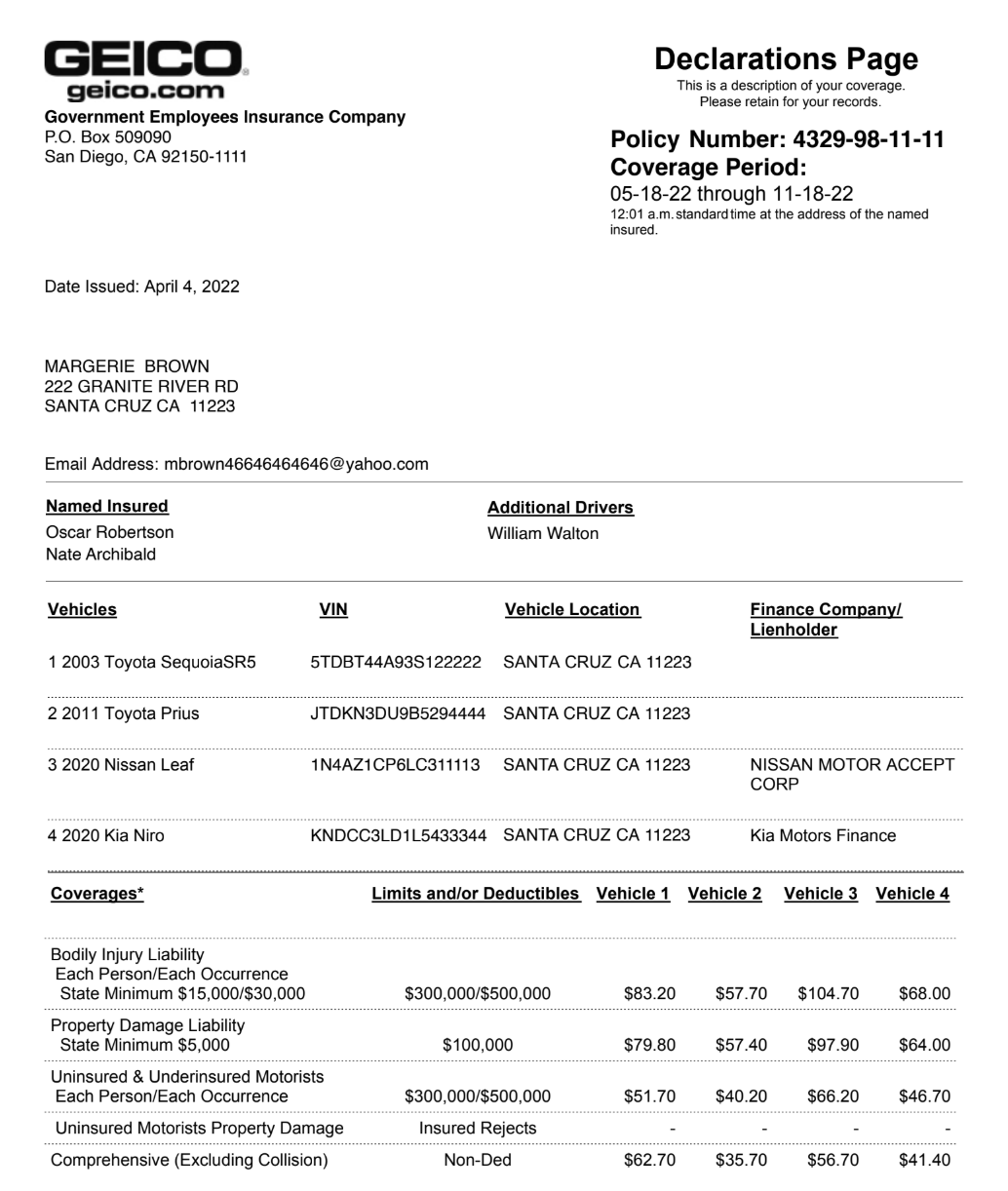
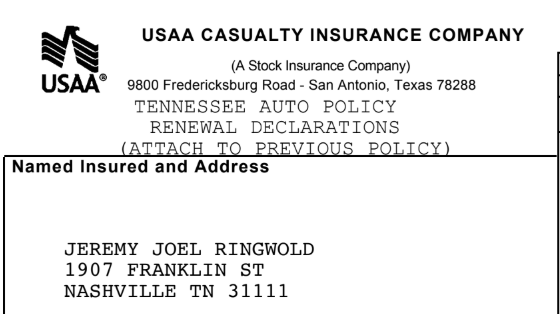
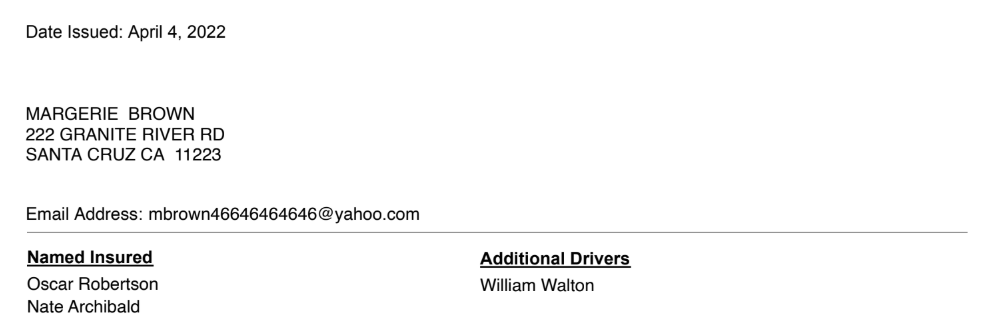
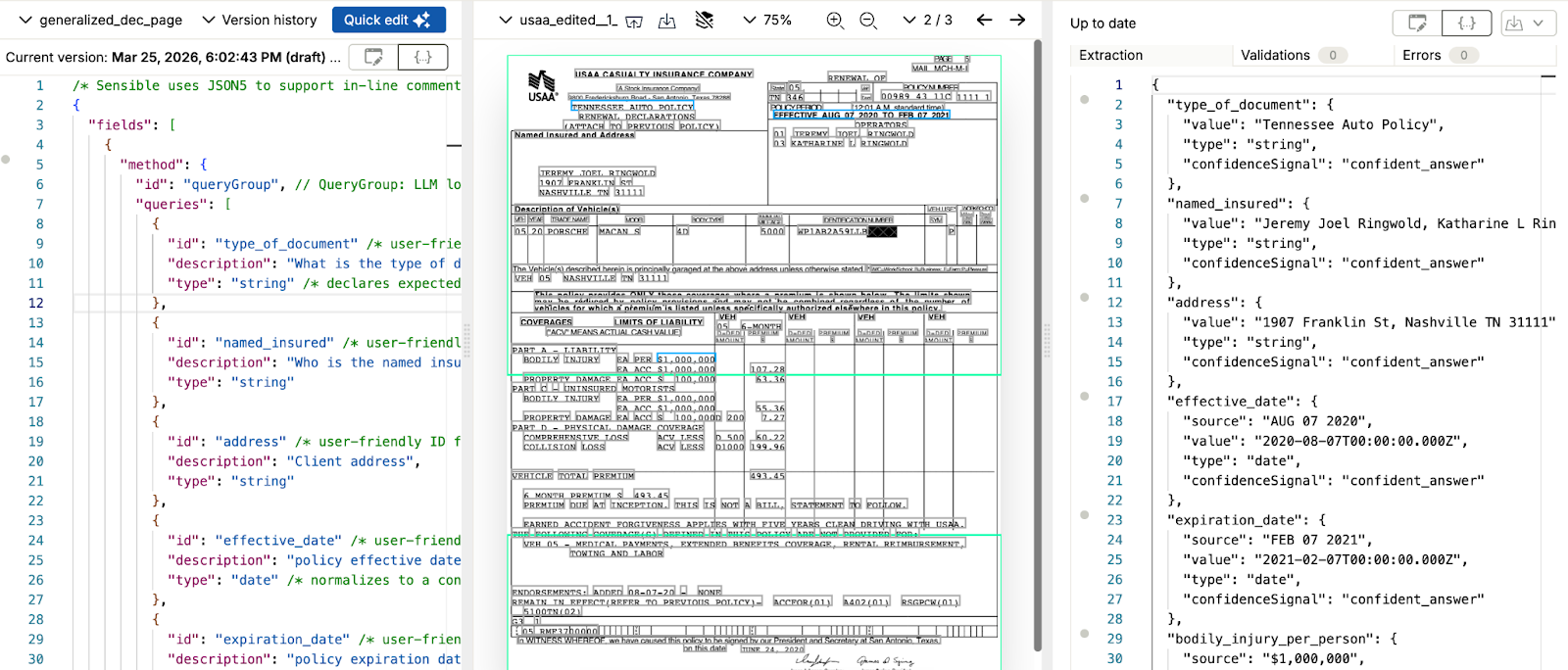
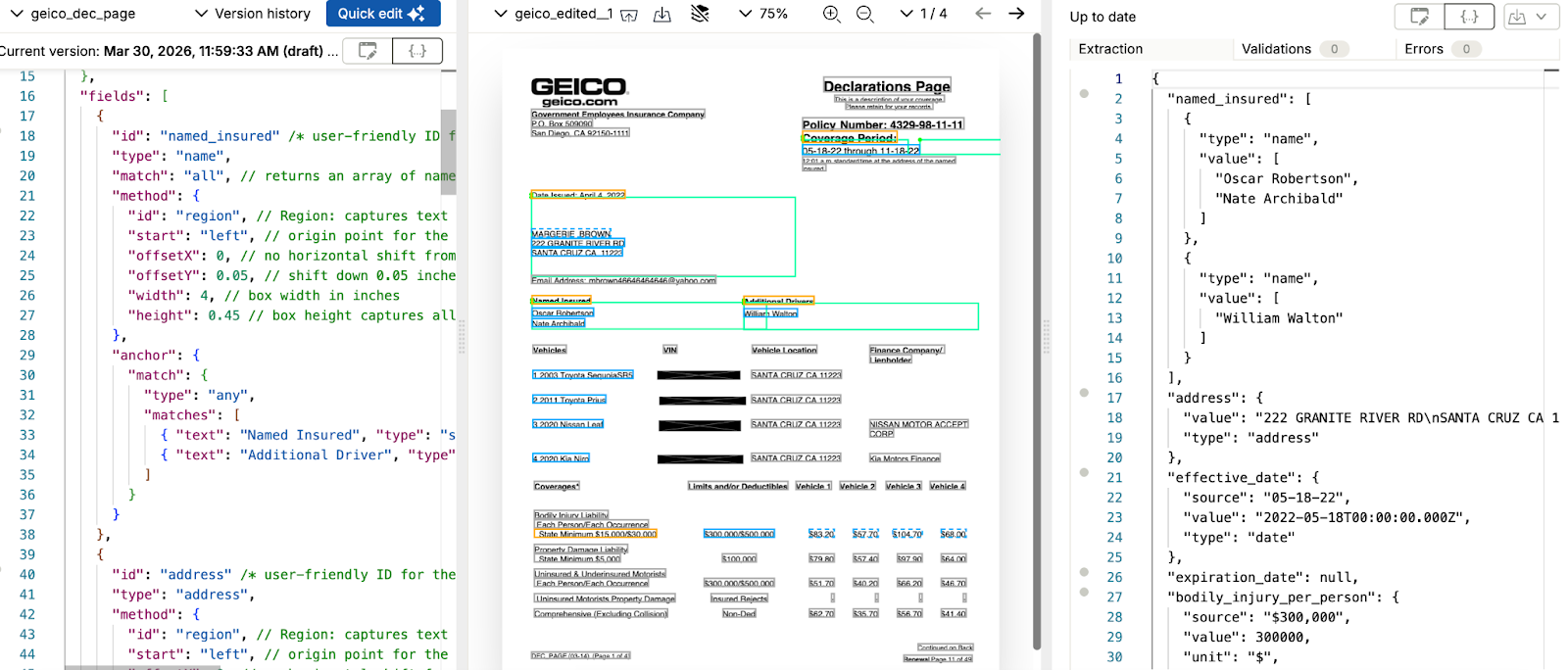
Named insured and address appear on every dec page, but carrier formats differ. USAA embeds them in an unlabeled header block. GEICO lists named parties under explicit "Named Insured" and "Additional Drivers" headings, with the mailing address positioned below the issue date.
Generalized config (USAA)
The generalized Query Group query locates both fields by reasoning over the document, regardless of where the carrier places them.
{
  "method": {
    "id": "queryGroup",           // QueryGroup: LLM locates multiple fields in a single pass
    "queries": [
      {
        "id": "named_insured",    /* user-friendly ID for the extracted data */
        "description": "Who is the named insured on the policy?", /* plain-language question the LLM answers */
        "type": "string"          /* declares expected output type; Sensible validates the result */
      },
      {
        "id": "address",          /* user-friendly ID for the extracted data */
        "description": "Client address",
        "type": "string"
      }
    ]
  }
}
The GEICO config uses the Region method for named insured, anchored to the "Named Insured" and "Additional Drivers" headings. The match: "all" parameter captures all insured parties in a single pass. Address uses Region anchored to the issue date line, capturing the address block within a coordinate box defined below the anchor.
Here are the queries we'll use:
{
  "id": "named_insured",            /* user-friendly ID for the extracted data */
  "type": "name",
  "match": "all",                   // returns an array of named insured entries, one entry per matching anchor
  "method": {
    "id": "region",                 // Region: captures text within a box defined in inch coordinates relative to the anchor
    "start": "left",                // origin point for the coordinate box
    "offsetX": 0,                   // no horizontal shift from the anchor
    "offsetY": 0.05,                // shift down 0.05 inches to clear the heading line
    "width": 4,                     // box width in inches
    "height": 0.45                  // box height captures all name lines below the heading
  },
  "anchor": {
    "match": {
      "type": "any",
      "matches": [
        { "text": "Named Insured", "type": "startsWith" },
        { "text": "Additional Driver", "type": "startsWith" }
      ]
    }
  }
},
{
  "id": "address",                  /* user-friendly ID for the extracted data */
  "type": "address",
  "method": {
    "id": "region",                 // Region: captures text within a box defined in inch coordinates relative to the anchor
    "start": "left",                // origin point for the coordinate box
    "offsetX": 0,                   // no horizontal shift from the anchor
    "offsetY": 0.05,                // shift down 0.05 inches to clear the label line
    "width": 4.5,                   // box width in inches, spanning the address block
    "height": 1.35                  // box height captures multi-line address
  },
  "anchor": {
    "match": [{ "text": "Date issued:", "type": "startsWith" }]  /* search for this label in the document */
  }
}
Both configs return named_insured and address. The GEICO layout config returns named_insured as a typed array because the config requests both the primary named insured and any additional drivers. The generalized Query Group config returns it as a string here, but expanding the query to ask for all insured parties produces the same array result. The address field ID is consistent across both.
Extract the policy period
Both carriers express the coverage period differently. USAA uses an inline format ("EFFECTIVE AUG 07 2020 TO FEB 07 2021") embedded in a text block. GEICO places start and end dates below a "Coverage Period:" label in a standardized MM-DD-YY format.
Generalized config (USAA)
Two Query Group queries pull effective and expiration dates. The LLM parses whichever date format the carrier uses and returns dates in whatever format or schema your downstream system requires.
Here are the queries we'll use:
{
  "method": {
    "id": "queryGroup",           // QueryGroup: LLM locates multiple fields in a single pass
    "queries": [
      {
        "id": "effective_date",   /* user-friendly ID for the extracted data */
        "description": "policy effective date", /* plain-language question the LLM answers */
        "type": "date"            /* normalizes to a consistent date format regardless of how the carrier writes it */
      },
      {
        "id": "expiration_date",  /* user-friendly ID for the extracted data */
        "description": "policy expiration date",
        "type": "date"
      }
    ]
  }
}
GEICO's coverage period label appears once, with the start date and end date both positioned below it on the same line. The Region method captures each date using a coordinate box relative to the "Coverage Period:" anchor: the left region captures the start date, a right-shifted region captures the end date.
Here are the queries we'll use:
{
  "id": "effective_date",           /* user-friendly ID for the extracted data */
  "type": "date",
  "method": {
    "id": "region",                 // Region: captures text within a box defined in inch coordinates relative to the anchor
    "start": "left",                // origin point for the coordinate box
    "offsetX": 0,                   // no horizontal shift, captures left side below the anchor
    "offsetY": 0.05,                // shift down 0.05 inches to clear the label line
    "width": 1.8,                   // box width captures the start date on the left
    "height": 0.25                  // box height captures one date line
  },
  "anchor": {
    "match": [{ "text": "Coverage Period:", "type": "equals" }]  /* search for this exact label in the document */
  }
},
{
  "id": "expiration_date",          /* user-friendly ID for the extracted data */
  "type": "date",
  "method": {
    "id": "region",                 // Region: captures text within a box defined in inch coordinates relative to the anchor
    "start": "left",                // origin point for the coordinate box
    "offsetX": 2,                   // shift right 2 inches to reach the end date column
    "offsetY": 0.05,                // shift down 0.05 inches to clear the label line
    "width": 1.8,                   // box width captures the end date on the right
    "height": 0.25                  // box height captures one date line
  },
  "anchor": {
    "match": [{ "text": "Coverage Period:", "type": "equals" }]  /* search for this exact label in the document */
  }
}
USAA formats dates as "AUG 07 2020"; GEICO uses "05-18-22". The Region method captures each date from a defined coordinate box below the "Coverage Period:" label: the left box returns the start date, the right-shifted box returns the end date. Both return a consistent date shape regardless of how the carrier formats the value.
Extract coverage details and liability limits
Liability limits are the most critical fields on an auto dec page for underwriting and coverage verification workflows. Both configs extract bodily injury limits, but the method differs: the generalized config uses Query Group to reason over the document; the GEICO layout config uses the Row method anchored to specific label text.
Generalized config (USAA)
Here are the queries we'll use:
{
  "method": {
    "id": "queryGroup",           // QueryGroup: LLM locates multiple fields in a single pass
    "queries": [
      {
        "id": "bodily_injury_per_person",   /* user-friendly ID for the extracted data */
        "description": "what is the per person bodily injury liability", /* plain-language question the LLM answers */
        "type": "currency"        /* returns a typed object { source, value, unit, type } */
      },
      {
        "id": "bodily_injury_per_accident", /* user-friendly ID for the extracted data */
        "description": "what is the bodily injury liability per accident",
        "type": "currency"
      }
    ]
  }
}
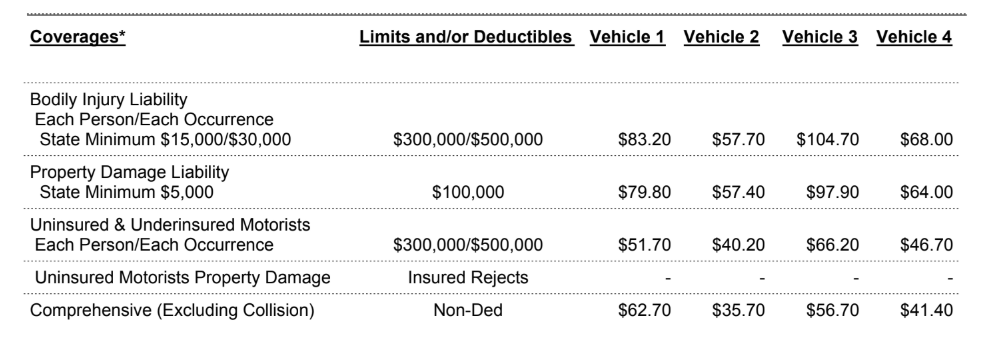
On the GEICO dec page, the bodily injury dollar limits appear on the "State Minimum" row, not on the "Each Person/Each Occurrence" header row above it. The Row method uses a three-step anchor to navigate to the correct row: first the section header, then the sublimit label, then the "State Minimum" row where the values are. An end parameter stops the search before the next coverage section to prevent false matches.
Here are the queries we'll use:
{
  "id": "bodily_injury_per_person", /* user-friendly ID for the extracted data */
  "type": "currency",               /* returns a typed object { source, value, unit, type } */
  "method": {
    "id": "row",                    // Row: extracts values from the same horizontal line as the anchor
    "position": "right",            // extract values to the right of the anchor text
    "tiebreaker": "first"           // returns the first value to the right = per-person limit
  },
  "anchor": {
    "match": [
      { "text": "Bodily injury", "type": "startsWith" },              /* step 1: find the coverage section */
      { "text": "Each person/Each occurrence", "type": "startsWith" }, /* step 2: find the sublimit header */
      { "text": "state minimum", "type": "startsWith" }               /* step 3: find the row with the limit values */
    ],
    "end": [{ "text": "property damage", "type": "includes" }]        /* stop searching before the next coverage section */
  }
},
{
  "id": "bodily_injury_per_accident", /* user-friendly ID for the extracted data */
  "type": "currency",               /* returns a typed object { source, value, unit, type } */
  "method": {
    "id": "row",                    // Row: extracts values from the same horizontal line as the anchor
    "tiebreaker": "second"          // returns the second value to the right = per-accident limit
  },
  "anchor": {
    "match": [
      { "text": "Bodily Injury Liability", "type": "startsWith" },     /* step 1: find the coverage section */
      { "text": "Each Person/Each Occurrence", "type": "startsWith" }, /* step 2: find the sublimit header */
      { "text": "State minimum", "type": "startsWith" }                /* step 3: find the row with the limit values */
    ],
    "end": [{ "text": "property damage", "type": "includes" }]        /* stop searching before the next coverage section */
  }
}
Both configs return bodily_injury_per_person and bodily_injury_per_accident as typed currency values. The GEICO layout config's three-step anchor navigates directly to the row containing the dollar limits, with an end bound preventing false matches from the adjacent Property Damage section. The Row method makes no LLM call on these fields. For a platform processing hundreds of GEICO dec pages daily, that deterministic path delivers faster response times and fully predictable output on those fields.
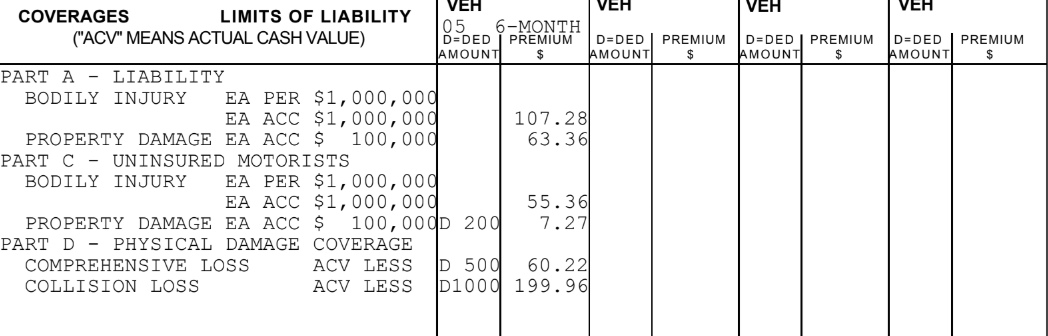
The generalized config also supports extracting all coverages at once using the List method, which returns every coverage line (name, limit, premium, vehicle) as a structured array regardless of how the carrier lays out the coverage table. This is useful when you need the full coverage picture rather than specific named fields.
Extract vehicle information
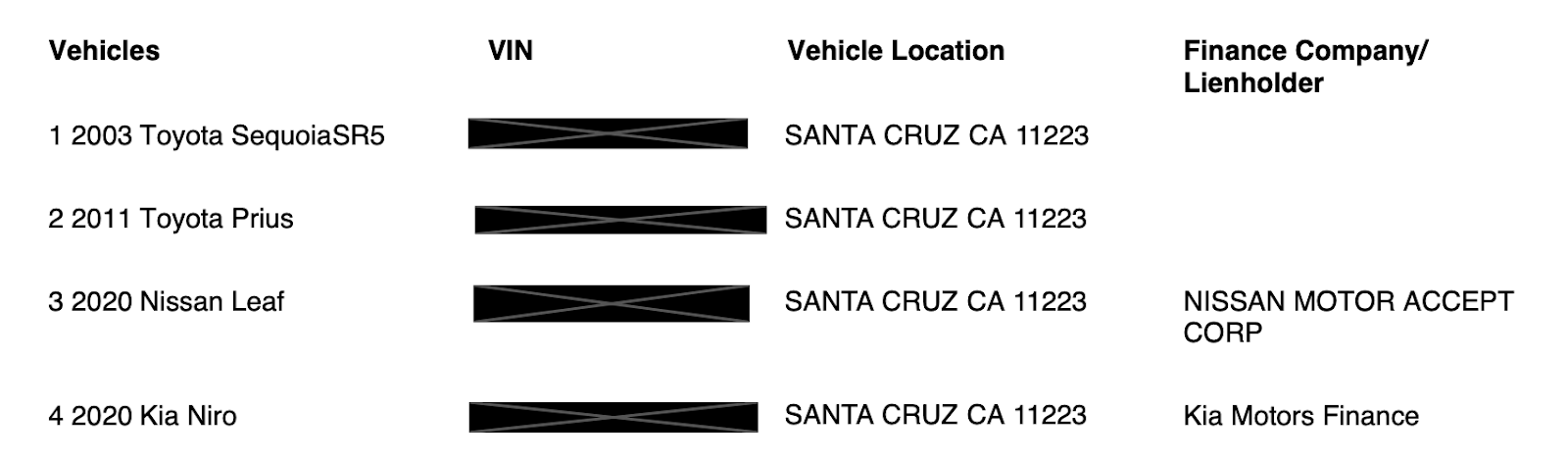
Dec pages for auto policies list covered vehicles, often with VINs, model years, and vehicle locations. USAA lists one vehicle per policy section. GEICO lists up to four vehicles in a numbered table.
Generalized config (USAA)
The List method describes vehicle properties in plain language and extracts them regardless of how the carrier lays out vehicle data.
GEICO lists vehicles in a numbered format ("1 2003 Toyota SequoiaSR5"). The GEICO config uses a Regex method with an anchor range to extract year, make, and model from each vehicle line.
Here are the queries we'll use:
{
  "id": "vehicle_year",             /* user-friendly ID for the extracted data */
  "match": "all",                   // returns an array of vehicle years, one entry per vehicle
  "method": {
    "id": "regex",
    "pattern": "(\\\\d{4})"           // captures the 4-digit model year from each numbered vehicle line
  },
  "anchor": {
    "start": { "text": "Vehicle", "type": "startsWith" },  /* start searching from this text */
    "match": {
      "type": "regex",
      "pattern": "^\\\\d \\\\d{4}"     // matches numbered lines like "1 2003"
    },
    "end": "coverages"              /* stop searching before this text */
  }
},
{
  "id": "vehicle_make",             /* user-friendly ID for the extracted data */
  "match": "all",                   // returns an array of vehicle makes, one entry per vehicle
  "method": {
    "id": "regex",
    "pattern": "^\\\\d \\\\d{4} ([\\\\w-]+)"  // captures the manufacturer name from the numbered vehicle line
  },
  "anchor": {
    "start": { "text": "Vehicle", "type": "startsWith" },  /* start searching from this text */
    "match": { "pattern": "^\\\\d \\\\d{4} .*", "type": "regex" },
    "end": { "text": "Coverages", "type": "startsWith" }   /* stop searching before this text */
  }
},
{
  "id": "vehicle_model",            /* user-friendly ID for the extracted data */
  "match": "all",                   // returns an array of vehicle models, one entry per vehicle
  "method": {
    "id": "regex",
    "pattern": "^\\\\d \\\\d{4} [\\\\w-]+ (.*)"  // captures everything after year and make as the model name
  },
  "anchor": {
    "start": { "text": "Vehicle", "type": "startsWith" },  /* start searching from this text */
    "match": { "pattern": "^\\\\d \\\\d{4} .*", "type": "regex" },
    "end": { "text": "Coverages", "type": "startsWith" }  /* stop searching before this text */
  }
}
Both configs return vehicle_year, vehicle_make, and vehicle_model. The List method describes the properties in plain language; the Regex method pattern-matches from the carrier's fixed numbering format. For GEICO's four-vehicle policy, match: "all" returns an array entry per vehicle.
When to use the generalized config vs. a carrier-specific layout template
The generalized config starts working on day one across your full carrier mix. No per-carrier configuration, no upfront template build. For platforms processing auto dec pages from 10, 20, or 50 different carriers, the generalized config covers every carrier that does not have a layout-specific template in your Sensible document type.
A carrier-specific layout template is worth building when a carrier meets one of these thresholds:
High volume: the carrier makes up a significant share of your pipeline, and per-document LLM cost at scale adds up.
Accuracy gap: the generalized config is not meeting the accuracy bar for a specific carrier's unusual field layout or label conventions.
Latency requirement: the workflow needs sub-second extraction, and LLM inference latency is a constraint.
The GEICO config in this post took under an hour to build. It covers policy number, coverage dates, named insured, vehicles with VINs, and every liability limit field with deterministic extraction: no LLM calls, no prompt maintenance. For a platform processing thousands of GEICO dec pages per month, that trades a one-time build against ongoing LLM cost on every document.
Both configs run through the same API endpoint. Sensible evaluates the fingerprint on each incoming document and routes it to the right config automatically. Your application code does not change when you add a new carrier-specific template.
Putting it all together
The two configs shown throughout this post extract the same fields using different approaches. Below is each complete config followed by its combined output.
USAA generalized config
/* Sensible uses JSON5 to support in-line comments */
{
  "fields": [
    {
      "method": {
        "id": "queryGroup",           // QueryGroup: LLM locates multiple fields in a single pass
        "queries": [
          {
            "id": "type_of_document", /* user-friendly ID for the extracted data */
            "description": "What is the type of document here (e.g., dec page, endorsement, cancellation)",
            "type": "string"          /* declares expected output type; Sensible validates the result */
          },
          {
            "id": "named_insured",    /* user-friendly ID for the extracted data */
            "description": "Who is the named insured on the policy?",
            "type": "string"
          },
          {
            "id": "address",          /* user-friendly ID for the extracted data */
            "description": "Client address",
            "type": "string"
          },
          {
            "id": "effective_date",   /* user-friendly ID for the extracted data */
            "description": "policy effective date",
            "type": "date"            /* normalizes to a consistent date format regardless of how the carrier writes it */
          },
          {
            "id": "expiration_date",  /* user-friendly ID for the extracted data */
            "description": "policy expiration date",
            "type": "date"
          },
          {
            "id": "bodily_injury_per_person",   /* user-friendly ID for the extracted data */
            "description": "what is the per person bodily injury liability",
            "type": "currency"        /* returns a typed object { source, value, unit, type } */
          },
          {
            "id": "bodily_injury_per_accident", /* user-friendly ID for the extracted data */
            "description": "what is the bodily injury liability per accident",
            "type": "currency"
          }
        ]
      }
    },
    {
      "id": "vehicles",
      "method": {
        "id": "list",
        "description": "vehicles covered by this insurance policy",
        "properties": [
          { "id": "vehicle_make",  "description": "vehicle manufacturer (e.g. Toyota, Honda)" },
          { "id": "vehicle_model", "description": "vehicle model name" },
          { "id": "vehicle_year",  "description": "model year" },
          { "id": "vin",           "description": "VIN number" }
        ],
        "chunkCount": 4
      }
    }
  ]
}
{
  "fingerprint": { /* runs before any field extraction; all tests must pass to activate this config */
    "tests": [
      {
        "page": "any",    /* check against any page in the document, not just the first */
        "match": [
          {
            "text": "geico",   /* search for this carrier name in the document */
            "type": "includes" /* partial match; catches "GEICO" and "Geico" case-insensitively */
          }
        ]
      }
    ]
  },
  "fields": [
    {
      "id": "named_insured",            /* user-friendly ID for the extracted data */
      "type": "name",
      "match": "all",                   // returns an array of named insured entries, one entry per matching anchor
      "method": {
        "id": "region",                 // Region: captures text within a box defined in inch coordinates relative to the anchor
        "start": "left",                // origin point for the coordinate box
        "offsetX": 0,                   // no horizontal shift from the anchor
        "offsetY": 0.05,                // shift down 0.05 inches to clear the heading line
        "width": 4,                     // box width in inches
        "height": 0.45                  // box height captures all name lines below the heading
      },
      "anchor": {
        "match": {
          "type": "any",
          "matches": [
            { "text": "Named Insured", "type": "startsWith" },
            { "text": "Additional Driver", "type": "startsWith" }
          ]
        }
      }
    },
    {
      "id": "address",                  /* user-friendly ID for the extracted data */
      "type": "address",
      "method": {
        "id": "region",                 // Region: captures text within a box defined in inch coordinates relative to the anchor
        "start": "left",                // origin point for the coordinate box
        "offsetX": 0,                   // no horizontal shift from the anchor
        "offsetY": 0.05,                // shift down 0.05 inches to clear the label line
        "width": 4.5,                   // box width in inches
        "height": 1.35                  // box height captures multi-line address
      },
      "anchor": {
        "match": [{ "text": "Date issued:", "type": "startsWith" }]
      }
    },
    {
      "id": "effective_date",           /* user-friendly ID for the extracted data */
      "type": "date",
      "method": {
        "id": "region",                 // Region: captures text within a box defined in inch coordinates relative to the anchor
        "start": "left",                // origin point for the coordinate box
        "offsetX": 0,                   // no horizontal shift, captures left side below the anchor
        "offsetY": 0.05,                // shift down 0.05 inches to clear the label line
        "width": 1.8,                   // box width captures the start date on the left
        "height": 0.25                  // box height captures one date line
      },
      "anchor": {
        "match": [{ "text": "Coverage Period:", "type": "equals" }]
      }
    },
    {
      "id": "expiration_date",          /* user-friendly ID for the extracted data */
      "type": "date",
      "method": {
        "id": "region",                 // Region: captures text within a box defined in inch coordinates relative to the anchor
        "start": "left",                // origin point for the coordinate box
        "offsetX": 2,                   // shift right 2 inches to reach the end date column
        "offsetY": 0.05,                // shift down 0.05 inches to clear the label line
        "width": 1.8,                   // box width captures the end date on the right
        "height": 0.25                  // box height captures one date line
      },
      "anchor": {
        "match": [{ "text": "Coverage Period:", "type": "equals" }]
      }
    },
    {
      "id": "bodily_injury_per_person", /* user-friendly ID for the extracted data */
      "type": "currency",               /* returns a typed object { source, value, unit, type } */
      "method": {
        "id": "row",
        "position": "right",
        "tiebreaker": "first"           // returns the first value to the right = per-person limit
      },
      "anchor": {
        "match": [
          { "text": "Bodily injury", "type": "startsWith" },              /* step 1: find the coverage section */
          { "text": "Each person/Each occurrence", "type": "startsWith" }, /* step 2: find the sublimit header */
          { "text": "state minimum", "type": "startsWith" }               /* step 3: find the row with the limit values */
        ],
        "end": [{ "text": "property damage", "type": "includes" }]        /* stop searching before the next coverage section */
      }
    },
    {
      "id": "bodily_injury_per_accident", /* user-friendly ID for the extracted data */
      "type": "currency",               /* returns a typed object { source, value, unit, type } */
      "method": {
        "id": "row",
        "tiebreaker": "second"          // returns the second value to the right = per-accident limit
      },
      "anchor": {
        "match": [
          { "text": "Bodily Injury Liability", "type": "startsWith" },     /* step 1: find the coverage section */
          { "text": "Each Person/Each Occurrence", "type": "startsWith" }, /* step 2: find the sublimit header */
          { "text": "State minimum", "type": "startsWith" }                /* step 3: find the row with the limit values */
        ],
        "end": [{ "text": "property damage", "type": "includes" }]        /* stop searching before the next coverage section */
      }
    },
    {
      "id": "vehicle_year",             /* user-friendly ID for the extracted data */
      "match": "all",                   // returns an array of vehicle years, one entry per vehicle
      "method": { "id": "regex", "pattern": "(\\\\d{4})" },
      "anchor": {
        "start": { "text": "Vehicle", "type": "startsWith" }, /* ignore anchor matches before this line */
        "match": { "type": "regex", "pattern": "^\\\\d \\\\d{4}" },
        "end": "coverages"              /* stop searching before this text */
      }
    },
    {
      "id": "vehicle_make",             /* user-friendly ID for the extracted data */
      "match": "all",                   // returns an array of vehicle makes, one entry per vehicle
      "method": { "id": "regex", "pattern": "^\\\\d \\\\d{4} ([\\\\w-]+)" },
      "anchor": {
        "start": { "text": "Vehicle", "type": "startsWith" }, /* ignore anchor matches before this line */
        "match": { "pattern": "^\\\\d \\\\d{4} .*", "type": "regex" },
        "end": { "text": "Coverages", "type": "startsWith" }  /* stop searching before this text */
      }
    },
    {
      "id": "vehicle_model",            /* user-friendly ID for the extracted data */
      "match": "all",                   // returns an array of vehicle models, one entry per vehicle
      "method": { "id": "regex", "pattern": "^\\\\d \\\\d{4} [\\\\w-]+ (.*)" },
      "anchor": {
        "start": { "text": "Vehicle", "type": "startsWith" }, /* ignore anchor matches before this line */
        "match": { "pattern": "^\\\\d \\\\d{4} .*", "type": "regex" },
        "end": { "text": "Coverages", "type": "startsWith" }  /* stop searching before this text */
      }
    }
  ]
}
Sensible can extract any field present on an insurance declaration page. The examples above cover carrier identification, named insured, policy period, liability limits, and vehicle information. A complete config can also pull property damage liability, uninsured/underinsured motorist limits, collision and comprehensive deductibles, total premium, per-vehicle premium breakdowns, loss payee and lienholder details, endorsement codes, roadside assistance status, rental reimbursement limits, and other data. Sensible's open-source configuration library includes prebuilt declaration page configs for auto, home, renters, pet, and commercial policies: Policy Declaration Pages config library. To build custom fields beyond the prebuilt configs, the SenseML reference covers every available extraction method. To have Sensible's team handle configuration, testing, and ongoing maintenance, managed services gets you fully set up.
Connect Sensible to your workflow
Once your SenseML config is set up, there are several ways to integrate insurance declaration page extraction into your application or process.
Python SDK
The Sensible Python SDK wraps the extraction API for Python applications. Install with pip and pass a file path or URL to get back a parsed_document object:
pip install sensibleapi
import json
from sensibleapi import SensibleSDK

sensible = SensibleSDK("YOUR_API_KEY")  # if you paste in your key, like SensibleSDK("1ac34b14"), then secure it in production

request = sensible.extract(
    path="./dec_page.pdf",  # replace with path to your document
    document_type="insurance_dec_page",
    environment="production"
)

results = sensible.wait_for(request)

try:
    print(json.dumps(results, indent=2))
except Exception:
    print(results)
Save the script as extract_dec_page.py. Run it from the command line:
python extract_dec_page.py
After running the script, you should see the following output.
Sample API response for an insurance declaration page (USAA generalized config):
For async processing at volume, configure a webhook instead of polling with wait_for. See the Python SDK docs for the full reference.
MCP server
Sensible's MCP server connects document extraction directly to AI coding tools like Claude, letting you query and extract insurance declaration page data through natural language without writing API calls. See the MCP server docs for setup instructions.
API (synchronous and asynchronous)
Call the Sensible REST API directly for language-agnostic integration. The synchronous endpoint returns extracted data inline; the asynchronous endpoint accepts a webhook URL and posts results when extraction completes, recommended for high-volume or large-document workflows. See the API reference for endpoint details.
Zapier
For no-code integration, Sensible's Zapier connector routes extracted insurance declaration page data into existing workflows without writing code, connecting to Google Sheets, Airtable, Slack, or any of Zapier's connected apps. See the Zapier integration docs to get started.
FAQ
What fields can be extracted from an insurance declaration page?
Sensible can extract any field present on an insurance declaration page. Core fields include named insured, policy number, coverage period, coverage types and limits, deductibles, total premium, and vehicle information including VINs. A complete config also pulls property damage liability, uninsured/underinsured motorist limits, endorsement codes, loss payee details, roadside assistance status, and per-vehicle premium breakdowns.
How does Sensible handle declaration pages from multiple carriers?
A generalized LLM config handles any carrier's dec page without per-carrier configuration, using Query Group and List methods to locate fields regardless of layout. Carrier-specific layout templates handle high-volume carriers with deterministic extraction at lower cost and latency. Both configs run through the same API endpoint, and Sensible routes each document to the right config using fingerprint-based carrier identification.
Can Sensible extract from declaration pages bundled with other insurance documents?
The portfolio method segments multi-document PDFs before extraction runs. Each document type in the file (dec page, endorsement schedule, ACORD form, loss run) is identified and extracted by its own config without interfering with the others.
How accurate is automated insurance declaration page extraction?
For carrier-specific layout templates, accuracy is very high: each field anchors to a fixed label position, and output is fully traceable back to source coordinates. The generalized LLM config handles the broad carrier mix with strong accuracy on standard fields like policy number, named insured, coverage period, and total premium.
How long does it take to set up insurance declaration page extraction with Sensible?
The generalized template is ready immediately from Sensible's open-source configuration library, and you can customize it from day one: adding new fields, modifying output schemas, or adjusting existing queries to match your specific data requirements. Carrier-specific layout templates take under an hour to configure depending on field count and document complexity.
What is the difference between the generalized config and a carrier-specific layout template?
The generalized config uses LLM methods to find fields by reasoning over the document, handling any carrier without prior templates. Carrier-specific layout templates use deterministic methods anchored to fixed label positions, with no LLM calls on those fields. Both return the same output schema and route through the same API endpoint.
Start extracting
The prebuilt configs in Sensible's open-source library cover auto, home, renters, pet, and commercial dec pages and are ready to run against your own samples immediately. The carrier-specific approach shown here for GEICO extends directly to any other carrier in your pipeline: fingerprint, field config, same output schema, same API call.
Insurance dec pages are one document type in a broader insurance intake workflow. Sensible also handles ACORD forms and loss runs from the same carriers, through the same API.




.png)
.png)