.png)
Invoices look like a solved problem. Every business issues them, every AP team processes them, and every ERP expects them. The reality at scale is different: invoices are one of the highest-variability document types in production, and that variability is what breaks most extraction pipelines.
Invoices are vendor-issued payment requests that document line items, quantities, prices, and payment instructions. At volume, extracting data from them manually introduces keying errors, delays AP cycles, and creates audit gaps. Sensible's hybrid extraction config handles format variability across vendors and returns typed, schema-validated output through a single API endpoint.
Every vendor formats differently. Field positions shift. Line item tables have inconsistent column counts, merged cells, and irregular row spacing. Invoices arrive bundled in the same PDF alongside packing slips, purchase orders, and remittance advice — requiring document detection before extraction even begins. Scan quality ranges from clean digital exports to phone photos of crumpled paper, and partially handwritten invoices are common in certain verticals.
Sensible handles this with a two-tier approach. A generalized LLM-powered template covers the long tail of vendor formats out of the box: no per-vendor configuration required, ready to extract on day one. For vendors whose invoices are high-volume or consistently underperforming on the generalized template, a layout-specific template can be built in 15 to 45 minutes depending on field count and document complexity. Both approaches run through the same API. You get breadth from the generalized template and precision where the volume justifies it.
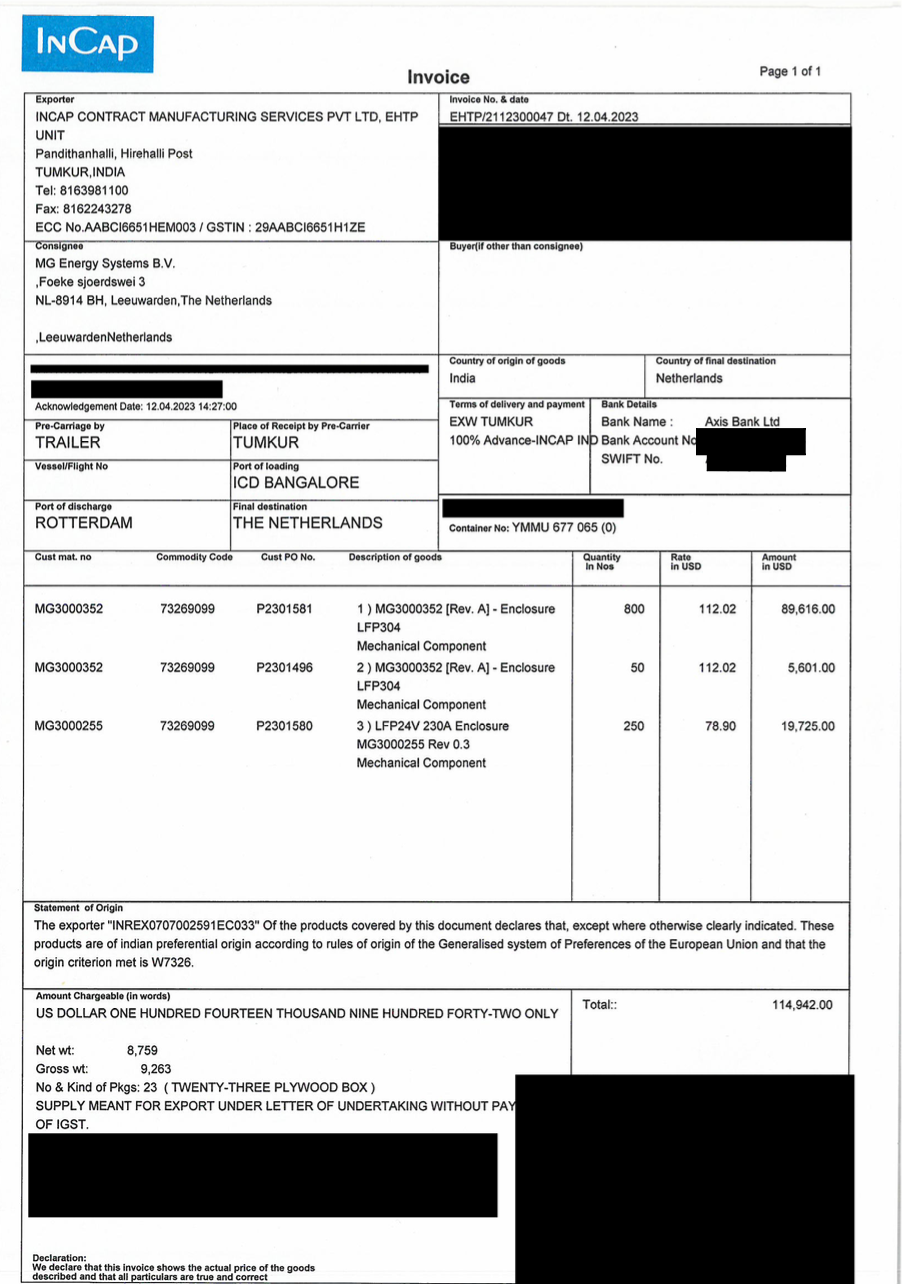
The examples below use a real commercial invoice from INCAP to show the generalized template approach in action across five field types.
What we'll cover:
- Vendor and customer identification with LLM field-level disambiguation
- Invoice header fields with automatic date normalization
- Line items using the List and Zip methods
- Payment details with conditional output logic
- Invoice total with explicit LLM provider selection
Prerequisites
- Sign up for a Sensible account
- Add invoice extraction support via the Out-of-the-box extractions quickstart
- Gather sample invoices from one or more vendors
Write document extraction queries with SenseML
SenseML is Sensible's configuration language for document extraction. Each field in your config defines how to locate and extract a value from the document. A complete config has the top-level shape { "fields": [ { "id": "...", "method": { ... } }, ... ] } — the examples below show individual field objects that slot into that array.
The examples below primarily use 2 methods you'll see throughout this post:
- Query Group: pass an LLM prompt to locate fields whose positions shift across vendors, returning typed, schema-validated output
- List: extract variable-length arrays like line items by describing each property in plain language, without requiring a fixed column layout
The generalized template uses Query Group and List throughout; layout-specific templates layer in deterministic methods for the fields that don't move.
Extract vendor and customer details
The vendor name appears near the logo or in a supplier header area on most invoices. The challenge: a single invoice also contains consignee, "Bill To," and "Ship To" blocks referencing other company names. Without precise instruction, an LLM can pull the wrong one.
The Query Group method accepts an LLM prompt in the description field that guides where and how to extract each value. Grouping co-located fields in a single Query Group call gives the LLM more context about their relationships, which improves disambiguation accuracy compared to querying each field independently.
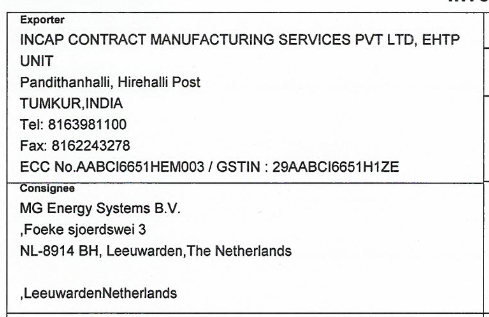
Here are the queries we'll use:
Setting confidenceSignals: true adds a confidenceSignal property to each output field. A value of "confident_answer" indicates a clear match; a lower confidence or null signals the field warrants human review before it reaches your ERP or AP system.
Extracted value:
Extract invoice header fields
Invoice number and invoice date appear on virtually every invoice, but their labels and positions vary by vendor. Wrapping them in a single Query Group call with searchBySummarization enabled submits the full document as context for short invoices like this one — for documents five pages or under, Sensible feeds the entire document to the LLM directly. For longer documents, Sensible summarizes first to identify the most relevant page before extracting, which is especially useful when header fields and payment details are spread across pages.
The "type": "date" declaration normalizes dates to ISO 8601 in the output. One caveat: type: "date" assumes MM/DD/YYYY by default. For vendors using international formats (DD/MM/YYYY is common on invoices from India, Europe, and elsewhere), silent misparsing is possible: April 12 could be read as December 4. When date format is ambiguous for your vendor mix, use type: "string" instead and include formatting instructions in the description to let the LLM handle normalization explicitly.
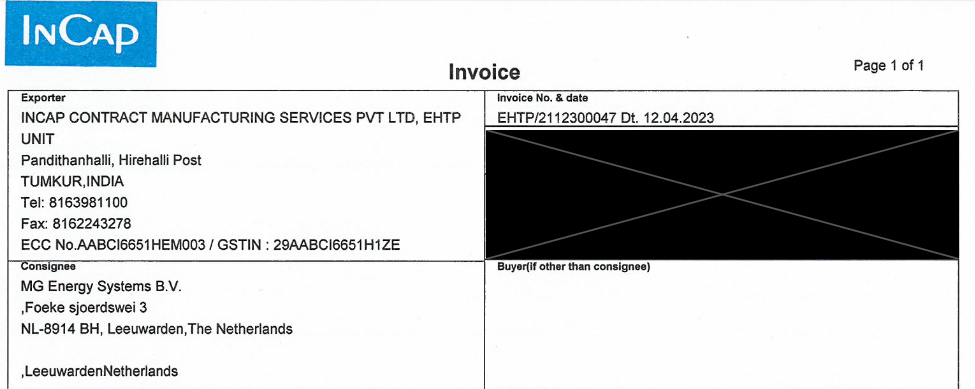
Here are the queries we'll use:
Extracted value:
The source field preserves the raw text from the document; value is the normalized ISO 8601 output. When Invoice due date is absent, the field returns null rather than populating with a guess.
Extract line items
Line item tables are the most structurally variable part of an invoice. Column count, header labels, row spacing, and whether items are grouped by PO all vary by vendor. The List method extracts repeating structured data by describing each property in plain language, without requiring a fixed column layout or header text to anchor against.
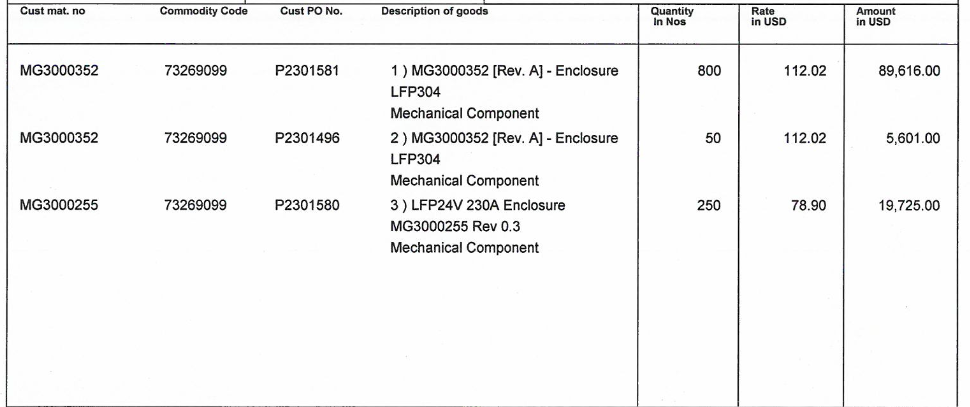
Here are the queries we'll use:
The List method returns parallel arrays (one per property, indexed by row). The Zip method restructures these into an array of row objects, where each object contains all properties for a single line item:
Extracted value:
The intermediate items field is suppressed from the final output using the Suppress Output method, keeping the API response clean.
Extract payment details
Vendor invoices frequently include bank transfer instructions: account holder name, bank name, SWIFT/BIC code, and account number. Each gets its own query within a Query Group call.
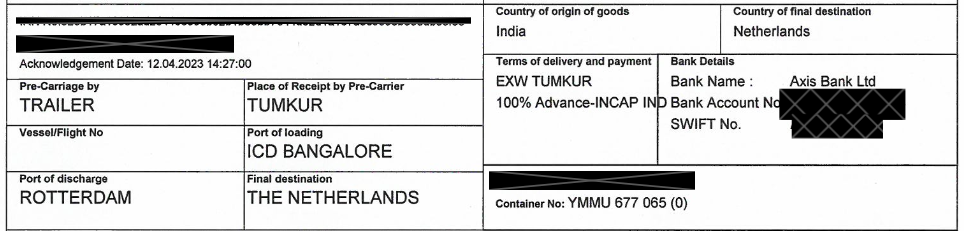
Here are the queries we'll use:
The bank name requires one additional step: it should only return when a bank name is also present. A Custom Computation field handles this with a JSON Logic conditional:
Extracted value:
Bank details are redacted from the sample output.
Custom Computation with JSON Logic is Sensible's mechanism for reconciliation logic across fields: conditioning one field's output on another's value, enforcing cross-field rules, or calculating derived values. It runs after LLM extraction on the structured output, so the logic is deterministic even when the upstream extraction is LLM-based.
Extract invoice total
Invoice totals require careful extraction. A single document often contains multiple currency figures: subtotals, tax amounts, balance due, and running totals. The description instructs the LLM to return only the final due amount, not a balance or partial figure.
Sensible supports OpenAI, Anthropic, and Google Gemini as LLM providers, giving you the flexibility to route individual queries to whichever model performs best for a given field type. For numeric extraction where the target value is surrounded by similar figures (subtotals, running totals, tax lines), switching providers can improve disambiguation accuracy on your specific document set. Setting llmEngine: { "provider": "anthropic" } routes this query to Anthropic's models while the rest of the config uses the default provider. If you haven't tested both, omit llmEngine and Sensible uses its default.
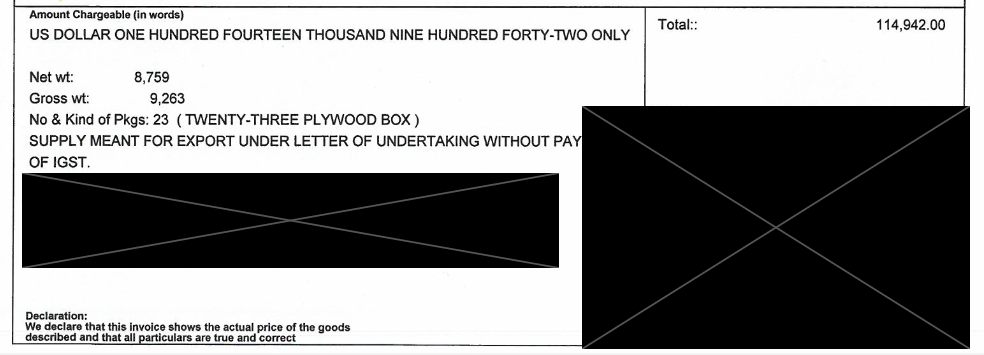
Here are the queries we'll use:
Extracted value:
The source field preserves the original formatted string from the document; value is the parsed number, typed and ready for financial calculations or reconciliation workflows. Cross-checking against the line item totals (89,616 + 5,601 + 19,725 = 114,942) confirms the extraction. Sensible also has built-in validation capabilities, so this kind of cross-field check can be encoded directly in your template rather than handled downstream.
When to build a layout-specific template
The generalized LLM template above covers the long tail of vendor formats with no per-vendor configuration. For most teams, it handles the majority of invoice volume on day one.
Two signals indicate a vendor warrants a layout-specific template:
- Volume: a vendor accounts for a meaningful share of your total invoice volume
- Accuracy: the generalized template consistently underperforms on that vendor's format
When either condition applies, a layout-specific template takes 15 to 45 minutes to configure depending on invoice complexity and the number of fields. Layout templates use deterministic methods for fields with fixed positions on that vendor's format, which improves extraction accuracy and removes the LLM call cost for those fields entirely. Both the generalized template and any layout-specific templates run through the same API endpoint. Sensible selects the right template automatically at extraction time.
Extract more data
Any field present on an invoice can be extracted with Sensible. The five sections above cover core invoice fields. A complete extraction config can also pull PO number, payment terms, currency code (normalized to ISO 4217), tax amount, subtotal, ship date, and other data. Sensible's open-source configuration library includes a prebuilt invoice config to use as a starting point and extend for your specific vendor mix.
To build a custom config from scratch, the SenseML reference covers every available extraction method. If you'd rather have Sensible's team handle configuration, testing, and ongoing maintenance, managed services gets you fully set up.
Connect Sensible to your workflow
Once your SenseML config is set up, there are several ways to integrate invoice extraction into your application or process.
Python SDK
The Sensible Python SDK wraps the extraction API for Python applications. Install with pip and pass a file path or URL to get back a typed parsed_document object:
For async processing at volume, configure a webhook instead of polling with wait_for. See the Python SDK docs for the full reference.
MCP server
Sensible's MCP server connects document extraction directly to AI coding tools like Claude, letting you query and extract invoice data through natural language without writing API calls. See the MCP server docs for setup instructions.
API (synchronous and asynchronous)
Call the Sensible REST API directly for language-agnostic integration. The synchronous endpoint returns extracted data inline; the asynchronous endpoint accepts a webhook URL and posts results when extraction completes, recommended for high-volume or large-document workflows. See the API reference for endpoint details.
Zapier
For no-code integration, Sensible's Zapier connector routes extracted invoice data into existing workflows without writing code, connecting to Google Sheets, Airtable, Slack, or any of Zapier's connected apps. See the Zapier integration docs to get started.
Frequently asked questions
What fields can be extracted from an invoice?
Core fields include vendor name and address, customer name, invoice number, invoice date, line items (description, quantity, unit price, line total), payment terms, bank details, subtotal, tax amount, and total due. A complete config also pulls PO number, currency code (ISO 4217), ship date, port of loading, and more.
Can Sensible handle invoices from multiple vendors?
The generalized template covers the long tail of vendor formats with no per-vendor configuration. For high-volume or consistently inaccurate vendors, a layout-specific template takes under an hour to configure. Both run through the same API; Sensible selects the right config automatically.
What format does extracted invoice data come out in?
JSON with typed values: dates as ISO 8601, currency amounts as numbers, line items as arrays of row objects. Every query group field includes a confidenceSignal when enabled. The output is schema-validated, so downstream systems receive consistent shapes regardless of how the original invoice was formatted.
How long does it take to set up invoice extraction with Sensible?
The generalized invoice template is ready immediately from Sensible's open-source configuration library and can be expanded on. Layout-specific templates for individual vendors take under an hour to configure depending on field count and document complexity.
Do I need to train a model to extract data from invoices?
No model training required. SenseML configs define extraction logic using Query Group and List methods for variable-layout fields and deterministic methods for fixed-position fields. Sensible manages model lifecycle, so your configs continue working when foundation models are updated or deprecated.
Start extracting
Download the prebuilt invoice config from Sensible's open-source library and run it against your own vendor samples. The config ships with the Query Group and List method setup shown above, plus additional fields for PO number, currency code, payment terms, and subtotals. Adjust the descriptions or add layout-specific templates for your highest-volume vendors as needed.
Invoices are one document type in a broader AP automation pipeline. Sensible also handles purchase orders, remittance advice, vendor statements, and other relevant doc types from the same vendor set, through the same API.
Start your free 2-week trial at https://app.sensible.so/register/
Want to walk through your specific vendor formats or document volume? Book a meeting at https://www.sensible.so/contact-us
.png)
.png)