
.png)
Introduction
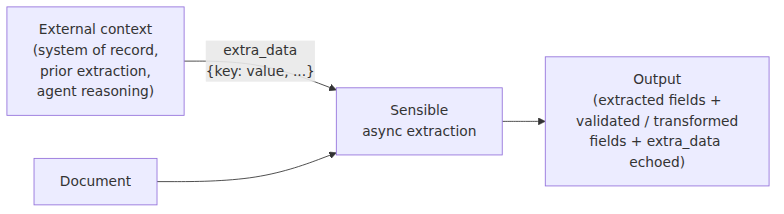
Document extraction rarely happens in isolation. Real workflows involve multiple documents, upstream systems, and business logic that exists outside any single file. An insurance platform might need to verify that the deductible on a declarations page matches what's on record in their policy system. A mortgage pipeline might need to cross-check a bank statement against figures from a loan application. A document AI agent might need to carry context from a previous reasoning step into the next extraction call.
Until now, making that work meant extracting data first, then comparing it in application code. With extra data, you can bring that external context directly into the extraction.
What is extra data?
The extra_data object is a flat key/value object you attach to an async extraction request:
{
  "document_url": "https://...",
  "extra_data": {
    "expected_premium": 1250.00,
    "applicant_id": "A-123"
  }
}
Sensible passes this caller-provided context into your config at extraction time. Any field in the config can read a value from it using the Extra Data method. Sensible echoes the object back in extraction responses and webhook deliveries, so it travels with the data through your pipeline.
What you can build with it
There are 3 primary ways in which teams can use the extra data feature:
Validate across document extractions
Extract fields from a first document — a loan application, say — then pass key values as extra_data into a subsequent extraction for that applicant's bank statement. The bank statement config uses the Extra Data method with the Custom Computation method to flag discrepancies between the incoming expected values, for example, stated income, against what it finds in the document. You get Boolean values or other output comparing the values, no application-side comparison logic required.

Incorporate external data
After extracting a VIN from an auto insurance policy, query a third-party lookup service and pass the result — for example, recorded mileage — back as extra_data in a follow-up extraction of an odometer disclosure statement. The config uses the Extra Data method with the Custom Computation method to flag any discrepancy between the lookup value and the mileage in the document.

Enrich agentic document pipelines
For teams building LLM-powered pipelines, extra_data is a natural handoff point between your agent's reasoning and the extraction step. Pass context from previous steps, retrieved records, or user-supplied parameters into the extraction, and feed it to LLM-based methods for comparison, transformation, or as additional context.
How it works
In your config, the Extra Data method works as a computed field method. Specify a key to look up in the extra_data object, and Sensible returns the value as a computed field. Use that field's output in downstream computed fields. For example, use JsonLogic in the Custom Computation method to compare against extracted values.
Here's a concrete example: a config that cross-checks values from a policy management system against a GEICO auto insurance declarations page. It uses two comparison strategies depending on the data type. The example document contains 3 values we’ll compare against the system: the name of the vehicle, the comprehensive deductible, and the collision deductible.
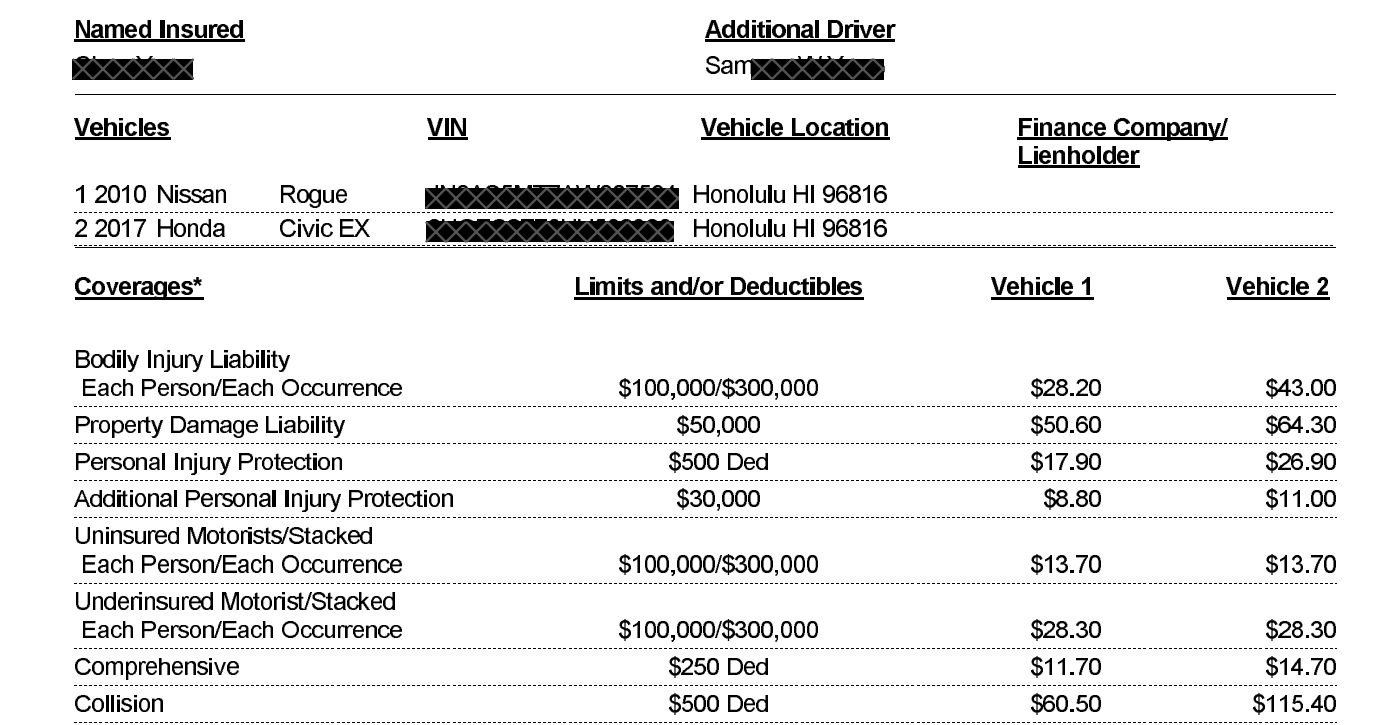
The Custom Computation method handles comparing the numeric deductibles. The LLM-based Query Group method with the Source IDs parameter handles semantic comparisons — so "NISSAN ROGUE 2010" (policy system) correctly matches "2010 Nissan Rogue" (document), even though the strings aren't equal.
Request
When you send the document extraction request using the Sensible API, include the extra data:
{
  "document_url": "https://...",
  "extra_data": {
    "expected_collision_deductible": 500,
    "expected_comprehensive_deductible": 300,
    "expected_insured_vehicle": "NISSAN ROGUE 2010"
  }
}
Output
vehicle_matches is true even though the strings aren't equal. collision_deductible_matches is true because the deductible ($500) matches the expected value. comprehensive_deductible_matches is false because the document shows $250, not the expected $300.
{
  "collision_deductible": { "source": "$500", "value": 500, "unit": "$", "type": "currency" },
  "comprehensive_deductible": { "source": "$250", "value": 250, "unit": "$", "type": "currency" },
  "expected_insured_vehicle": { "value": "NISSAN ROGUE 2010", "type": "string" },
  "insured_vehicle": { "value": "2010 Nissan Rogue", "type": "string", "confidenceSignal": "confident_answer" },
  "vehicle_matches": { "value": true, "type": "boolean", "confidenceSignal": "not_supported" },
  "expected_collision_deductible": { "value": 500, "type": "number" },
  "expected_comprehensive_deductible": { "value": 300, "type": "number" },
  "collision_deductible_matches": { "value": true, "type": "boolean" },
  "comprehensive_deductible_matches": { "value": false, "type": "boolean" }
}
Getting started
The extra_data parameter is available today on asynchronous extraction URL endpoints. To get started:
- Add an extra_data object to your extraction request with the key/value pairs your config needs.
- In your config, add computed fields using the Extra Data method to read those values.
- Use the computed field output in downstream fields to dynamically compare, transform, or enrich your extraction — use the Custom Computation method for rule-based logic, or the Query Group method with the Source IDs parameter for LLM-based semantic comparisons.
For more information about this example, see the Extra Data documentation.
Ready to try it? Sign up for free or talk to our team to see how extra data fits into your document pipeline.
Frequently asked questions
What is extra data in Sensible?
extra_data is a flat key/value object you attach to an async extraction request. Sensible passes it into your SenseML config at extraction time, where you can read individual values using the Extra Data method and use them in computed fields for comparison, validation, or enrichment.
How do I validate or transform a document field against a value from my system of record?
Pass the expected value as a key in extra_data when you submit the extraction. In your config, read it with the Extra Data method, then use the Custom Computation method with JsonLogic to compare or transform it alongside the extracted field. For validation, the result is a Boolean field in your extraction output. For transformation — for example, computing a total using a caller-supplied rate — use JsonLogic arithmetic operations instead. No post-processing required.
Can I use extra data with portfolio (multi-document file) extractions?
Yes. When you attach extra_data to a portfolio extraction request, Sensible passes the same object to every document in the portfolio. Each document type's config can independently read values from it using the Extra Data method.
How does extra data compare to post-processing in application code?
Post-processing in application code runs after extraction, on data that's already been returned. extra_data moves that logic — whether validation, transformation, or enrichment — into the extraction itself. The result ships as part of the extraction output, travels with webhook deliveries, and is visible in the Sensible app alongside other extracted fields. This simplifies pipeline logic and keeps your business logic closer to the data.
Can I use extra data for data transformation, not just validation?
Yes. extra_data is not limited to validation. You can pass any caller-provided values — a conversion rate, a tax rate, a running total from a prior step — and use the Custom Computation method with JsonLogic to derive new fields from them. For example, pass a tax rate from your system of record and multiply it against an extracted subtotal to produce a computed total in the output. The distinction is in how you use the downstream computed field: equality checks for validation, arithmetic or string operations for transformation.
What SenseML methods can read extra data?
The Extra Data method reads values from the extra_data object by key. The resulting field can then be used as an input to any downstream computed field — including the Custom Computation method for rule-based comparisons and the Query Group method with the Source IDs parameter for LLM-based semantic comparisons.
.png)

.png)