Introduction
Automating accounts payable in QuickBooks often breaks at one step: invoice extraction. QuickBooks has a B2B payments network -- when your vendor is on it, invoices arrive electronically and create bills automatically. But most vendors aren't on the network. They send PDFs by email. Before any bill can be approved or paid, someone has to read the document and enter the data.
That manual step is what keeps AP from being fully automated.
What QuickBooks does natively
QuickBooks Online includes Bill Capture, an OCR feature that pre-fills a bill from an uploaded PDF or photo. It's built into Quickbooks plans and handles the common case: a readable single-page invoice, clean scan, standard layout. You can upload files manually through the interface, use the mobile app, or forward PDFs to a Quickbooks-assigned email address. For occasional, simple invoices, it works.
Bill Capture works well for simple invoices reviewed inside the Quickbooks interface. The limits show up in automated workflows and with multi-page or non-standard formats. That’s where a powerful document-parsing solution like Sensible comes in. The comparisons below are based on Intuit's product documentation and third-party reviews.
|
Bill Capture (Quickbooks native) |
Sensible |
|
|
What it extracts |
Vendor name, date, and total amount. No invoice number or line-item detail |
Vendor name, date, total amount, invoice number, and full line-item array |
|
Line items |
Not supported; must be entered manually after capture |
Description and amount per line, extracted automatically |
|
Multi-page invoices |
Breaks on multi-page invoices; designed for single-page receipts |
Handles multi-page layouts as part of normal extraction |
|
Vendor format coverage |
Single-page, clean layouts; custom formats need manual correction |
Prebuilt config covers a wide range of vendor formats out of the box |
|
Where it runs |
Cannot be automated programmatically; intake is via the Quickbooks interface, mobile app, or a Quickbooks-assigned forwarding email address |
API/SDK-based; runs in any pipeline (email trigger, batch script, webhook) |
|
Structured output |
Pre-filled Quickbooks fields only; no data available outside Quickbooks |
Schema-validated JSON available to any downstream system |
|
Customization |
No customization options are documented; Intuit describes a fixed set of extracted fields |
Config-as-code: add fields, adjust extraction logic, version-control changes |
Intuit Assist (Quickbooks's newer AI suite) expands some field extraction: vendor address, payment terms, and expense categories. It does not handle multi-line item bills. Line items still require manual entry.
Use Bill Capture if:
- Invoice volume is low
- Your vendors use simple, single-page formats
- Manual review after capture is acceptable
Use Sensible if:
- You process invoices from multiple vendors with varying formats
- You need full line-item data extracted automatically
- You want extraction to run programmatically, outside the Quickbooks interface
Sensible adds the extraction layer that makes programmatic AP automation in QuickBooks possible.
How Sensible connects to QuickBooks
Sensible provides a Python starter kit for connecting invoice extraction to QuickBooks. Clone the repository, point it at a PDF invoice, and it creates a fully populated QuickBooks bill: vendor matched, line items included, no manual editing required.
Get the starter kit on GitHub
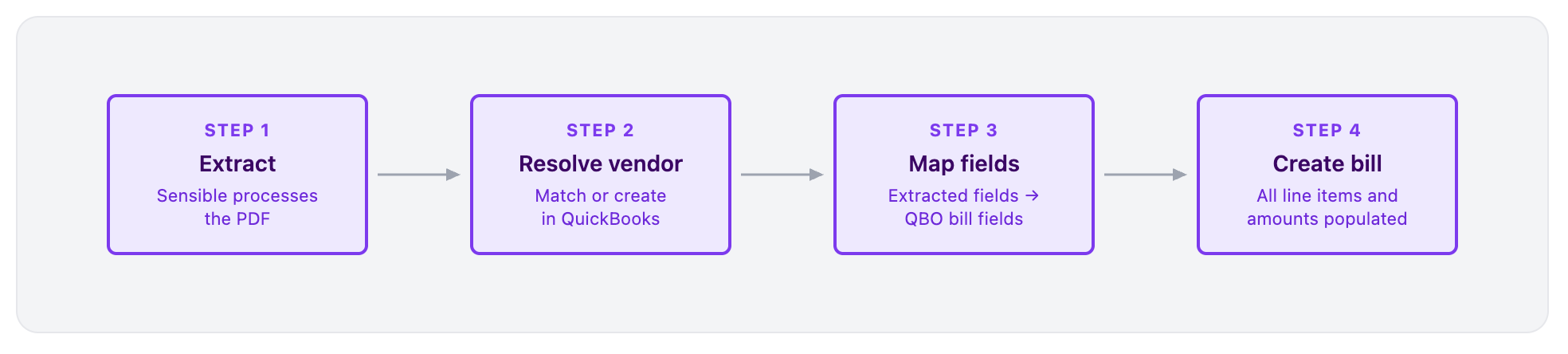
The starter kit runs four steps:
- Extract - Sensible processes the invoice document (PDF, Word doc, image, or other file format) and returns a structured
parsed_documentobject with typed fields - Resolve vendor - The script finds an existing QuickBooks vendor matching the extracted vendor name, or creates one
- Map fields - Extracted fields map directly to QuickBooks bill fields (see table below)
- Create bill - A QuickBooks bill is created with all line items, dates, and amounts populated
Field mapping
|
Sensible field |
QuickBooks field |
|
|
VendorRef |
|
|
TxnDate |
|
|
DueDate |
|
|
DocNumber |
|
|
line.Description |
|
|
line.Amount |
The prebuilt Sensible invoice configuration extracts all of these fields from the majority of vendor invoice layouts without any per-vendor setup.
Get started
Fastest path: clone the starter kit
Clone the repository and create your first QuickBooks bill from a PDF invoice:
sensible-hq/sensible-quickbooks-py on GitHub
Need full setup details?
The integration guide covers OAuth setup, token handling, sandbox testing, and the changes required for production. You'll need a free Sensible account and a QuickBooks sandbox via the Intuit Developer Portal.
Sensible-QuickBooks integration docs
Don't want to build it yourself?
Sensible's team handles configuration, testing, and ongoing maintenance.