Introduction
Your team shares documents in Slack -- invoices, tax forms, insurance docs. The data needs to end up in Google Sheets. But PDFs don't route themselves into spreadsheets. So someone copies and pastes -- or the data never makes it into Sheets at all.
Sensible acts as the extraction layer between Slack and Google Sheets. Drop a PDF into Slack. A row appears in Google Sheets. This two-Zap workflow removes that manual step entirely -- no copy-paste, no cleanup, no manual entry.
Why Google Sheets users need this
Google Sheets is where document data often ends up -- invoices, tax forms, insurance documents, intake forms. The problem is getting it there. Manual entry doesn't scale, and most OCR tools connected to Zapier return raw text that needs cleanup before it's usable in a spreadsheet.
Sensible skips that step entirely.
Sensible returns schema-validated output: typed dates, currency values, arrays of line items, and consistent field IDs regardless of which vendor or carrier issued the document. It uses precise rules for fixed-position data and LLM reasoning for fields that vary by format. That output maps directly into Sheets columns with no cleanup.
Why raw OCR isn't enough
Most PDF parsing tools connected to Zapier return raw text -- the words they find on the page, untyped. A tax total comes back as the string $12,500.00. A date comes back as March 15, 2026. Neither works in a Sheets formula. Your SUM is wrong. Your date sort breaks. Your workflows become unreliable.
Sensible returns typed data that works the moment it lands in Sheets. The total is a number. The date is a date. Field IDs are consistent across every document variant. No cleanup required.
How the workflow runs
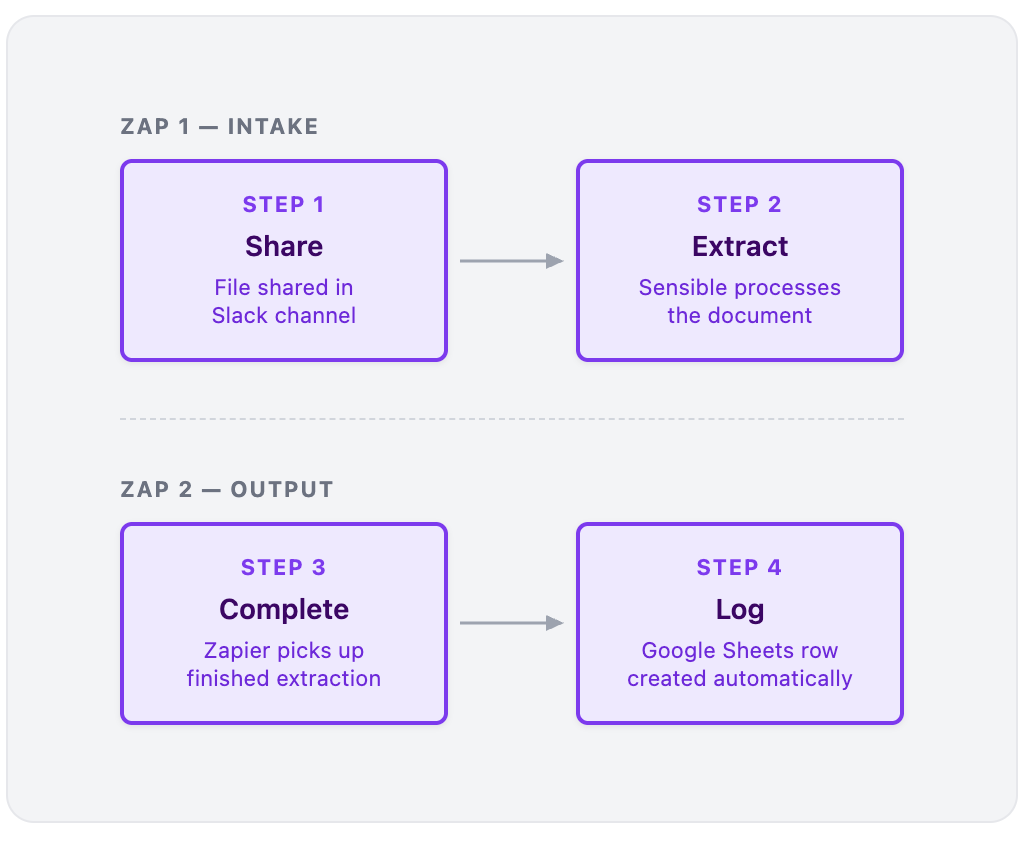
This uses two Zaps, but functions as a single pipeline: Slack → extraction → Google Sheets. Zapier chains them using a webhook so the completed extraction gets matched back to the original file.
Zap 1: Intake
- Share - A file is shared in a designated Slack channel (e.g.,
#invoices-inbox) - Extract - Zapier sends the file to Sensible; extraction runs automatically -- no user action required
Zap 2: Output
- Complete - Sensible signals completion; Zap 2 picks up the finished extraction
- Log - Zapier creates a fully populated row in Google Sheets
What lands in Google Sheets
A 1040 is a good example. Sensible's prebuilt 1040s configuration extracts dozens of fields from a structured multi-page return: income sources, deductions, credits, tax liability, refund amounts, dependent information, and more. You don't need every field -- just map the ones your sheet depends on.
Here's a slice:
|
Sensible field |
Google Sheets column |
|
|
Taxpayer Name |
|
|
Tax Year |
|
|
Filing Status |
|
|
Adjusted Gross Income |
|
|
Total Tax |
|
|
Refund Amount |
The full field set is much larger. The same workflow works across document types -- swap in any document type Sensible supports and the same two-Zap structure applies. The full setup guide walks through the complete configuration using 1040s as the example.
When this setup makes sense
Use this workflow if:
- Your team receives documents in Slack
- You track data in Google Sheets
- Manual entry or cleanup steps are slowing you down
- You want a no-code workflow that handles real-world PDFs
You might not need this if:
- Data already arrives in structured formats (CSV, forms, APIs)
- Document volume is very low
Want this fully set up and maintained?
Sensible's team handles extraction configuration, testing, and ongoing maintenance -- including post-processing logic to normalize, transform, or derive fields before they reach Google Sheets. Calculated columns, conditional logic, data that doesn't appear verbatim in the source document -- all built into the configuration. No additional scripting on your end.
Talk to our team about managed services
Get started
Fastest path:
Set up the Slack-to-Google-Sheets workflow with the full setup guide:
Zapier + Google Sheets + Slack setup guide
What you'll need:
- A free Sensible account
- A Zapier account
- Access to a Slack workspace
- A Google Sheets spreadsheet with columns matching your document's extracted fields
Prefer a done-for-you setup?