Introduction
You need invoice data, tax returns, or insurance forms in Airtable, but the documents arrive as PDFs. Airtable doesn't read PDFs. Zapier doesn't extract data from them. Every invoice, tax form, or insurance document turns into manual data entry -- one record at a time.
Sensible is the extraction layer that makes this automated. Connect it to Zapier to extract PDF data into Airtable automatically -- tax forms, invoices, insurance documents, intake forms -- with no code required.
The gap this fills
Airtable is excellent for structured data. Zapier is excellent for connecting apps. Neither extracts structured data from PDFs natively.
One workaround is manual: open the document, find the fields, type them into an Airtable record. For occasional documents that's manageable. For recurring workflows at any real volume, it becomes a bottleneck and a source of keying errors.
Sensible adds the missing extraction layer between documents and automation. When you receive a document by email, upload, or other method, Sensible returns typed, schema-validated fields, using deterministic layout-based extraction methods for fixed-position data and LLM-based extraction methods for fields that vary by vendor or format. Zapier picks those up and maps them into Airtable columns.
The Airtable record is created before anyone opens the PDF.
Why raw OCR isn't enough
Most PDF parsing tools connected to Zapier return raw text -- not structured data. A total comes back as the string $4,250.00. An invoice date comes back as March 15, 2026. Before Airtable can calculate with it, that data needs to be cleaned and normalized -- usually with extra formatter steps in Zapier or custom logic built into the base.
Sensible skips that entire layer.
Sensible returns typed fields. The total is a number. The date is a date. Field IDs are consistent across every vendor and document variant. When the data lands in Airtable, your rollups and formulas work without touching it.
How the integration works
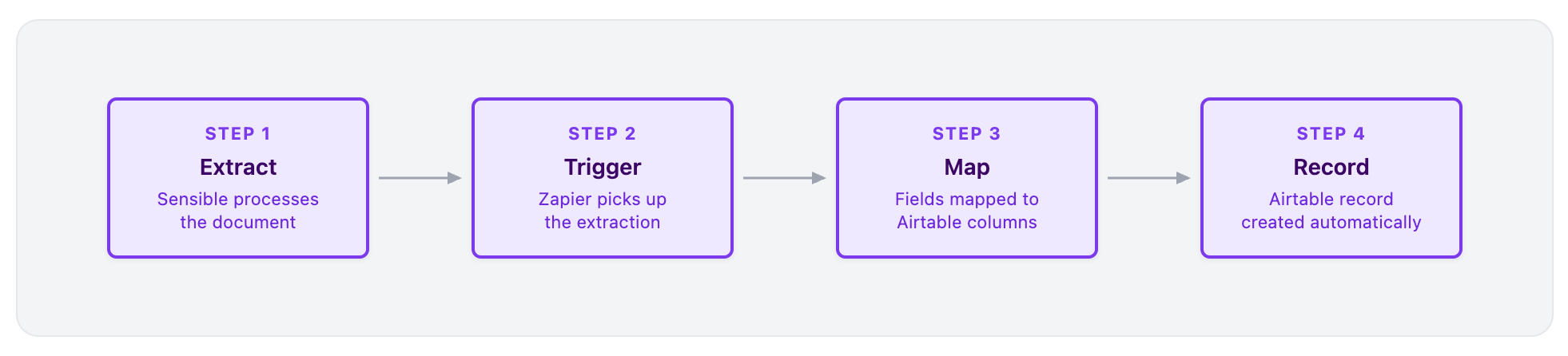
The Zap has two parts: a Sensible trigger and an Airtable action.
- Extract - Sensible processes the document and returns a structured
parsed_documentwith typed, ready-to-use fields - Trigger - The Sensible trigger in Zapier fires on each completed extraction for the configured document type
- Map - Zapier maps extracted field IDs to Airtable column names
- Record - Airtable creates a fully populated record. No manual edits required.
You can also fully automate ingestion: trigger Sensible when a file lands in Google Drive, arrives by email, or gets uploaded to another app.
What lands in Airtable
A 1040 is a good example. Sensible's prebuilt 1040s configuration extracts dozens of fields: income sources, deductions, credits, tax liability, refund amounts, dependent information, and more. You don't need every field -- just map the ones your workflow depends on. Here's a slice:
|
Sensible field |
Airtable column |
|
|
Taxpayer Name |
|
|
Adjusted Gross Income |
|
|
Filing Status |
|
|
Adjusted Gross Income |
|
|
Tax Year |
|
|
Total Tax |
The full field set is much larger. For more information about mapping, see the Zapier integration docs, which walk through the setup end to end using 1040s as the example document type.
The same Zap works across document types. Change the Sensible configuration, update your field mapping, and reuse the workflow for invoices, pay stubs, insurance forms, bank statements, or any other recurring document.
When this setup makes sense
Use Sensible + Zapier + Airtable if:
- Documents arrive as PDFs (email, uploads, Google Drive, etc.)
- You need structured data in Airtable with no manual entry
- Formatter-heavy Zaps or manual cleanup are slowing you down
- You want a no-code workflow that handles real-world document variability
You might not need this if:
- Data already arrives in structured formats (CSV, forms, APIs)
- Document volume is very low
Need this fully set up and maintained?
Sensible's team handles extraction configuration, testing, and ongoing maintenance -- including custom logic for formatting, derived fields, and conditional mapping based on document content. No additional scripting on your end.
Talk to our team about managed services
Get started
Fastest path:
Set up your first extraction-to-Airtable workflow with the Sensible Zapier integration guide:
Sensible Zapier integration guide
What you'll need:
- A free Sensible account
- A Zapier account
- An Airtable base with columns matching your document's extracted fields
Prefer a done-for-you setup?