
.png)
TL;DR
- A multi-page credit card statement breaks most naive conversion methods at the page boundary: transaction tables that continue across pages lose their running balance, or duplicate and drop rows entirely.
- Manual copy-paste and generic PDF-to-Excel tools both work fine on a single clean page, but fail predictably once a statement runs long, the issuer's layout changes, or the output has no account identifiers, totals, or balances to check it against.
- The real problem has two parts: extracting a table that spans several pages without breaking its structure, and handling the fact that every card issuer formats a statement differently.
- Lenders, accounting teams, and expense management platforms all hit this same wall at volume, and the failure mode looks the same regardless of industry: plausible-looking data that's quietly wrong.
- Sensible ships a prebuilt credit card statement configuration built around exactly this problem, with output that lands directly in Excel through an API or SDK.
Every accounting team, lending desk, and finance operations group eventually runs into the same task: turning a stack of credit card statements into a spreadsheet someone can actually work with. A bank builds a statement PDF for a person to read, laid out for printing, not for a machine to parse. Every downstream process that needs that same data in a spreadsheet, underwriting, bookkeeping, reconciliation, has to reverse that decision and pull structured numbers back out of a document built to display them, not hand them off. A one-page statement is a minor annoyance to convert. A ten-page statement is where it stops being one.
This piece covers why a multi-page statement is a genuinely different problem from a single-page one, not just a bigger version of it; the specific methods teams try first and where each one breaks; and how Sensible is built to handle the problem end to end.
Why Are Multi-Page Credit Card Statements Hard to Convert?
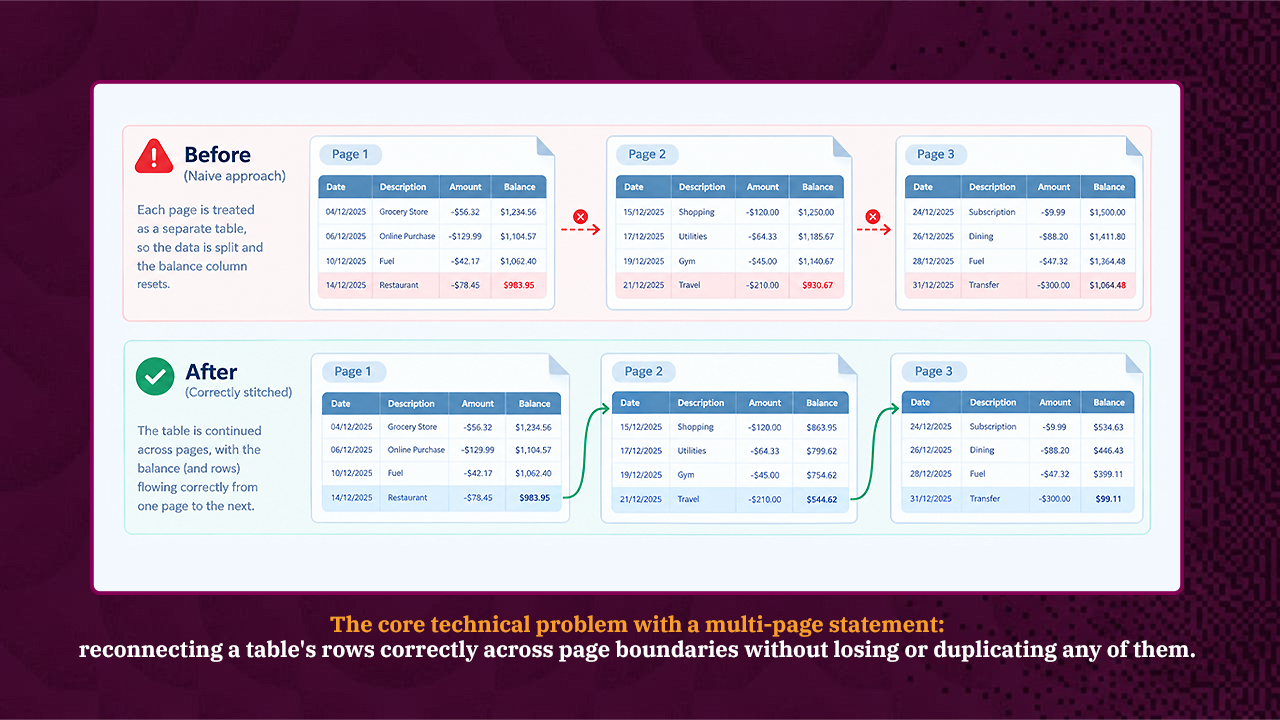
A single-page statement is close to a solved problem. A parser reads the page once, finds the transaction table, and pulls out the rows. A multi-page statement introduces a structural challenge a single page never has: the transaction table itself spans page breaks, and the data has to be stitched back together correctly on the other side.
Four things make that stitching genuinely difficult, not just tedious.
- Running balances have to carry across the page break. A running balance column updates with every transaction, so treating each page as its own table breaks the sequence, either restarting from a wrong value or losing the connection to the prior page. Sensible's List method handles this by chunking the document, scoring each chunk's relevance, then concatenating matches into one continuous list rather than reading each page in isolation.
- Every issuer formats a statement differently. Chase, Amex, Discover, and a regional issuer all report the same underlying data, transaction date, description, amount, in different column orders, date formats, and header labels. A method tuned to one issuer's layout often fails silently on another, returning data that looks plausible but is actually misaligned.
- Multi-account statements mix sections. A single PDF with more than one account, a personal card and a business card, for instance, can get merged into one undifferentiated table by a naive extraction instead of staying separate.
- Scan quality and inconsistent formatting add a second layer of ambiguity. A scanned or faxed statement loses its clean text layer and needs OCR first. Even a clean digital PDF can format negative amounts inconsistently, a minus sign on one line, parentheses on another, within the same document.
None of these four problems is exotic. Each one shows up constantly in ordinary statements from ordinary banks. What makes them costly isn't rarity; it's that a tool built without them in mind fails quietly rather than loudly, returning a spreadsheet that looks complete until someone checks the totals.
What Fields Does a Properly Converted Statement Need to Include?
A spreadsheet with just a list of transaction amounts isn't actually useful on its own. A conversion that's doing its job returns three layers of information together, and missing any one of them turns a finished output back into a half-finished one.
Account-level identifiers establish which statement the data belongs to: account holder name, the last four digits of the account number, account type, the issuing bank or card brand, and the statement period the document covers.
Transaction-level detail is the core of the table: transaction date, posted date where the statement distinguishes the two, a description or merchant name, the amount, a debit or credit indicator, the running balance after that transaction, and a check number where applicable.
Statement-level totals close the loop and make the output checkable: total deposits, total withdrawals, total fees, interest earned or charged, average daily balance, and the total transaction count for the period. These totals matter more than they might seem at first glance; they let someone reconcile the extracted spreadsheet against the original PDF in seconds by adding up the transaction rows and confirming they match the stated total, rather than manually rechecking every row.
A conversion tool that only returns the middle layer- transactions with no account context and no totals to check against- hands back data that's technically structured but still requires manual verification before anyone can trust it.
What Methods Do People Try First and Where Do They Break?
Most teams try one of four approaches before looking for a dedicated tool, and each one works right up until a document doesn't fit its assumptions.
- Manual copy-paste and retyping is the default when volume is low. It works, technically, but the cost scales linearly with every statement processed, and transcription errors creep in exactly where they're hardest to catch: a misread digit in a transaction amount, a skipped row near a page break.
- A bank's own CSV or QFX export only covers accounts held at that specific bank. The moment a workflow needs to process a statement from a different institution, a client's statement, a vendor's statement, or an applicant's statement during underwriting, that export option isn't available at all, since it only exists inside the issuing bank's own portal.
- Generic PDF-to-Excel converters (Adobe Acrobat's table export, free online converters, spreadsheet-formula-based extraction) handle a clean, single-page table reasonably well. They tend to struggle specifically with the multi-page case: a table that continues past a page break often gets exported as two separate tables, or the column alignment shifts partway through if the PDF's underlying text positioning isn't perfectly consistent from page to page.
- Spreadsheet formulas and text-splitting macros built around a copy-pasted block of raw text can work for one specific statement format, but they're brittle by construction. A formula tuned to Chase's column spacing breaks the moment the same macro runs against a Wells Fargo statement, since the underlying text layout it depends on has changed underneath it.
The pattern across all four is the same. Each method is adequate for the easy case- one page, one issuer, one account- and each one degrades in a specific, predictable way once a statement gets longer or an unfamiliar issuer shows up.
Where Do These Failures Show Up in Practice?
The gap between a demo and a real workflow shows up fastest at volume, not on the first document.
Picture a lending team processing fifty applicant-submitted bank and credit card statements in a week, pulled from a mix of major banks and smaller regional credit unions, each applicant submitting whatever format their own bank happens to produce. A generic converter or a hand-built macro might handle the three or four largest banks cleanly, since those are the formats most likely to have been tested against. The regional credit union statement, the one with a slightly different column order or an unusual date format, is exactly the one that silently misaligns. In a lending context, a misaligned transaction amount isn't a cosmetic error; it directly affects an underwriting decision.
The same pattern plays out in accounts payable reconciliation, where a finance team matches credit card charges against expense reports, and in bookkeeping firms processing statements for dozens of small-business clients, each banking somewhere different. The volume and the stakes vary by use case, but the actual failure mode is identical everywhere: a tool that works on the formats it was tested against and degrades quietly on the ones it wasn't.
What Is Sensible?
Sensible is a document extraction platform built around exactly this kind of structural complexity, combining deterministic, layout-based extraction with LLM-based methods under a single API. It ships with prebuilt configurations for common financial documents, credit card statements and bank statements listed as separate document types in Sensible's own template library, so a team doesn't have to build an extraction pipeline for this use case from a blank page.
How Does Sensible Convert a Multi-Page Statement to Excel?
Sensible's approach addresses the same structural problems described above directly, rather than treating a multi-page statement as a scaled-up version of a single-page one.
Table continuation across pages. Whether a statement runs ten pages or fifty, deposits, withdrawals, fees, and running balances get combined across page breaks without duplicated or missing rows, and the running balance sequence stays intact from the first page to the last.
Automatic per-issuer configuration. Because every institution uses its own column headers, date formats, and transaction layouts, a team can author a separate configuration for each major issuer, Chase, Wells Fargo, Bank of America, and so on, while a long tail of smaller or regional issuers falls under a more generalized configuration. Sensible's document classification runs in two stages: it first matches a document to a high-level type (a credit card statement versus a bank statement or a 1040), then to the specific config within that type, the same mechanism that tells a 1040s_2018 config apart from a 1040_20 config for tax forms. Applied to statements, that means it can tell a Chase-formatted config apart from a Wells Fargo one automatically, without a document being manually sorted by issuer first.
Multi-account splitting. When a single PDF contains more than one account, checking, savings, a second card, Sensible's Sections method extracts a repeating group of fields as a structured array, one object per account, rather than merging every account's transactions into a single table.
Schema-mapped output, not a fixed field list. Account holder name, account number, statement period, and opening and closing balance come back alongside the full transaction table, structured and typed to match the schema the destination system actually expects.
Direct Excel output. Getting that output into Excel doesn't require a manual conversion step. Sensible has a dedicated endpoint for it:
GET https://api.sensible.so/v0/generate_excel/{extraction_id}
Authorization: Bearer YOUR_API_KEY
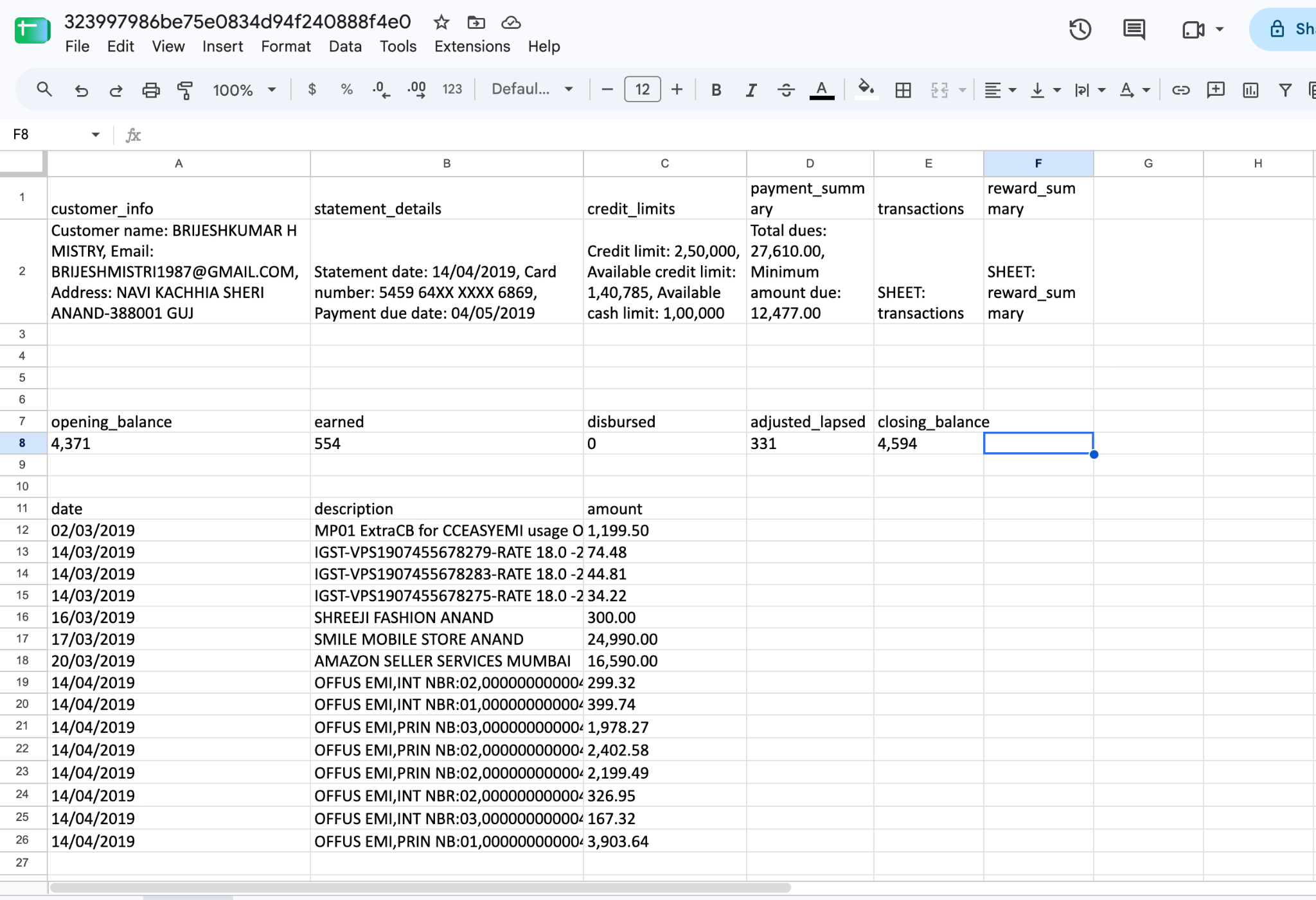
It returns a download link valid for 15 minutes. Extraction IDs can be comma-separated to merge several statements into one workbook, useful for a batch of fifty applicant statements. The workbook structure is automatic: a fields sheet for single-value data, a separate sheet per table field, and an indexed sheet for repeating data like multiple accounts on one statement.
One pipeline regardless of source quality. A statement that needs OCR first because it's a scan or a fax, and a statement with a clean underlying text layer, both resolve to the same structured schema on the output side, so the downstream process doesn't need to branch based on how a given document arrived.
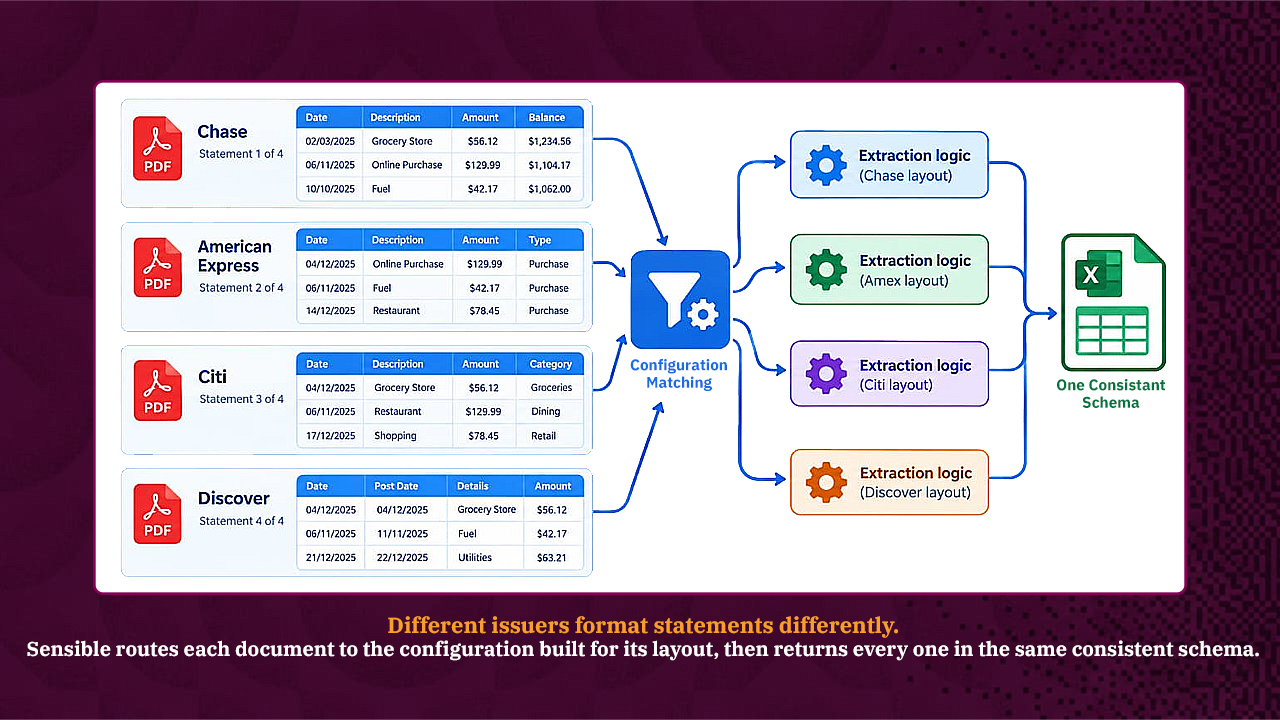
Diagram showing Chase, Amex, Citi, and Discover statement PDFs each routed through issuer-specific extraction logic and mapped into one consistent output schema
Who Uses This Workflow?
The need to convert multi-page statements at volume shows up across a handful of recurring roles, each with a slightly different reason the manual version stopped scaling.
- Lending and underwriting teams pull bank and credit card statements from applicants to verify income and cash flow, and need consistent, comparable data across statements that arrive in whatever format each applicant's bank happens to produce.
- Accounting and bookkeeping firms process statements across many small-business clients simultaneously, each client banking somewhere different, which turns issuer-format variety from an occasional annoyance into a daily constant.
- Expense management and accounts payable teams reconcile card transactions against submitted receipts and expense reports, where a misaligned transaction amount produces a reconciliation mismatch that someone then has to chase down manually.
- Auditors and financial due diligence teams need a full, verifiable transaction history across a statement set, where the running-balance continuity described earlier isn't optional; it's often what they check.
How Do You Get Started Converting a Statement to Excel?
Getting a first extraction running doesn't require building a configuration from scratch. Credit card statements and bank statements are both in Sensible's out-of-the-box configuration library, so the starting point is choosing that document type rather than authoring extraction logic manually.
- Sign up for a free trial, no credit card required, and open the Template library tab inside the Sensible app.
- Clone the credit card statement type to your account, then upload a real statement, ideally one that's actually been causing trouble, in the Extract tab to see how the prebuilt configuration handles it.
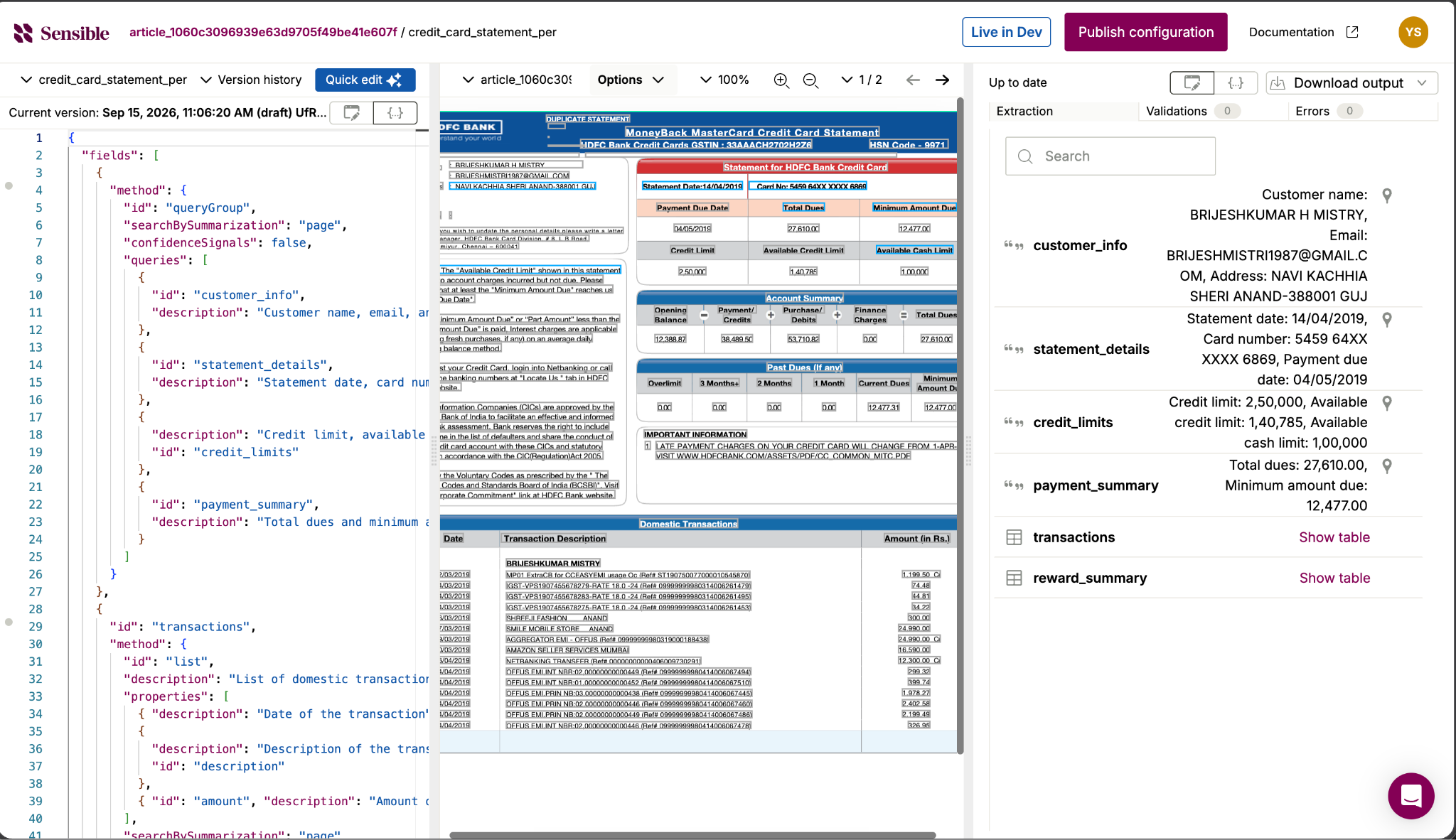
- Review the extracted fields in the app's side-by-side editor, the source PDF on one side, the extracted output on the other, and adjust the configuration if a specific issuer's layout needs a small adjustment.
- Publish the configuration to production and pull data at scale through Sensible's REST API, the Python or Node SDK, or batch extract, which processes up to 5,000 documents concurrently.
- Compile the extracted output into Excel by calling GET /v0/generate_excel/{extraction_id} once extraction finishes; no separate conversion script needed.
Conclusion: The Page Break Is the Real Problem to Solve
A single-page credit card statement barely needs a dedicated tool. The moment a statement runs multiple pages, the actual engineering problem shows up: keeping a transaction table's rows and its running balance intact across every page break, while still handling the fact that no two card issuers format a statement the same way, and while still returning the account-level and statement-level context that makes the output checkable rather than just plausible-looking. Manual entry and generic converters both work until that exact moment, and both fail in the same predictable place after it.
Sensible's credit card statement configuration is built around that specific problem: table continuation across pages and automatic adaptation to issuer layout, with output that lands directly in Excel. The fastest way to see whether it holds up is a direct test: upload the statement that's actually been causing trouble, not a clean single-page sample, and see what comes back.
FAQs
Why do multi-page PDF-to-Excel converters break on bank and credit card statements specifically?
Most generic converters treat each page as an independent table. A credit card statement's transaction table is one continuous table that spans several pages, with a running balance that depends on every prior row. Treating pages independently breaks that continuity, producing disconnected fragments instead of one clean table.
Can a conversion method handle a bank or issuer format it has never seen before?
It depends on how the method is built. A rigid, hand-built template tends to fail outright on an unfamiliar layout. A more adaptive approach, one that reads a document's structure rather than matching it against a fixed template, can generalize to a new issuer's format without needing a template built specifically for it. However, accuracy on a genuinely novel layout is still usually lower than on a well-tested one.
What if the statement is a scanned image rather than a digital PDF?
A scanned or faxed statement needs OCR first to reconstruct a text layer the document doesn't already have, before the same extraction logic can run on it. Accuracy on a scanned document depends more on scan quality than on a digital PDF, since OCR errors compound whatever extraction happens afterward.
How does automated extraction compare to manual data entry on accuracy?
Manual entry introduces transcription errors at a rate that scales with volume and fatigue; a misread digit or a skipped row becomes more likely the more statements one person processes in a sitting. Automated extraction removes that fatigue factor, though its accuracy still depends heavily on document quality and how well the extraction logic actually fits the statement formats being processed.
Does converting a statement to Excel with Sensible require any coding?
Getting a first extraction running through the Sensible app's Template library tab and editor doesn't require writing code.. Pulling extracted data at production scale, publishing a configuration, calling the API on a schedule, and compiling output into Excel automatically uses Sensible's REST API or SDKs, which does involve some integration work on a team's side.
Can Sensible run this conversion automatically on a recurring schedule?
Once a configuration is published to production, it can be called through the API on whatever schedule a workflow needs: a nightly batch, a real-time upload trigger, rather than requiring someone to open the app for every new statement that arrives manually.
.png)
