
What is an appraisal report?
If you're building software for mortgage lending or real estate finance, chances are you've encountered the residential appraisal report, also known as Form 1004. A Form 1004 is the standard Fannie Mae and Freddie Mac appraisal form for single-family properties. It captures the subject property's characteristics, a neighborhood analysis, up to nine comparable sales, and the appraiser's final value opinion. Lenders need this data to underwrite loans, manage risk, and meet investor delivery requirements. However, they often lack access to appraisal reports in any format other than PDFs, which makes extracting data a potentially difficult problem.
With Sensible you can extract key information out of residential appraisal report PDFs using SenseML, Sensible's hybrid deterministic and LLM-based query language for extracting data from documents. We've written a library of open-source SenseML configurations, so you don't need to write queries from scratch for common documents. From there, your residential appraisal report data is accessible via API, SDK, Sensible's UI, or 5,000 other software integrations thanks to Zapier.
In this post, you'll learn to extract appraisal report data using deterministic methods. Because Form 1004 is a government-standardized form, its field positions and label text are consistent across all lenders and appraisers. Therefore, Sensible handles this data extraction through a layout-specific config. Form 1004 reports are well suited to this approach: the form's field positions and label text are fixed by Fannie Mae and Freddie Mac specifications, giving reliable anchor points that deterministic methods extract precisely, with no LLM calls and no prompt maintenance overhead. For less common appraisal formats, a generalized LLM config can handle extraction on day one without per-format configuration. Both run through the same API.
What we'll cover
This blog post briefly walks you through configuring extractions for Form 1004 residential appraisal reports. By the end, you'll know a few SenseML methods and you'll be on your way to extracting any data you choose using our documentation or our prebuilt open-source residential appraisal report configurations.
Prerequisites
To extract from this document, take the following steps:
- Sign up for a Sensible account.
- After completing onboarding, click the Document types tab and click Create new document type.
- In the dialog, upload the example document. Leave all defaults as-is, except ensure "Auto-generate configuration" is disabled. Name the document type
residential_appraisal_reports. Click Create.
Write document extraction queries with SenseML
Let's walk through extracting specific pieces of data from a residential appraisal report. Here's an example of a Form 1004 PDF with redacted data:
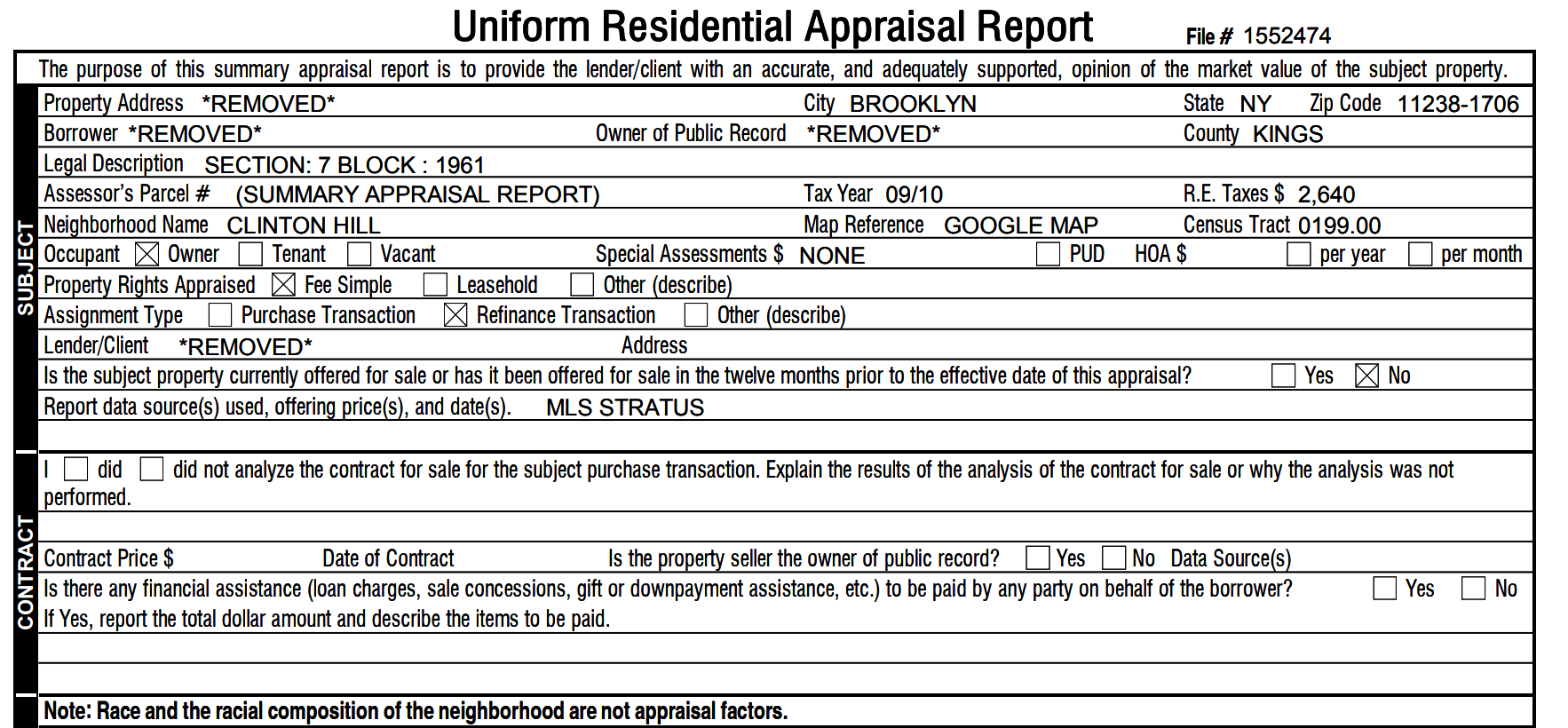
To keep the example in this post simple, let's extract just the:
- File number
- Property rights appraised (fee simple, leasehold, or other)
- Final appraised value
Identify and classify incoming residential appraisal reports
One Fingerprint test uniquely identifies the Form 1004 format. Two text conditions must both pass before field extraction runs.
Sensible uses these tests to route each incoming document to the correct extraction config automatically. If a document fails any test, Sensible skips this config and tries the next one. This is useful when a document type has multiple carrier- or vendor-specific layouts. Here, the test runs on every page ("page": "every") and requires both the text "residential appraisal report" and "Form 1004" to appear before the config runs.
Extract the file number
See the following screenshot for an overview of how to extract the file number:

The query in the left pane in the preceding image uses the anchor text "file #" to locate the label, then extracts text to its left using the Region method. The Word Filters parameter strips the label text from the output, leaving just the numeric file number. The PDF is displayed in the middle pane, and the extracted data is in the right pane.
To try this out yourself, paste the following query into the left pane of the Sensible app.
You'll get this output:
Extract property rights appraised
See the following screenshot for an overview of how to extract the property rights appraised:

The queries in the left pane in the preceding image work in two steps. First, three Checkbox method fields detect which of the three options ("Fee Simple," "Leasehold," or "Other") is checked on the form. Then a Pick Values field reads those boolean results and returns the label of the checked option as a string. The PDF is displayed in the middle pane, and the extracted data is in the right pane.
The outer subject field uses the Sections method to scope the checkbox queries to a specific region of the document. The Sections method can extract repeating data, like line items in a table, but it's also useful for scoping queries to a single, well-defined region of a complex document. Form 1004 repeats text ("Fee Simple," "Leasehold," "other") in multiple places, so the range parameter narrows extraction to the area between "property address" and "did not analyze the contract," where the property rights checkboxes appear.
To try this out yourself, paste the following queries into the left pane of the Sensible app.
You'll get this output:
The Checkbox method returns true or false for each option, and the Pick Values method with "match": "one" selects the label of the single checked field and returns it as a string. Form 1004 repeats this Checkbox-plus-Pick Values pattern across more than 30 fields: occupancy status, assignment type, flood zone, zoning compliance, and more. It's the core extraction pattern for the form.
Extract the final appraised value
See the following screenshot for an overview of how to extract the final appraised value:

The query in the left pane in the preceding image extracts final_reconciled_value by anchoring on "as of" and reading the number to its left using the Row method. The PDF is displayed in the middle pane, and the extracted data is in the right pane. The config adds fallback fields for Form 1004 variants where the appraised value has a different layout. Sensible returns the first non-null result across all fallbacks.
To try this out yourself, paste the following queries into the left pane of the Sensible app.
You'll get this output:
Putting it all together
Here's the complete SenseML config combining everything we've covered:
You'll get this output:
Extract more residential appraisal report data
We've covered how to extract a few pieces of data from a residential appraisal report. Our library of prebuilt configs extracts much more information. To build custom fields or add carrier variants, the SenseML reference covers every available extraction method. To have Sensible's team handle configuration, testing, and ongoing maintenance, managed services gets you fully set up.
Connect Sensible to your workflow
Once your SenseML config is set up, there are several ways to integrate residential appraisal report extraction into your application or process.
- Python SDK — wraps the extraction API; install with pip to call Sensible from your application code
- MCP server — connects document extraction to AI coding tools like Claude
- API (synchronous and asynchronous) — synchronous returns data inline; asynchronous accepts a webhook, recommended for high-volume workflows such as bulk appraisal processing
- Zapier — no-code integration; routes extracted data into Google Sheets, Airtable, Slack, or any of 5,000 other apps
Frequently asked questions
What fields can be extracted from a Form 1004 residential appraisal report?
Sensible's Form 1004 config can extract the full breadth of the form, including: file number, subject property address and legal description, borrower and lender names, neighborhood characteristics (location, growth, property values, supply/demand), site details (zoning, utilities, FEMA flood zone), improvement details (construction type, foundation, HVAC, room counts, gross living area), up to nine comparable sales with descriptions and adjustments for each feature, reconciliation values (cost approach, income approach, sales comparison approach, and final reconciled value), appraisal condition, cost approach inputs and depreciation schedules, income approach estimates, and appraiser certification details.
How accurate is automated Form 1004 extraction?
Because the Form 1004 is a standardized, layout-consistent form, Sensible uses deterministic layout-based methods rather than probabilistic LLMs. The extracted values are either exactly right or null, with no hallucination risk. For the document in this post, key fields like the appraised value and property rights all extracted correctly on the first pass.
How does Sensible handle different appraisal forms?
The fingerprint method routes each incoming document to the correct config automatically based on layout-identifying text. The config above targets Fannie Mae Form 1004 PDFs. If your pipeline also includes Form 1073 (condo), Form 1025 (2-4 unit), or Form 2055 (exterior-only), you'd create separate configs for each and Sensible routes them automatically.
Can Sensible extract from Form 1004s bundled with other documents in a loan package?
Yes. Sensible's Portfolio method splits multi-document PDFs (loan packages, closing binders) into individual documents and routes each to the appropriate config before extraction. This means you can submit an entire loan package and receive structured data for each document in the package in one API response.
Start extracting
You can extend the Form 1004 config shown above to the other agency appraisal forms in the same document type. Form 1073 for condos, Form 1025 for two-to-four unit properties, and Form 2055 for exterior-only inspections each get their own config, and Sensible routes every incoming report to the right one.
Residential appraisal reports are one document type in the mortgage origination workflow. Sensible also handles closing disclosures, bank statements, and title reports through the same API, so loan packet processing runs through a single extraction pipeline regardless of document type.
Sign up for a free 2-week trial to run the config against your own appraisal reports. Talk to our team to scope coverage across your full document mix.
.png)
.png)
.png)