.png)
TL;DR
- Invoice OCR software is a packaged application: users upload invoices, review the captured fields, and export to an accounting system or ERP.
- An invoice extraction API is a building block: a developer sends a PDF and receives structured, validated JSON that feeds the team's own product or workflow.
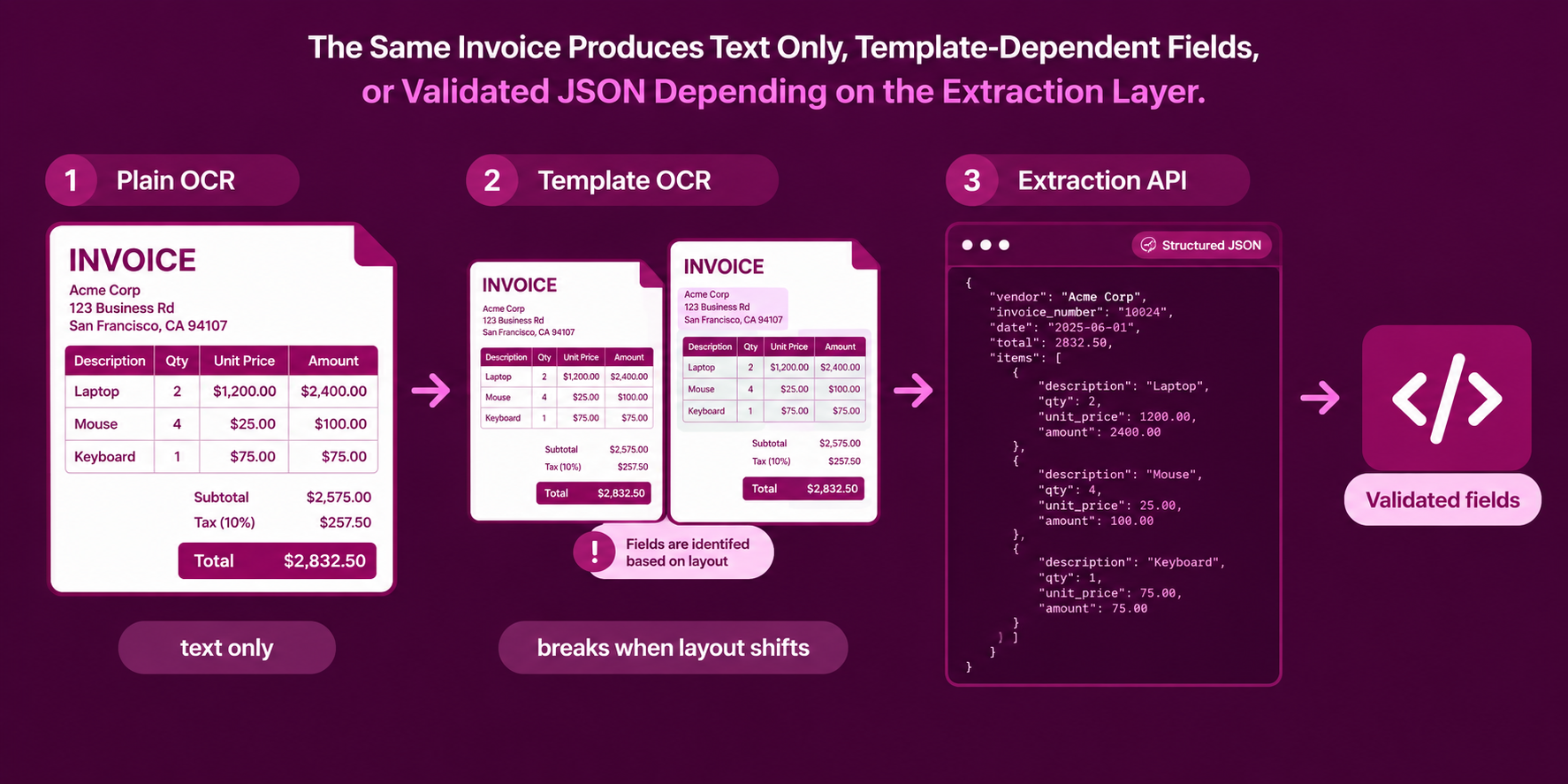
- Plain OCR only converts characters to text, so line-item tables can scramble unless a layout-aware layer sits on top.
- Template-based tools need one template per vendor layout, while hybrid APIs combine layout rules with LLM parsing to cover new vendors without a template.
- The decision comes down to who owns the invoice workflow: an operations team choosing software, or an engineering team embedding extraction in a product.
Every business that pays or issues invoices eventually faces the same problem: invoices arrive as PDFs, scans, and email attachments in thousands of different layouts, and someone has to turn them into rows in an accounting system. Optical character recognition, or OCR, has handled the first step of that job for decades. Buyers who search for a solution now find two product shapes with similar names and very different day-to-day experiences. This guide starts with what each shape does and where plain OCR falls short, before comparing them side by side and walking through how Sensible's invoice extraction API works in practice.
What Does Invoice OCR Software Do?
Invoice OCR software is a finished application for reading invoices. A user uploads a document, the software recognizes the text, maps it to fields such as vendor, invoice number, date, and total, and presents the result in an interface for review. Approved data then exports to an accounting platform or ERP. The software usually bundles the surrounding workflow as well: approval routing, duplicate checks, and vendor matching.
The term covers a loose category. Some products rely on zonal OCR, where an operator draws rectangles around each field on a sample invoice and the system reads text only inside those coordinates on every later document. Others use trained machine learning models to find fields without fixed zones. In both cases, the buyer receives a product with a user interface, and the vendor controls how extraction behaves.
That arrangement suits an accounts payable team without engineering support. Setup is a configuration exercise, the review screen is built in, and no one has to write code. The trade-off is flexibility: the data flows where the product's integrations allow, and the extraction logic stays inside the vendor's system.
How Does an Invoice Extraction API Work?
That design makes extraction a component inside something larger. A fintech can embed it in an expense product, a procurement platform can run it on every uploaded supplier invoice, and a data team can pipe results into a warehouse. Because the output is validated JSON, downstream code receives named fields such as vendor_name, line_items, and total_amount instead of a block of text.
Plain OCR sits underneath both product shapes, and it explains why the distinction exists. Generic OCR returns every word on the page as recognized characters, in roughly reading order. Invoices need fields, and a flat text dump can push a value into the wrong row or column when a line-item table is linearized. High character accuracy does not guarantee correct field-level data, because it says nothing about whether the system understood the table structure.
How Do Invoice OCR Software and Extraction APIs Compare Side by Side?
The table below compares the two product shapes across the dimensions that usually decide a purchase. Each row describes the typical pattern, and individual products vary within each category.
Why Do Variable Vendor Layouts Break Template-Based Tools?
Every vendor formats invoices differently, from accounting software exports to hand-built PDFs. Zonal and template-based tools handle that variety by creating a separate template for each layout, which works for a handful of regular vendors and scales poorly beyond that. A team processing invoices from 30 vendors needs 30 templates, and each template needs maintenance whenever a vendor changes its layout.
Layout drift causes the most frequent failures. When a vendor updates its invoice design, the fixed rectangles capture the wrong field or empty space, and the error often surfaces downstream instead of at extraction time. Scan quality adds a second problem, since slight misalignment can shift text outside a zone boundary. One invoice OCR vendor reports that zonal systems in production spend 30 to 50 percent of their processing time on exception handling.
Line items create the hardest case for every approach. Tables span multiple pages, rows contain multi-line descriptions, cells merge, and tax codes vary by line. A tool must understand table structure, not only characters, to return rows that sum correctly. This is the main reason hybrid and LLM-assisted extraction has gained ground over pure template matching.
How Should a Team Choose Between the Two?
The choice follows from four questions about the team and the invoices. The first question is who owns the workflow. A finance operations team that wants a ready-made review queue and approval routing fits software, while an engineering team embedding extraction in its own product fits an API. The second question is vendor variety. A small, stable set of vendors suits template-based software, and a long tail of changing layouts favors layout-aware or LLM-assisted extraction.
The third question is where the data goes. Software works best when the destination is one of its supported accounting platforms. An API works best when the destination is a custom system, a data warehouse, or a product feature. The fourth question is cost shape: per-seat or tiered subscriptions are easy to budget for steady internal use, while per-document pricing scales with product usage. Some teams combine the two, using packaged software for routine accounts payable and an API for invoices that arrive through a customer-facing product.
What Is Sensible's Invoice Extraction API?
Sensible is a document extraction platform that returns structured JSON from documents through a REST API, with Python and Node SDKs and webhook support. Its invoice document type converts invoices into validated JSON for accounts payable automation and for products that process invoices on behalf of customers. It handles invoices exported from QuickBooks, Xero, NetSuite, SAP, Oracle, FreshBooks, and Wave, along with custom systems, and it supports standard invoices, credit memos, debit notes, proforma invoices, and construction progress billing.
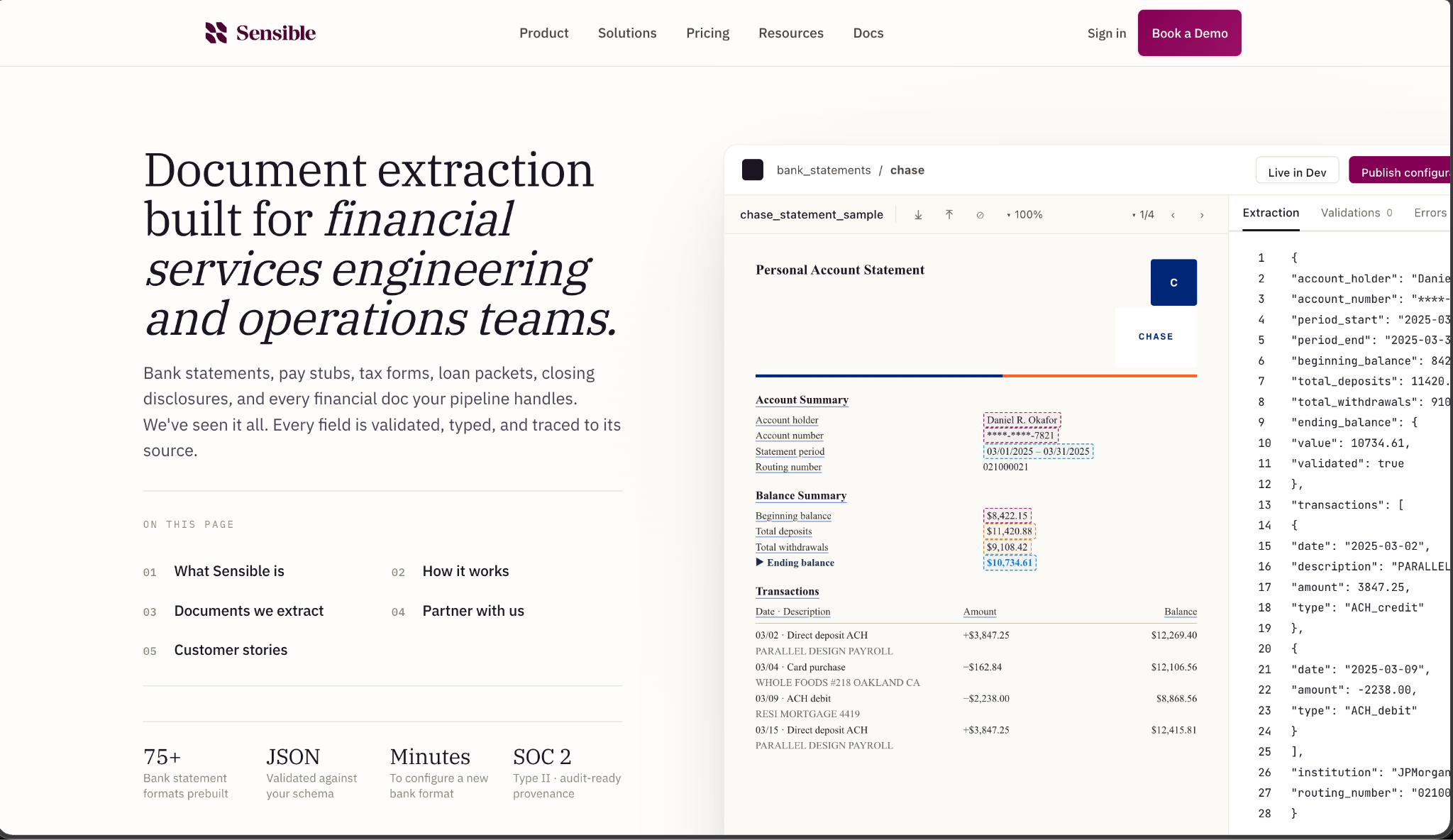
For header information, Sensible returns the invoice number, date, due date, PO number, vendor name and address, bill-to details, and payment terms. For line items, it returns description, quantity, unit price, unit of measure, discount, tax amount, extended amount, and SKU or part number. For totals, it returns subtotal, discount total, tax total, shipping or freight, grand total, amount paid, balance due, and currency.
How Does Sensible Extract an Invoice Step by Step?
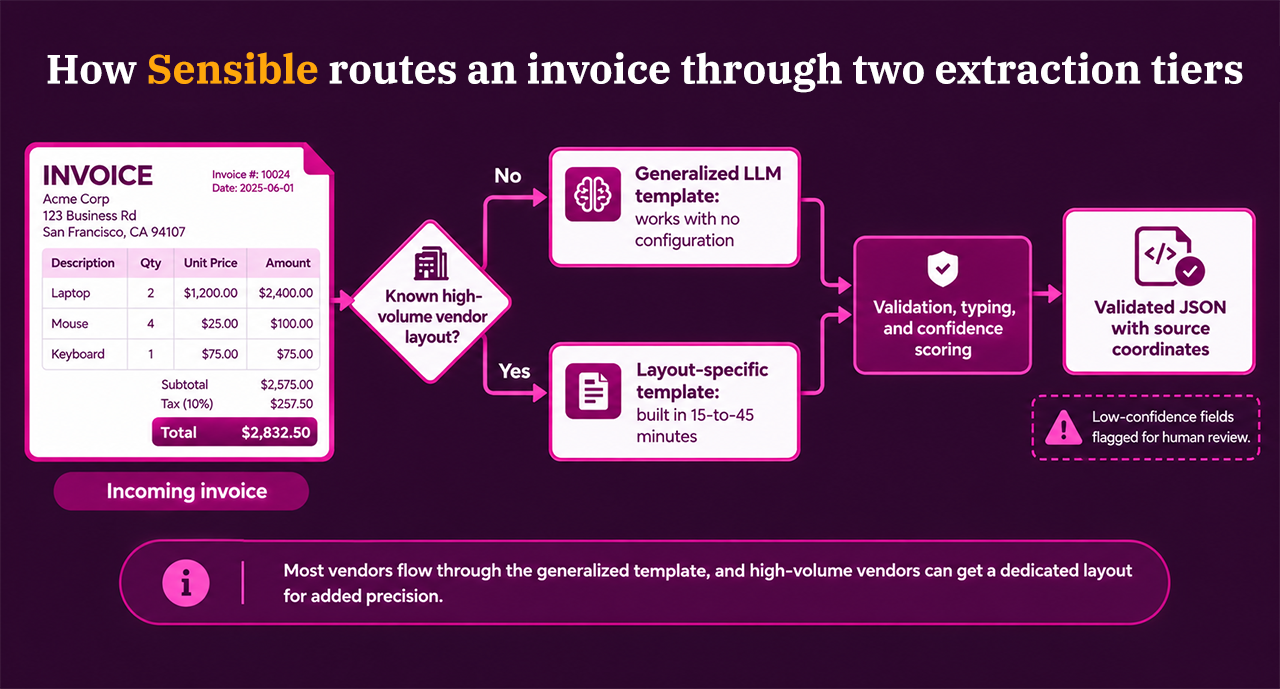
Sensible uses a hybrid, two-tier architecture. A generalized template powered by an LLM handles the majority of vendor formats with no configuration, and layout-specific templates give higher precision for high-volume vendors. Teams build a layout-specific template in roughly 15 to 45 minutes, according to Sensible's own walkthrough. Each extraction runs through five steps.
- Document detection separates invoices from other documents in a bundled file, such as packing slips and purchase orders.
- Field localization uses LLM prompts to find fields whose positions vary across vendors.
- Data extraction applies deterministic or LLM-based methods depending on the field type.
- Validation and normalization checks the output against a schema and converts values to typed formats.
- Confidence scoring optionally flags fields that need human review.
Extraction logic lives in SenseML, Sensible's configuration language, which describes fields with prompts and rules. A Query Group passes LLM prompts for fields whose position varies, while a List method extracts repeating structures such as line items by describing their properties in plain language, without fixed column layouts. A Zip step then restructures the parallel arrays into one object per line item.
Calling the API takes a few lines of code.
from sensibleapi import SensibleSDK

sensible = SensibleSDK(YOUR_API_KEY)
results = sensible.extract(
    path="./invoice.pdf",
    document_type="invoices"
)
What Does Sensible Return for Totals, Line Items, and Confidence?
The response arrives as typed JSON with schema enforcement. Dates return in ISO 8601 format with the original text preserved in a source field, currency values return as numbers with a unit such as USD, and line items return as an array of row objects. An optional confidenceSignal per field marks whether Sensible is confident in the value, so downstream code can route low-confidence fields to a reviewer.
Validation runs inside the extraction. Sensible checks that line items sum correctly and that tax matches stated rates, then flags discrepancies with confidence scores. Cross-field reconciliation rules can be added with JSON Logic. Every extracted value also carries source coordinates, which link it to its location and bounding box on the page, so a reviewer or auditor can check a number against the original document in seconds.
Sensible states that most production deployments reach 95 percent or higher accuracy when validation rules and confidence signals are in place. Teams should test that range against their own invoice samples, since results depend on the vendor mix and scan quality. Documents of five pages or fewer are submitted whole, and longer documents are summarized first to locate the relevant sections.
How Does Sensible Price Invoice Extraction?
Sensible prices per document, with no token-based volatility, regardless of page count or complexity. The Growth plan runs $499 per month billed monthly or $449 per month billed annually, with 750 documents included and $0.57 per document in overage. The Scale plan runs $1,499 per month billed monthly or $1,349 per month billed annually, with 3,200 documents included and $0.53 per document in overage. Enterprise pricing is custom, starting at 10,000 documents per month.
A 14-day free trial includes full access to extraction, validation, and the configuration editor, with no credit card required. Teams that expect high volumes of single-page documents can ask about alternative pricing models.
Where Does Packaged Invoice Software Still Fit Better?
An extraction API requires engineering time, and Sensible's configuration language adds a learning curve for teams without developers. A finance team that needs a review queue, approval routing, and an ERP connector next week, with no engineering support, will find packaged invoice software faster to adopt. Sensible returns confidence signals that flag low-confidence fields for human review, and a team wires those flags into its own review process. For teams with engineers, the equation changes. A single API call replaces a per-vendor template library, and the same integration extends to other document types, such as bank statements, pay stubs, and insurance documents.
Conclusion: Pick the Tool by Who Owns the Invoice Workflow
Invoice OCR software and invoice extraction APIs read the same documents and serve different owners. Software gives an operations team a finished workflow with review and export built in. An API gives an engineering team validated JSON to build into a product, a pipeline, or a warehouse. Plain OCR sits beneath both and needs a layout-aware layer to return reliable line items.
Teams processing invoices from many vendors, or embedding extraction in their own product, can test Sensible on their own invoices through the 14-day free trial, which needs no credit card.
FAQs
Is invoice OCR the same as invoice data extraction?
They overlap but differ in output. OCR converts an image of an invoice into text, while invoice data extraction returns named fields such as vendor, invoice number, line items, and totals. Most invoice products use OCR as the first step and add layout analysis or machine learning to produce fields.
Can invoice OCR software read line items accurately?
It depends on the layout. Tables that span pages, rows with multi-line descriptions, and merged cells commonly trip up template-based and plain OCR approaches, and character-level accuracy does not guarantee correct rows. Tools that understand table structure and validate that line items sum to the stated totals handle these cases better.
When does an invoice extraction API make more sense than OCR software?
An API makes more sense when the extraction is part of a product or a custom pipeline, when invoices arrive from a long tail of vendors with changing layouts, or when the output has to feed a system that packaged software doesn't integrate with. Software makes more sense when a finance team wants a ready-made review and approval workflow.
Does Sensible need a template for every vendor?
No. Sensible's generalized LLM template handles most vendor formats without configuration. Teams add a layout-specific template for high-volume vendors where extra precision helps, and Sensible says building one takes roughly 15 to 45 minutes.
How does Sensible price invoice extraction?
Sensible charges per document. Growth is $499 per month billed monthly or $449 billed annually and includes 750 documents, and Scale is $1,499 per month billed monthly or $1,349 billed annually and includes 3,200 documents. Enterprise pricing is custom, and a 14-day free trial is available with no credit card required.
.png)