Sensible vs Docparser

Docparser feeds spreadsheets.
Sensible feeds your product.

Docparser is a no-code parser with zonal rules and an AI engine that exports to spreadsheets and apps. Sensible runs a layout or LLM method per field and returns typed JSON, CSV or Excel.

Choose Docparser if you want a no-code parser with zonal rules that exports to spreadsheets. Choose Sensible if the data feeds a product or system of record and you need validation, a method per field and typed JSON.

No credit card
·
Sample documents loaded
★★★★★
4.9 on G2 · 14 reviews
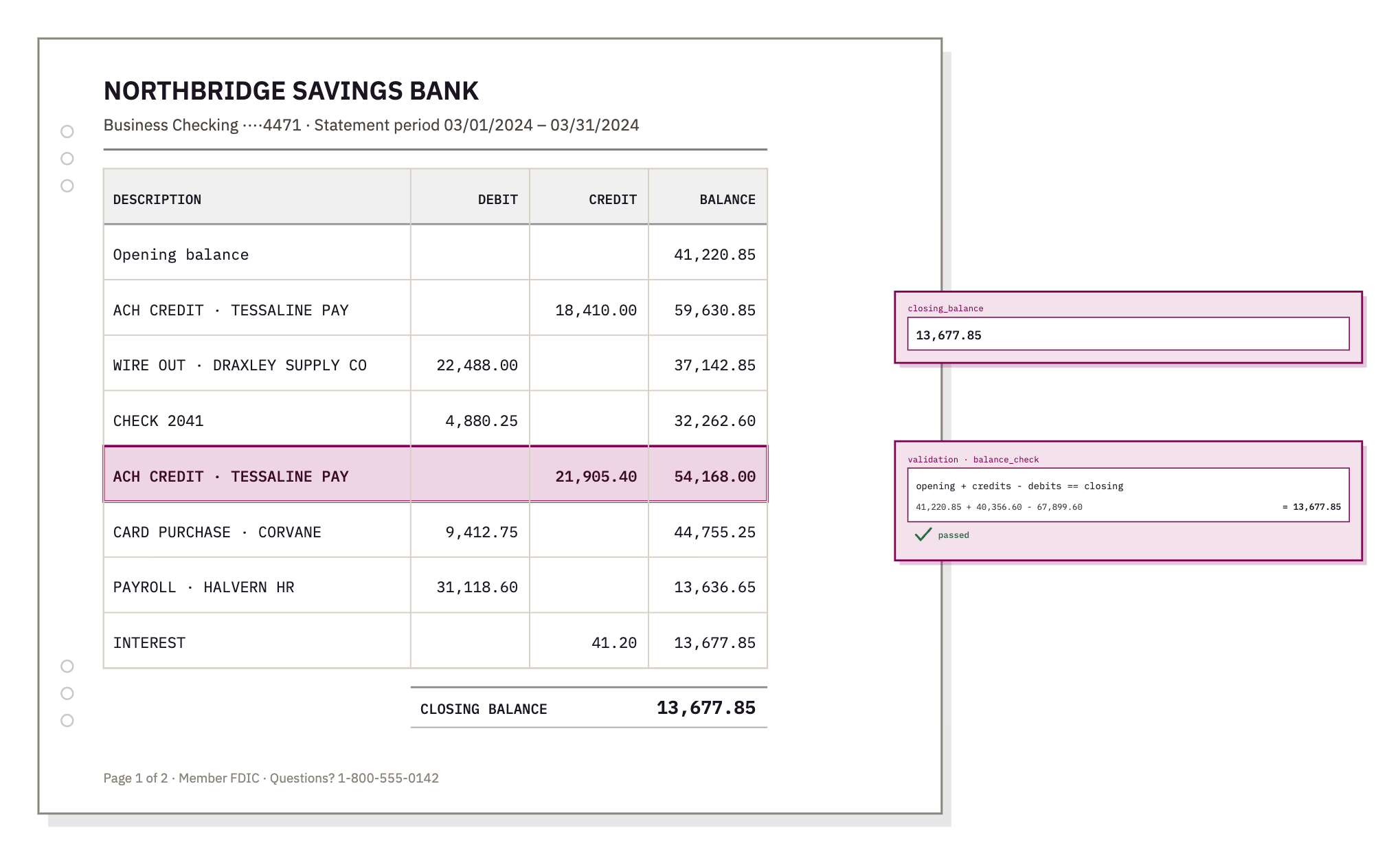
Bank statement with the extracted closing_balance and a passed balance check.

Per field

Choose an LLM or deterministic method for each field

Per document

Pricing, whatever the page count

SOC 2 + HIPAA

SOC 2 Type II · BAA on Enterprise

No credit card

14-day free trial

Trusted by teams turning documents into production data

Shepherd processed a 351-page Travelers loss run in 31 seconds. Read customer stories

Technical Comparison

Sensible vs Docparser

Sensible is a document extraction platform where you choose a method for each field: a deterministic layout method or an LLM. It returns JSON typed to your schema, runs your validation checks, and can include the page and bounding polygon each value came from. LLM query fields return confidence signals, and pricing is per document, whatever the page count.

Docparser

Docparser is a self-serve parser for Word, PDF, CSV, XLS, TXT, XML and image files. It extracts with zonal OCR, pattern recognition, anchor keywords and DocparserAI, exports to Excel, CSV, JSON or XML, and bills in credits of up to 5 pages.

What we're comparing
Sensible
Docparser
The practical trade-off
Extraction Architecture
Hybrid (SenseML Layout Rules + LLMs)
Zonal OCR, Anchor Keywords And AI
DocparserAI writes a rule per field from a sample. Sensible lets you choose a layout or LLM method per field.
Best Use Case
Production pipelines that write document data into a system of record: underwriting, claims, lending, AP, onboarding
No-code parsing into spreadsheets and apps
Docparser is set up by business teams without code. Sensible serves teams that ship extraction inside a product.
Output Format
JSON matching your schema, plus CSV and Excel export
Excel, CSV, JSON or XML, plus Zapier
Both export Excel and CSV. Docparser has more no-code connectors; Sensible reaches Google Sheets through Zapier.
Setup Approach
Describe fields in plain language on day one, or have Sensible's team build the configuration
Preset rules, or DocparserAI from a sample
Both start from one sample. Docparser edits rules in its app, Sensible in a text configuration you can version.
Layout Variation
Methods chain as fallbacks, and documents route to the configuration that fits
Multi-Layout Parsers, an add-on on Starter and Professional
Docparser includes multi-layout parsers on Business and sells them as an add-on on Starter and Professional.
Document Length
Async files up to 6 GB, with no stated page maximum
50 pages by default, 200 at most
Docparser caps scanned files at 50 pages and any file at 200. Check it against your longest document.
Version Control
A configuration in text that can sit in version control
Parser Version Control, an add-on on Starter and Professional, included on Business
Both offer versioning. Docparser includes it on Business and sells it as an add-on on Starter and Professional.
Compliance Status
SOC 2 Type II; HIPAA with a signed BAA on Enterprise
GDPR compliant; no health data use cases
Docparser states it does not support health data use cases, so PHI workloads need another tool.
Pricing Structure
Per-document pricing: 750 documents on Growth, $0.57 for each extra document
Credits: $39 a month billed monthly for 100, up to 5 pages
Docparser costs far less at low volume. Sensible's Growth plan starts at 750 documents a month.

Docparser details verified November 2026. Sources: Docparser pricing page, Docparser FAQ, Docparser security page, Docparser help center.

Technical Architecture

How Sensible's hybrid extraction works

A SenseML config picks a layout method or an LLM method per field. Sensible types each value, runs your checks and flags failures.

Document Ingestion
PDFs, Images, Text
SenseML Router
Rule-based orchestrator
Deterministic Engine
Spatial Anchors & Regex
Multimodal LLM Engine
Generative Interpretation
Compute
Type coercion & derived fields
Validate
JsonLogic rule checks
Human Review
Flagged docs, one-click fix
Structured Output
Typed JSON + page positions
Document Ingestion
PDFs, Images, Text
SenseML Router
Rule-based orchestrator
Deterministic Engine
Spatial Anchors & Regex
+
Multimodal LLM Engine
Generative Interpretation
Compute
Type coercion & derived fields
Validate
JsonLogic rule checks
Human Review if flagged
Flagged docs, one-click fix
Structured Output
Typed JSON + page positions
Frequently Asked Questions

Sensible vs Docparser: common questions

Does Docparser cost less than Sensible at low volume?
+
Starter is $39 a month for 100 credits, Professional $74 for 250 and Business $159 for 1,000, on month-by-month billing. One credit covers a document up to 5 pages. Sensible Growth is $449 a month on annual billing for 750 documents.
Does Docparser use AI to build parsing rules?
+
Yes. DocparserAI scans one sample document and creates a rule for each field, which you can edit. Its DocparserAI article doesn't name the model it uses. Sensible lets you choose an LLM or layout method per field.
Does Docparser limit pages per document by default?
+
Its help center sets a 50-page default, a fixed 50-page cap for scans and a 200-page maximum. Its FAQ says 30. A credit covers up to 5 pages. Sensible's documentation states no page maximum.
Is Docparser HIPAA compliant for health data?
+
Its security page says it is not a HIPAA certified service and doesn't support health data use cases. Sensible is SOC 2 Type II on all plans, with HIPAA and a signed BAA on Enterprise.
Does Docparser read handwriting and scanned documents?
+
It has built-in OCR with image cleanup, and its DocparserAI article lists handwriting and checkmarks among the fields it reads. Test your own scans on both tools.
Do you build the parsing rules yourself in Docparser?
+
In Docparser you build rules in the app or let DocparserAI draft them. Every plan includes one free parsing setup, and a paid Parsing Assistant setup service is available. Sensible's managed services team can build and adjust configurations from your samples.
Is Sensible an alternative to Docparser?
+
Yes, for teams that have outgrown spreadsheet exports and need an API with validation.
Does Sensible export to Excel and CSV?
+
Yes, alongside typed JSON.
Is Docparser no-code?
+
Yes, it uses zonal rules and an AI engine without code.
The Takeaway

Should you choose Docparser or Sensible?

Docparser if...
  • You need a self-serve parser you want to start this week, with plans from $39 a month and a 14-day trial that needs no credit card.
  • Output goes to spreadsheets your data ends up in Excel, CSV, Google Sheets, Workato or Power Automate, and you want those connectors built in.
  • Up to 1,000 documents a month your volume fits Professional at 250 credits for $74 or Business at 1,000 for $159.
  • Documents under 50 pages your files stay under Docparser's 50-page default and carry no health data, which its security page rules out.
Sensibleif...
  • Your application reads the output your system consumes typed JSON from an API, checked against a schema you define before it is delivered.
  • A method chosen per field fixed values are read by layout rules and variable wording by an LLM, chained as fallbacks in one configuration.
  • Health data in the documents you need SOC 2 Type II on all plans, and HIPAA with a signed BAA on Enterprise for claims or EOBs.
  • Pricing that counts documents you want to budget by document, and not by credits that depend on how many pages each file has.
  • Someone to write configurations Sensible's managed services team can build and adjust them from your samples when a layout changes.

Related comparisons: Sensible vs Parseur, Sensible vs Nanonets, Sensible vs Rossum. See also logistics document extraction or all comparisons.

Try Sensible on your documents.

Bring the document your team dreads. If it works on that one, you'll know.

14-day free trial on any paid plan · No credit card