Sensible vs Amazon Textract

Textract returns blocks.
Sensible returns your record.

Amazon Textract reads pages into blocks with geometry, and your code assembles the record your system expects. Sensible starts from that record and returns typed JSON.

Choose Amazon Textract if you want OCR blocks and prebuilt analyses that your own code assembles into records. Choose Sensible if you want the record itself: typed JSON in your fields, validated, priced per document.

No credit card
·
Sample documents loaded
★★★★★
4.9 on G2 · 14 reviews
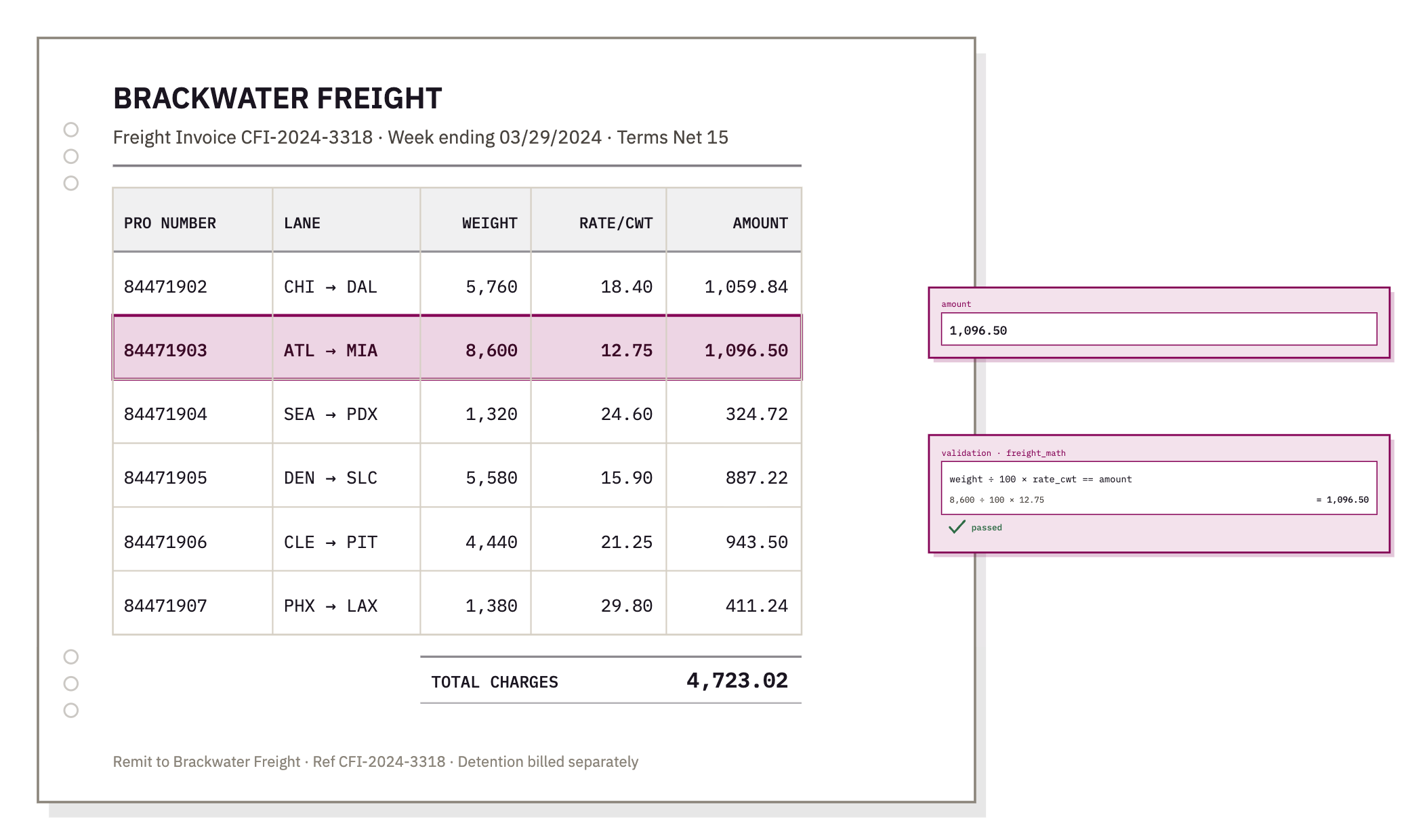
Freight invoice with the extracted amount and a passed weight times rate check.

Per field

Choose an LLM or deterministic method for each field

Per document

Pricing, whatever the page count

SOC 2 + HIPAA

SOC 2 Type II · BAA on Enterprise

No credit card

14-day free trial

Trusted by teams turning documents into production data

Shepherd processed a 351-page Travelers loss run in 31 seconds. Read customer stories

Technical Comparison

Sensible vs Amazon Textract

Sensible is a document extraction platform where you choose a method for each field: a deterministic layout method or an LLM. It returns JSON typed to your schema, runs your validation checks, and can include the page and bounding polygon each value came from. LLM query fields return confidence signals, and pricing is per document, whatever the page count.

Amazon Textract

Amazon Textract is an AWS API for text detection and document analysis: forms, tables, queries, layout and signatures, plus operations for expenses, IDs and lending packages. It returns blocks with geometry and a confidence value, billed per page by feature.

What we're comparing
Sensible
Amazon Textract
The practical trade-off
Extraction Architecture
Hybrid (SenseML Layout Rules + LLMs)
Deep-Learning OCR And Analysis APIs
Textract detects text, forms and tables. Sensible picks a method per field and maps each one to your schema.
Best Use Case
Production pipelines that write document data into a system of record: underwriting, claims, lending, AP, onboarding
Teams building OCR and forms into AWS applications
Textract suits teams that write the mapping code. Sensible suits teams that want the record returned.
Output Format
JSON matching your schema, plus CSV and Excel export
Blocks, key-value pairs, tables, query answers
Textract's blocks need assembling into your schema. Expense, ID and Lending APIs return AWS's own field names.
Setup Approach
Describe fields in plain language on day one, or have Sensible's team build the configuration
Queries per field, optional trained adapters
Textract queries run on English documents, with 15 or 30 per page. Sensible keeps fields in one configuration.
Source Audit Trail
Source lines with page and bounding polygon per field
Bounding box and polygon for each block
Both return coordinates. With Textract you decide how a block's position attaches to your record.
Complex Table Parsing
Layout or LLM table methods, chosen per table
TABLE and CELL blocks with row and column indexes
Both read tables. Textract hands you cells, and turning cells into rows for your schema is your code.
Document Size
Async files up to 6 GB, with no stated page maximum
Async PDF and TIFF up to 3,000 pages and 500 MB
Textract states its page ceiling and it is high. Synchronous calls take one page per PDF or TIFF.
Human Exception Routing
Failed checks flag the extraction for a built-in review queue
Amazon A2I human loops, closed to new customers
AWS says human-loop requests fail for accounts that are not A2I customers. Plan your own review screen.
Pricing Structure
Per-document pricing: 750 documents on Growth, $0.57 for each extra document
Per page by feature, $0.0015 to $0.07
For plain text, Textract costs far less. Forms, tables and queries together run $0.07 a page.

Textract details verified November 2026. Sources: AWS Textract pricing page, AWS Textract quotas, AWS Textract features.

Technical Architecture

How Sensible's hybrid extraction works

A SenseML config picks a layout method or an LLM method per field. Sensible types each value, runs your checks and flags failures.

Document Ingestion
PDFs, Images, Text
SenseML Router
Rule-based orchestrator
Deterministic Engine
Spatial Anchors & Regex
Multimodal LLM Engine
Generative Interpretation
Compute
Type coercion & derived fields
Validate
JsonLogic rule checks
Human Review
Flagged docs, one-click fix
Structured Output
Typed JSON + page positions
Document Ingestion
PDFs, Images, Text
SenseML Router
Rule-based orchestrator
Deterministic Engine
Spatial Anchors & Regex
+
Multimodal LLM Engine
Generative Interpretation
Compute
Type coercion & derived fields
Validate
JsonLogic rule checks
Human Review if flagged
Flagged docs, one-click fix
Structured Output
Typed JSON + page positions
Frequently Asked Questions

Sensible vs Amazon Textract: common questions

Does Textract return a structured record?
+
Textract returns blocks linked by relationships, each with geometry and a confidence value. Its Expense, ID and Lending APIs return named fields such as TOTAL, and your code builds any other record.
Do Textract Queries have limits on language or count?
+
A query is a natural-language question with an alias, and the answer returns its text, location and confidence. AWS allows 15 queries per page in synchronous calls and 30 in asynchronous calls, on English documents.
Is Textract's per-page pricing cheaper than Sensible's?
+
Textract bills per page by feature: text detection is $0.0015, Tables $0.015, Forms $0.05, all three with Queries $0.07 (US West Oregon, first million pages). Sensible bills per document, so add the mapping code to the comparison.
Can Textract process long multi-page documents?
+
Yes, through asynchronous calls. AWS lists PDF and TIFF files up to 500 MB and 3,000 pages, while synchronous calls take one page. Sensible accepts async files up to 6 GB, with no stated page maximum.
Does Textract read handwriting and languages beyond English?
+
It detects English, French, German, Italian, Portuguese and Spanish text, with handwriting recognized in English. Queries run on English documents. Check your language mix against that list.
Does Textract include human review for low-confidence results?
+
It returns a confidence value per detection, and AWS notes low values might need a human to confirm. Its A2I review hook is closed to new customers. Sensible returns confidence signals on LLM query fields and flags failed checks for review.
Is Sensible an alternative to Amazon Textract?
+
Yes, when you want typed fields instead of building the record yourself from Textract output.
The Takeaway

Should you choose Amazon Textract or Sensible?

Amazon Textract if...
  • You already build on AWS you want OCR, forms and tables as services inside an application your team already runs on AWS.
  • Plain text or simple forms your volume is plain text detection, which AWS prices at $0.0015 a page in most regions for the first million pages.
  • Engineers to write the mapping your team will turn blocks and query answers into your own schema and wants control over that code.
  • Very long single files asynchronous calls accept PDF and TIFF files up to 3,000 pages and 500 MB, and AWS documents that limit.
Sensibleif...
  • The record in your fields you want typed JSON in your own fields, checked against your schema, with no block-to-field code to write.
  • A method chosen per field fixed values are read by layout rules and variable wording by an LLM, chained as fallbacks in one configuration.
  • Checks that trigger review a total that fails its JsonLogic rule should send the extraction to a review queue that you don't have to build.
  • Pricing that counts documents you want to budget by document, and not by page count and by which Textract features each call turns on.
  • Someone to write configurations managed services can build and adjust them from your samples, in place of mapping code your team maintains.

Related comparisons: Sensible vs LlamaParse, Sensible vs Reducto, Sensible vs ABBYY Vantage. See also logistics document extraction or all comparisons.

Try Sensible on your documents.

Bring the document your team dreads. If it works on that one, you'll know.

14-day free trial on any paid plan · No credit card